
NetPerfect
EV certificate & Windows CI

CKEditor
Premium editor features

Dosu
Automated GitHub support
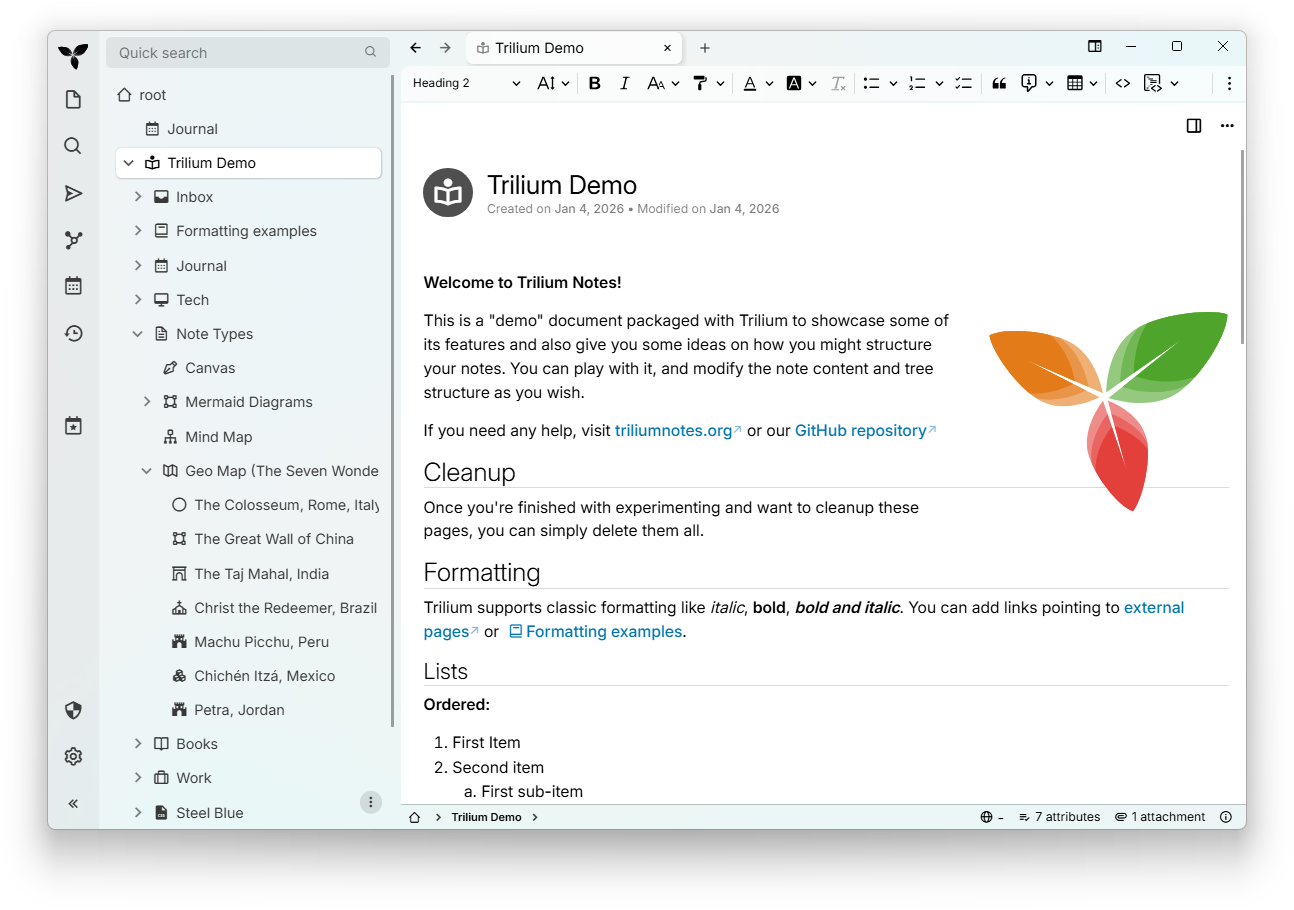 ## Download
- [Laatse release](https://github.com/TriliumNext/Trilium/releases/latest) -
stabiele versie, aangeraden voor meeste gebruikers
- [Nachtige build](https://github.com/TriliumNext/Trilium/releases/tag/nightly)
– unstabiele development versie, dagelijks geupdatet met de laatste functies
en oplossingen.
## 📚 Documentatie
**Bekijk onze beknopte documentatie op
[docs.triliumnotes.org](https://docs.triliumnotes.org/)**
Onze documentatie is beschikbaar in meerdere formaten:
- **Online Documentatie**: Blader door de volledige documentatie op
[docs.triliumnotes.org](https://docs.triliumnotes.org/)
- **In-App Help**: Toets`F1` binnen Trilium om dezelfde documentatie direct in
de applicatie te bekijken
- **GitHub**: Navigeer door de [User Guide](./User%20Guide/User%20Guide/) in
deze repository
### Snelkoppelingen
- [Getting Started Gids](https://docs.triliumnotes.org/)
- [Installatie Instructies](https://docs.triliumnotes.org/user-guide/setup)
- [Docker
Installatie](https://docs.triliumnotes.org/user-guide/setup/server/installation/docker)
- [Upgrading
TriliumNext](https://docs.triliumnotes.org/user-guide/setup/upgrading)
- [Basis Concepten en
Features](https://docs.triliumnotes.org/user-guide/concepts/notes)
- [Patronen van Personal Knowledge
Base](https://docs.triliumnotes.org/user-guide/misc/patterns-of-personal-knowledge)
## 🎁 Kenmerken
* Notes kunnen in een diepe boomstructuur geplaatst worden. Een enkele note kan
op meerdere plekken in de boom geplaatst worden. (zie
[cloning](https://docs.triliumnotes.org/user-guide/concepts/notes/cloning))
* Rijke WYSIWYG note editor inclusief e.g. tabellen, afbeeldingen en
[math](https://docs.triliumnotes.org/user-guide/note-types/text) met markdown
[autoformat](https://docs.triliumnotes.org/user-guide/note-types/text/markdown-formatting)
* Ondersteuning voor bewerken van [notes met source
code](https://docs.triliumnotes.org/user-guide/note-types/code), inclusief
syntax highlighting
* Snelle en gemakkelijke [navigatie tussen
notities](https://docs.triliumnotes.org/user-guide/concepts/navigation/note-navigation),
uitgebreide text zoekopdrachten en [notities
promoveren](https://docs.triliumnotes.org/user-guide/concepts/navigation/note-hoisting)
* Naadloze [notitie
versiegeschiedenis](https://docs.triliumnotes.org/user-guide/concepts/notes/note-revisions)
* Notitie[-attributen](https://docs.triliumnotes.org/user-guide/advanced-usage/attributes)
kunnen worden ingezet voor notitie-organisatie, queries en geavanceerd
[scripten](https://docs.triliumnotes.org/user-guide/scripts)
* Gebruikersinterface verkrijgbaar in het Engels, Duits, Spaans, Frans, Roemeens
en Chinees (versimpeld en traditioneel)
* Directe [OpenID en TOTP
integratie](https://docs.triliumnotes.org/user-guide/setup/server/mfa) voor
beter beveiligde aanmelding
* [Synchronisatie](https://docs.triliumnotes.org/user-guide/setup/synchronization)
met zelfgehoste synchronisatieserver
* er zijn [diensten van derden voor het hosten van de
synchronisatieserver](https://docs.triliumnotes.org/user-guide/setup/server/cloud-hosting)
* [Delen](https://docs.triliumnotes.org/user-guide/advanced-usage/sharing)
(publiceer) notities naar het internet (publieklijk)
* Sterke [encryptie van
notities](https://docs.triliumnotes.org/user-guide/concepts/notes/protected-notes)
met granulariteit per notitie
* Teken diagrammen, gebaseerd op [Excalidraw](https://excalidraw.com/) (notitie
type "canvas")
* [Relatie
overzichten](https://docs.triliumnotes.org/user-guide/note-types/relation-map)
en [notitie/koppeling
overzichten](https://docs.triliumnotes.org/user-guide/note-types/note-map)
voor het visualiseren van notities en hun relaties
* Mind maps, gebaseerd op [Mind Elixir](https://docs.mind-elixir.com/)
* [Geografische
kaarten](https://docs.triliumnotes.org/user-guide/collections/geomap) met
locatie pins en GPX tracks
* [Scripting](https://docs.triliumnotes.org/user-guide/scripts) - zie
[Geavanceerde
voorbeelden](https://docs.triliumnotes.org/user-guide/advanced-usage/advanced-showcases)
* [REST API](https://docs.triliumnotes.org/user-guide/advanced-usage/etapi) voor
automatisering
* Schaalt goed in zowel bruikbaarheid als performantie met meer dan 100 000
notities
* Voor aanraakschermen geoptimaliseerde [mobiele
interface](https://docs.triliumnotes.org/user-guide/setup/mobile-frontend)
voor smartphones en tablets
* Ingebouwd [donker
thema](https://docs.triliumnotes.org/user-guide/concepts/themes),
ondersteuning voor gebruikera thema's
* [Evernote](https://docs.triliumnotes.org/user-guide/concepts/import-export/import-from-apps/evernote.html)
en [Markdown importeren &
exporteren](https://docs.triliumnotes.org/user-guide/concepts/import-export/markdown)
* [Web Clipper](https://docs.triliumnotes.org/user-guide/setup/web-clipper) om
eenvoudig webinhoud op te slaan
* Customizable UI (sidebar buttons, user-defined widgets, ...)
* [Metrics](https://docs.triliumnotes.org/user-guide/advanced-usage/metrics),
along with a Grafana Dashboard.
✨ Check out the following third-party resources/communities for more TriliumNext
related goodies:
- [awesome-trilium](https://github.com/Nriver/awesome-trilium) for 3rd party
themes, scripts, plugins and more.
- [TriliumRocks!](https://trilium.rocks/) for tutorials, guides, and much more.
## ❓Why TriliumNext?
The original Trilium developer ([Zadam](https://github.com/zadam)) has
graciously given the Trilium repository to the community project which resides
at https://github.com/TriliumNext
### ⬆️Migrating from Zadam/Trilium?
There are no special migration steps to migrate from a zadam/Trilium instance to
a TriliumNext/Trilium instance. Simply [install
TriliumNext/Trilium](#-installation) as usual and it will use your existing
database.
Versions up to and including
[v0.90.4](https://github.com/TriliumNext/Trilium/releases/tag/v0.90.4) are
compatible with the latest zadam/trilium version of
[v0.63.7](https://github.com/zadam/trilium/releases/tag/v0.63.7). Any later
versions of TriliumNext/Trilium have their sync versions incremented which
prevents direct migration.
## 💬 Discuss with us
Feel free to join our official conversations. We would love to hear what
features, suggestions, or issues you may have!
- [Matrix](https://matrix.to/#/#triliumnext:matrix.org) (For synchronous
discussions.)
- The `General` Matrix room is also bridged to
[XMPP](xmpp:discuss@trilium.thisgreat.party?join)
- [Github Discussions](https://github.com/TriliumNext/Trilium/discussions) (For
asynchronous discussions.)
- [Github Issues](https://github.com/TriliumNext/Trilium/issues) (For bug
reports and feature requests.)
## 🏗 Installation
### Windows / MacOS
Download the binary release for your platform from the [latest release
page](https://github.com/TriliumNext/Trilium/releases/latest), unzip the package
and run the `trilium` executable.
### Linux
If your distribution is listed in the table below, use your distribution's
package.
[](https://repology.org/project/trilium/versions)
You may also download the binary release for your platform from the [latest
release page](https://github.com/TriliumNext/Trilium/releases/latest), unzip the
package and run the `trilium` executable.
TriliumNext is also provided as a Flatpak, but not yet published on FlatHub.
### Browser (any OS)
If you use a server installation (see below), you can directly access the web
interface (which is almost identical to the desktop app).
Currently only the latest versions of Chrome & Firefox are supported (and
tested).
### Mobile
To use TriliumNext on a mobile device, you can use a mobile web browser to
access the mobile interface of a server installation (see below).
See issue https://github.com/TriliumNext/Trilium/issues/4962 for more
information on mobile app support.
#### TriliumDroid
If you prefer a native Android app, you can use
[TriliumDroid](https://apt.izzysoft.de/fdroid/index/apk/eu.fliegendewurst.triliumdroid).
Report bugs and missing features at [their
repository](https://github.com/FliegendeWurst/TriliumDroid). Note: It is best to
disable automatic updates on your server installation (see below) when using
TriliumDroid since the sync version must match between Trilium and TriliumDroid.
#### Pocket Trilium
If you want a full-featured native Android app, check out [Pocket
Trilium](https://github.com/Nriver/pocket-trilium). It runs a complete Trilium
instance on your phone, supports full offline use, and allows you to sync with
your server.
#### Trinote
If you want a native iOS app, you can use
[Trinote](https://apps.apple.com/us/app/trinote/id6761228249), an open-source
client for your self-hosted Trilium / TriliumNext server. It lets you browse and
organize your note tree, search for notes on the server, read and edit all note
types (text, code, mindmap, spreadsheet, geomap, canvas, etc.), and keeps notes
available and editable offline. Here's the
[repo](https://github.com/StephenArg/Trinote) if you're interested in
contributing and here's the [discord](https://discord.com/invite/ghjJG56EUS)
server if you have any feedback or suggestions you want to discuss.
### Server
To install TriliumNext on your own server (including via Docker from
[Dockerhub](https://hub.docker.com/r/triliumnext/trilium)) follow [the server
installation docs](https://docs.triliumnotes.org/user-guide/setup/server).
## 💻 Contribute
### Translations
If you are a native speaker, help us translate Trilium by heading over to our
[Weblate page](https://hosted.weblate.org/engage/trilium/).
Here's the language coverage we have so far:
[](https://hosted.weblate.org/engage/trilium/)
### Code
Download the repository, install dependencies using `pnpm` and then run the
server (available at http://localhost:8080):
```shell
git clone https://github.com/TriliumNext/Trilium.git
cd Trilium
pnpm install
pnpm run server:start
```
### Documentation
Download the repository, install dependencies using `pnpm` and then run the
environment required to edit the documentation:
```shell
git clone https://github.com/TriliumNext/Trilium.git
cd Trilium
pnpm install
pnpm edit-docs:edit-docs
```
Alternatively, if you have Nix installed:
```shell
# Run directly
nix run .#edit-docs
# Or install to your profile
nix profile install .#edit-docs
trilium-edit-docs
```
### Building the Executable
Download the repository, install dependencies using `pnpm` and then build the
desktop app for Windows:
```shell
git clone https://github.com/TriliumNext/Trilium.git
cd Trilium
pnpm install
pnpm run --filter desktop electron-forge:make --arch=x64 --platform=win32
```
For more details, see the [development
docs](https://github.com/TriliumNext/Trilium/tree/main/docs/Developer%20Guide/Developer%20Guide).
### Developer Documentation
Please view the [documentation
guide](https://github.com/TriliumNext/Trilium/blob/main/docs/Developer%20Guide/Developer%20Guide/Environment%20Setup.md)
for details. If you have more questions, feel free to reach out via the links
described in the "Discuss with us" section above.
## 💖 Sponsors
## Download
- [Laatse release](https://github.com/TriliumNext/Trilium/releases/latest) -
stabiele versie, aangeraden voor meeste gebruikers
- [Nachtige build](https://github.com/TriliumNext/Trilium/releases/tag/nightly)
– unstabiele development versie, dagelijks geupdatet met de laatste functies
en oplossingen.
## 📚 Documentatie
**Bekijk onze beknopte documentatie op
[docs.triliumnotes.org](https://docs.triliumnotes.org/)**
Onze documentatie is beschikbaar in meerdere formaten:
- **Online Documentatie**: Blader door de volledige documentatie op
[docs.triliumnotes.org](https://docs.triliumnotes.org/)
- **In-App Help**: Toets`F1` binnen Trilium om dezelfde documentatie direct in
de applicatie te bekijken
- **GitHub**: Navigeer door de [User Guide](./User%20Guide/User%20Guide/) in
deze repository
### Snelkoppelingen
- [Getting Started Gids](https://docs.triliumnotes.org/)
- [Installatie Instructies](https://docs.triliumnotes.org/user-guide/setup)
- [Docker
Installatie](https://docs.triliumnotes.org/user-guide/setup/server/installation/docker)
- [Upgrading
TriliumNext](https://docs.triliumnotes.org/user-guide/setup/upgrading)
- [Basis Concepten en
Features](https://docs.triliumnotes.org/user-guide/concepts/notes)
- [Patronen van Personal Knowledge
Base](https://docs.triliumnotes.org/user-guide/misc/patterns-of-personal-knowledge)
## 🎁 Kenmerken
* Notes kunnen in een diepe boomstructuur geplaatst worden. Een enkele note kan
op meerdere plekken in de boom geplaatst worden. (zie
[cloning](https://docs.triliumnotes.org/user-guide/concepts/notes/cloning))
* Rijke WYSIWYG note editor inclusief e.g. tabellen, afbeeldingen en
[math](https://docs.triliumnotes.org/user-guide/note-types/text) met markdown
[autoformat](https://docs.triliumnotes.org/user-guide/note-types/text/markdown-formatting)
* Ondersteuning voor bewerken van [notes met source
code](https://docs.triliumnotes.org/user-guide/note-types/code), inclusief
syntax highlighting
* Snelle en gemakkelijke [navigatie tussen
notities](https://docs.triliumnotes.org/user-guide/concepts/navigation/note-navigation),
uitgebreide text zoekopdrachten en [notities
promoveren](https://docs.triliumnotes.org/user-guide/concepts/navigation/note-hoisting)
* Naadloze [notitie
versiegeschiedenis](https://docs.triliumnotes.org/user-guide/concepts/notes/note-revisions)
* Notitie[-attributen](https://docs.triliumnotes.org/user-guide/advanced-usage/attributes)
kunnen worden ingezet voor notitie-organisatie, queries en geavanceerd
[scripten](https://docs.triliumnotes.org/user-guide/scripts)
* Gebruikersinterface verkrijgbaar in het Engels, Duits, Spaans, Frans, Roemeens
en Chinees (versimpeld en traditioneel)
* Directe [OpenID en TOTP
integratie](https://docs.triliumnotes.org/user-guide/setup/server/mfa) voor
beter beveiligde aanmelding
* [Synchronisatie](https://docs.triliumnotes.org/user-guide/setup/synchronization)
met zelfgehoste synchronisatieserver
* er zijn [diensten van derden voor het hosten van de
synchronisatieserver](https://docs.triliumnotes.org/user-guide/setup/server/cloud-hosting)
* [Delen](https://docs.triliumnotes.org/user-guide/advanced-usage/sharing)
(publiceer) notities naar het internet (publieklijk)
* Sterke [encryptie van
notities](https://docs.triliumnotes.org/user-guide/concepts/notes/protected-notes)
met granulariteit per notitie
* Teken diagrammen, gebaseerd op [Excalidraw](https://excalidraw.com/) (notitie
type "canvas")
* [Relatie
overzichten](https://docs.triliumnotes.org/user-guide/note-types/relation-map)
en [notitie/koppeling
overzichten](https://docs.triliumnotes.org/user-guide/note-types/note-map)
voor het visualiseren van notities en hun relaties
* Mind maps, gebaseerd op [Mind Elixir](https://docs.mind-elixir.com/)
* [Geografische
kaarten](https://docs.triliumnotes.org/user-guide/collections/geomap) met
locatie pins en GPX tracks
* [Scripting](https://docs.triliumnotes.org/user-guide/scripts) - zie
[Geavanceerde
voorbeelden](https://docs.triliumnotes.org/user-guide/advanced-usage/advanced-showcases)
* [REST API](https://docs.triliumnotes.org/user-guide/advanced-usage/etapi) voor
automatisering
* Schaalt goed in zowel bruikbaarheid als performantie met meer dan 100 000
notities
* Voor aanraakschermen geoptimaliseerde [mobiele
interface](https://docs.triliumnotes.org/user-guide/setup/mobile-frontend)
voor smartphones en tablets
* Ingebouwd [donker
thema](https://docs.triliumnotes.org/user-guide/concepts/themes),
ondersteuning voor gebruikera thema's
* [Evernote](https://docs.triliumnotes.org/user-guide/concepts/import-export/import-from-apps/evernote.html)
en [Markdown importeren &
exporteren](https://docs.triliumnotes.org/user-guide/concepts/import-export/markdown)
* [Web Clipper](https://docs.triliumnotes.org/user-guide/setup/web-clipper) om
eenvoudig webinhoud op te slaan
* Customizable UI (sidebar buttons, user-defined widgets, ...)
* [Metrics](https://docs.triliumnotes.org/user-guide/advanced-usage/metrics),
along with a Grafana Dashboard.
✨ Check out the following third-party resources/communities for more TriliumNext
related goodies:
- [awesome-trilium](https://github.com/Nriver/awesome-trilium) for 3rd party
themes, scripts, plugins and more.
- [TriliumRocks!](https://trilium.rocks/) for tutorials, guides, and much more.
## ❓Why TriliumNext?
The original Trilium developer ([Zadam](https://github.com/zadam)) has
graciously given the Trilium repository to the community project which resides
at https://github.com/TriliumNext
### ⬆️Migrating from Zadam/Trilium?
There are no special migration steps to migrate from a zadam/Trilium instance to
a TriliumNext/Trilium instance. Simply [install
TriliumNext/Trilium](#-installation) as usual and it will use your existing
database.
Versions up to and including
[v0.90.4](https://github.com/TriliumNext/Trilium/releases/tag/v0.90.4) are
compatible with the latest zadam/trilium version of
[v0.63.7](https://github.com/zadam/trilium/releases/tag/v0.63.7). Any later
versions of TriliumNext/Trilium have their sync versions incremented which
prevents direct migration.
## 💬 Discuss with us
Feel free to join our official conversations. We would love to hear what
features, suggestions, or issues you may have!
- [Matrix](https://matrix.to/#/#triliumnext:matrix.org) (For synchronous
discussions.)
- The `General` Matrix room is also bridged to
[XMPP](xmpp:discuss@trilium.thisgreat.party?join)
- [Github Discussions](https://github.com/TriliumNext/Trilium/discussions) (For
asynchronous discussions.)
- [Github Issues](https://github.com/TriliumNext/Trilium/issues) (For bug
reports and feature requests.)
## 🏗 Installation
### Windows / MacOS
Download the binary release for your platform from the [latest release
page](https://github.com/TriliumNext/Trilium/releases/latest), unzip the package
and run the `trilium` executable.
### Linux
If your distribution is listed in the table below, use your distribution's
package.
[](https://repology.org/project/trilium/versions)
You may also download the binary release for your platform from the [latest
release page](https://github.com/TriliumNext/Trilium/releases/latest), unzip the
package and run the `trilium` executable.
TriliumNext is also provided as a Flatpak, but not yet published on FlatHub.
### Browser (any OS)
If you use a server installation (see below), you can directly access the web
interface (which is almost identical to the desktop app).
Currently only the latest versions of Chrome & Firefox are supported (and
tested).
### Mobile
To use TriliumNext on a mobile device, you can use a mobile web browser to
access the mobile interface of a server installation (see below).
See issue https://github.com/TriliumNext/Trilium/issues/4962 for more
information on mobile app support.
#### TriliumDroid
If you prefer a native Android app, you can use
[TriliumDroid](https://apt.izzysoft.de/fdroid/index/apk/eu.fliegendewurst.triliumdroid).
Report bugs and missing features at [their
repository](https://github.com/FliegendeWurst/TriliumDroid). Note: It is best to
disable automatic updates on your server installation (see below) when using
TriliumDroid since the sync version must match between Trilium and TriliumDroid.
#### Pocket Trilium
If you want a full-featured native Android app, check out [Pocket
Trilium](https://github.com/Nriver/pocket-trilium). It runs a complete Trilium
instance on your phone, supports full offline use, and allows you to sync with
your server.
#### Trinote
If you want a native iOS app, you can use
[Trinote](https://apps.apple.com/us/app/trinote/id6761228249), an open-source
client for your self-hosted Trilium / TriliumNext server. It lets you browse and
organize your note tree, search for notes on the server, read and edit all note
types (text, code, mindmap, spreadsheet, geomap, canvas, etc.), and keeps notes
available and editable offline. Here's the
[repo](https://github.com/StephenArg/Trinote) if you're interested in
contributing and here's the [discord](https://discord.com/invite/ghjJG56EUS)
server if you have any feedback or suggestions you want to discuss.
### Server
To install TriliumNext on your own server (including via Docker from
[Dockerhub](https://hub.docker.com/r/triliumnext/trilium)) follow [the server
installation docs](https://docs.triliumnotes.org/user-guide/setup/server).
## 💻 Contribute
### Translations
If you are a native speaker, help us translate Trilium by heading over to our
[Weblate page](https://hosted.weblate.org/engage/trilium/).
Here's the language coverage we have so far:
[](https://hosted.weblate.org/engage/trilium/)
### Code
Download the repository, install dependencies using `pnpm` and then run the
server (available at http://localhost:8080):
```shell
git clone https://github.com/TriliumNext/Trilium.git
cd Trilium
pnpm install
pnpm run server:start
```
### Documentation
Download the repository, install dependencies using `pnpm` and then run the
environment required to edit the documentation:
```shell
git clone https://github.com/TriliumNext/Trilium.git
cd Trilium
pnpm install
pnpm edit-docs:edit-docs
```
Alternatively, if you have Nix installed:
```shell
# Run directly
nix run .#edit-docs
# Or install to your profile
nix profile install .#edit-docs
trilium-edit-docs
```
### Building the Executable
Download the repository, install dependencies using `pnpm` and then build the
desktop app for Windows:
```shell
git clone https://github.com/TriliumNext/Trilium.git
cd Trilium
pnpm install
pnpm run --filter desktop electron-forge:make --arch=x64 --platform=win32
```
For more details, see the [development
docs](https://github.com/TriliumNext/Trilium/tree/main/docs/Developer%20Guide/Developer%20Guide).
### Developer Documentation
Please view the [documentation
guide](https://github.com/TriliumNext/Trilium/blob/main/docs/Developer%20Guide/Developer%20Guide/Environment%20Setup.md)
for details. If you have more questions, feel free to reach out via the links
described in the "Discuss with us" section above.
## 💖 Sponsors
|
NetPerfect EV certificate & Windows CI |
CKEditor Premium editor features |
Dosu Automated GitHub support |