 Ellie Huxtable
56fcb05a4f
Ellie Huxtable
56fcb05a4f
Add these to

- commands
- outputs
- tools

Integrate history filters and credential redacting to captured tool calls, ensuring we do not leak private data by capturing ai activity.

We can periodically review and improve this. Patterns are also user configurable

## Checks
- [ ] I am happy for maintainers to push small adjustments to this PR, to speed up the review cycle
- [ ] I have checked that there are no existing pull requests for the same thing
41 KiB
Config
Atuin maintains two configuration files in ~/.config/atuin/, and stores data
in ~/.local/share/atuin (unless overridden by XDG_*).
The full path to the config file would be ~/.config/atuin/config.toml
The config location can be overridden with ATUIN_CONFIG_DIR
db_path
Default: ~/.local/share/atuin/history.db
The path to the Atuin SQLite database.
db_path = "~/.history.db"
key_path
Default: ~/.local/share/atuin/key
The path to the Atuin encryption key.
key_path = "~/.atuin-key"
dialect
Default: us
This configures how the stats command parses dates. It has two possible values
dialect = "uk"
or
dialect = "us"
auto_sync
Default: true
Configures whether to automatically sync, when logged in.
auto_sync = true/false
update_check
Default: true
Configures whether to automatically check for updates. When enabled, Atuin
checks https://api.atuin.sh for the latest release at most once per hour,
and prints a notice if you're out of date.
Set to false to disable. With the update check turned off and sync not set
up, Atuin makes no network requests of its own.
update_check = true/false
sync_address
Default: https://api.atuin.sh
The address of the server to sync with!
sync_address = "https://api.atuin.sh"
sync_frequency
Default: 5m
How often to automatically sync with the server, as a duration like 10s,
20m, 1h, or 1d.
A bare number is read as a count of seconds, for backwards compatibility. If set
to 0, Atuin will sync after every command — some servers may rate limit
frequent syncs, but this won't cause any issues.
sync_frequency = "5m"
search_mode
Default: fuzzy
Which search mode to use. Atuin supports prefix, fulltext, fuzzy, and
daemon-fuzzy search modes.
prefixmode searches for "query*".fulltextmode searches for "*query*".fuzzyapplies the fuzzy search syntax.
search_mode = "fuzzy"
!!! note "daemon-fuzzy search mode"
The "daemon-fuzzy" mode is new as of Atuin 18.13. This search mode uses an in-memory index, stored in the daemon, to perform fast and customizable searches.

To use the new `"daemon-fuzzy"` mode, enable the daemon, set autostart to true (unless you manage its lifecycle yourself), and set the search mode:

```toml
search_mode = "daemon-fuzzy"

[daemon]
enabled = true
autostart = true
```

You can customize the priority given to frequency, recency, and frecency scores in this mode. See [the score multipliers section](#score-multipliers) for more information.

Note: in non-interactive searches (manually running `atuin search` from the command line), `daemon-fuzzy` behaves like `fuzzy`.
fuzzy search syntax
The fuzzy and daemon-fuzzy search syntax is based on the
fzf search syntax.
| Token | Match type | Description |
|---|---|---|
sbtrkt |
fuzzy-match | Items that match sbtrkt |
'wild |
exact-match (quoted) | Items that include wild |
^music |
prefix-exact-match | Items that start with music |
.mp3$ |
suffix-exact-match | Items that end with .mp3 |
!fire |
inverse-exact-match | Items that don't include fire |
!^music |
inverse-prefix-exact-match | Items that don't start with music |
!.mp3$ |
inverse-suffix-exact-match | Items that don't end with .mp3 |
A single bar character term acts as an OR operator. For example, the following
query matches entries that start with core and end with either go, rb,
or py.
^core go$ | rb$ | py$
!!! warning "Bar not supported in daemon-fuzzy" The "daemon-fuzzy" search mode doesn't currently support the bar character operator.
filter_mode
Default: global
The filter mode that interactive search starts in. Accepted values are global,
host, session, directory, workspace, and session-preload — see
Filter mode for what each one searches.
Whichever mode you start in, you can still cycle through the rest with ctrl-r.
filter_mode = "host"
search_mode_shell_up_key_binding
Default: fuzzy
The default search mode to use when searching and being invoked from a shell up-key binding.
Accepts exactly the same options as search_mode above
search_mode_shell_up_key_binding = "fuzzy"
Defaults to the value specified for search_mode.
filter_mode_shell_up_key_binding
Default: global
The default filter to use when searching and being invoked from a shell up-key binding.
Accepts exactly the same options as filter_mode above
filter_mode_shell_up_key_binding = "session"
Defaults to the value specified for filter_mode.
inline_height_shell_up_key_binding
The maximum number of lines the interface should take up when atuin is invoked from a shell up-key binding.
The accepted values are identical to those of inline_height.
When unset, the value from inline_height is used.
inline_height_shell_up_key_binding = 10
workspaces
Default: true
This flag enables a pseudo filter-mode named "workspace": the filter is automatically activated when you're in a git repository.
With workspace filtering enabled, Atuin will filter for commands executed in any directory within a git repository tree.
Filter modes can still be toggled via ctrl-r.
workspaces = false
style
Default: compact
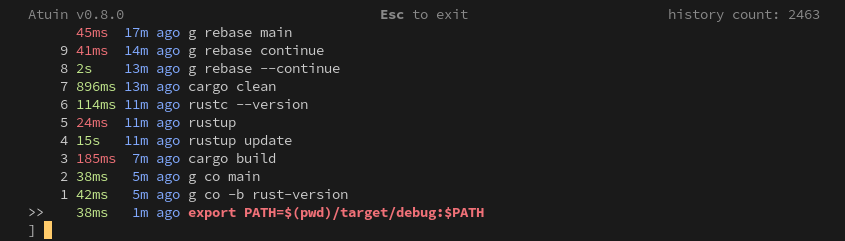
Which style to use. Possible values: auto, full and compact.
compact:
full:
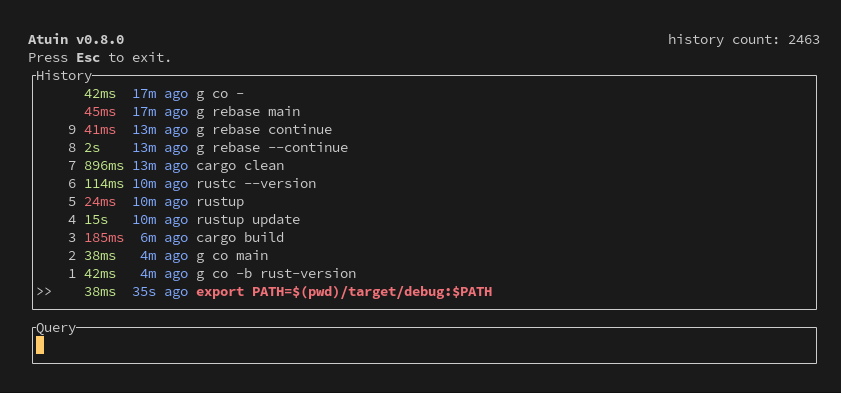
With auto, Atuin uses full mode, but automatically switches to compact mode when the terminal window is too short for full to display properly.
style = "compact"
invert
Default: false
Invert the UI - put the search bar at the top.
invert = true/false
inline_height
Default: 40
Set the maximum number of lines Atuin's interface should take up.
If set to 0, Atuin will always take up as many lines as available (full screen).
inline_height = 40
show_preview
Default: true
Configure whether to show a preview of the selected command.
Useful when the command is longer than the terminal width and is cut off.
show_preview = true
max_preview_height
Default: 4
Configure the maximum height of the preview to show.
Useful when you have long scripts in your history that you want to distinguish by more than the first few lines.
max_preview_height = 4
show_help
Default: true
Configure whether to show the help row, which includes the current Atuin version (and whether an update is available), a keymap hint, and the total amount of commands in your history.
show_help = true
show_tabs
Default: true
Configure whether to show tabs for search and inspect.
show_tabs = true
auto_hide_height
Default: 8
Hide extra UI lines when the available height falls below this number of rows. This has no effect except
when compact style is being used (see style above), and currently applies to only the
interactive search and inspector. It can be turned off entirely by setting to 0.
auto_hide_height = 8
exit_mode
Default: return-original
What to do when the escape key is pressed when searching
| Value | Behaviour |
|---|---|
| return-original (default) | Set the command-line to the value it had before starting search |
| return-query | Set the command-line to the search query you have entered so far |
Pressing ctrl+c or ctrl+d will always return the original command-line value.
exit_mode = "return-query"
history_format
The default format used by history list. It can also be specified per invocation with the --format argument, which takes precedence over this config value.
More on history list
history_format = "{time}\t{command}\t{duration}"
history_filter
Use the history filter to exclude commands from history tracking - maybe you want to keep ALL of your curl commands totally out of your shell history, or maybe just some matching a pattern.
This supports regular expressions, so you can hide pretty much whatever you want!
## Note that these regular expressions are unanchored, i.e. if they don't start
## with ^ or end with $, they'll match anywhere in the command.
history_filter = [
   "^secret-cmd",
   "^innocuous-cmd .*--secret=.+"
]
A filtered command's output isn't captured either. To keep a command in history
but not its output, use command_filter in [output]. The
filter applies to the commands your AI agents run too: a matching call is
captured with its tool's name only.
cwd_filter
Use the cwd filter to exclude directories from history tracking.
This supports regular expressions, so you can hide pretty much whatever you want!
## Note that these regular expressions are unanchored, i.e. if they don't start
## with ^ or end with $, they'll match anywhere in the path.
# cwd_filter = [
#   "^/very/secret/directory",
# ]
After updating that parameter, you can run the prune command to remove old history entries that match the new filters.
An AI session captured in a matching directory keeps only the names of the tools its agent called there.
store_failed
Default: true
store_failed = true
Configures whether to store commands that failed (those with non-zero exit status) or not.
secrets_filter
Default: true
secrets_filter = true
Matches each command against a set of built-in regular expressions, and refuses to save it if any of them match. The patterns currently cover:
| Service | Matches |
|---|---|
| AWS | Access key IDs, commands setting AWS_SECRET_ACCESS_KEY or AWS_SESSION_TOKEN, and Amazon Bedrock API keys |
| Azure | Commands setting AZURE_*_KEY, and Entra ID client secrets |
| Google Cloud | Commands setting GOOGLE_SERVICE_ACCOUNT_KEY, and API keys |
| GitHub | Personal access tokens (old and new), OAuth access tokens (app and user), app installation tokens, and refresh tokens |
| GitLab | Personal, deploy, runner, CI/CD job, feed, SCIM, agent and OAuth tokens |
| AI providers | Anthropic, OpenAI, OpenRouter, Groq, xAI, Perplexity, Pinecone, LangSmith and Hugging Face keys |
| Slack | Bot, user, app and config tokens, and webhook URLs |
| Stripe | Live, test and restricted keys |
| Package registries | npm, PyPI, RubyGems, Clojars, Docker Hub and Artifactory tokens |
| Infrastructure | DigitalOcean, Terraform Cloud, HashiCorp Vault, Fly.io, Heroku, Cloudflare origin CA, Databricks, PlanetScale, Supabase, Tailscale, Dynatrace, Grafana, Sentry, Doppler and OpenShift tokens |
| Other services | Netlify, Pulumi, Atlassian, Linear, Notion, Postman, Shopify, SendGrid, Brevo, Square, EasyPost, Duffel, Frame.io, ReadMe, Prefect, Infracost and Telegram tokens, Discord and Microsoft Teams webhooks, 1Password service account tokens and age secret keys |
| Atuin | atuin login, which takes your password and encryption key as arguments |
Many of these come from the rules of gitleaks.
For the exact expressions, see
secrets.rs.
The same patterns are applied to captured command output, and to
AI sessions. A command whose own text is
clean can still print a credential, so recognised values in the captured
output are replaced with **** before storage. Only the value is replaced; the
variable name or flag beside it stays. Output is also checked for credentials
recognised by where they sit, which never keep a command out of history:
- private keys (
-----BEGIN ... PRIVATE KEY-----), JSON web tokens,Authorizationheaders and bearer tokens, andcurl -u user:password - the password in a web address or connection string (
postgres://app:pw@db,password=...) - a value assigned to a name that holds a credential, such as
DB_PASSWORD=...,"client_secret": "..."orapi_key: .... Placeholders like${TOKEN},<password>andchangemestay.
A credential that color codes split apart in the output isn't recognised.
Output that can't be redacted quickly (within a quarter of a second) isn't
stored at all. Add patterns of your own with
redact_patterns.
!!! note
This is a safety net, not a guarantee. It only catches credentials in
recognized formats — use [`history_filter`](#history_filter) for anything
else you need kept out, or [`command_filter`](#command_filter) to keep a
command but not its output, and see
[Keeping Secrets Out of Atuin](../guide/excluding-commands.md).
macOS Ctrl-n key shortcuts
Default: true
macOS doesn't have an ++alt++ key, although terminal emulators can often be configured to map the ++option++ key to be used as ++alt++. However, remapping ++option++ this way may prevent typing some characters, such as using ++option+3++ to type # on the British English layout. For such a scenario, set the ctrl_n_shortcuts option to true in your config file to replace ++alt+0++ to ++alt+9++ shortcuts with ++ctrl+0++ to ++ctrl+9++ instead:
# Use Ctrl-0 .. Ctrl-9 instead of Alt-0 .. Alt-9 UI shortcuts
ctrl_n_shortcuts = true
show_numeric_shortcuts
Default: true
Whether to show numeric shortcuts (1..9) beside list items in the TUI. Set this to false to hide the moving numbers if you find them distracting.
show_numeric_shortcuts = true
network_timeout
Default: 30s
The maximum time to wait for a network request, as a duration like 500ms,
30s, or 5m. If any operation with a sync server takes longer than this, it
fails rather than waiting indefinitely.
A bare number is read as a count of seconds (network_timeout = 30), for
backwards compatibility.
network_timeout = "30s"
network_connect_timeout
Default: 5s
The maximum time Atuin waits for a connection to a remote sync server to be
established, as a duration like 500ms, 5s, or 1m. Any longer and the
request fails.
A bare number is read as a count of seconds (network_connect_timeout = 5), for
backwards compatibility.
network_connect_timeout = "5s"
extra_headers
Default: {}
Extra HTTP headers to send on every request to the sync server. This is useful when a self-hosted server sits behind a proxy or access gateway that requires its own authentication header — for example Cloudflare Access.
Headers that Atuin sets itself (such as Authorization) can't be overridden,
because Atuin's values always win.
To avoid leaking credentials, Atuin refuses to follow cross-origin redirects when extra headers are configured — they're never sent to an origin other than the one you configured.
extra_headers = { "CF-Access-Client-Id" = "...", "CF-Access-Client-Secret" = "..." }
local_timeout
Default: 2s
Timeout for acquiring a local database (SQLite) connection, as a duration like
500ms, 2s, or 1m.
A bare number is read as a count of seconds (local_timeout = 2), for backwards
compatibility.
local_timeout = "2s"
command_chaining
Default: false
Use this to build a command chain with the && or || operator. When enabled, opening Atuin will search for the next command in the chain, and append to the current buffer.
command_chaining = false
enter_accept
Default: false
When set to true, Atuin will default to immediately executing a command rather than the user having to press enter twice. Pressing tab will return to the shell and give the user a chance to edit.
This technically defaults to true for new users, but false for existing. We
have set enter_accept = true in the default config file. This is likely to
change to be the default for everyone in a later release.
enter_accept = false
keymap_mode
Default: emacs
The initial keymap mode of the interactive Atuin search (for example, started by the
keybindings in the shells). Four values are supported: "emacs",
"vim-normal", "vim-insert", and "auto". The keymap mode "emacs" is the
most basic one. In the keymap mode "vim-normal", you may use ++k++
and ++j++ to navigate the history list as in Vim, whilst pressing
++i++ changes the keymap mode to "vim-insert". In the keymap mode "vim-insert",
you can search for a string as in the keymap mode "emacs", while pressing ++esc++
switches the keymap mode to "vim-normal". When set to "auto", the initial
keymap mode is automatically determined based on the shell's keymap that triggered
the Atuin search. "auto" isn't supported by Nushell at present, where it will
always trigger the Atuin search with the keymap mode "emacs".
keymap_mode = "emacs"
keymap_cursor
Default: (empty dictionary)
The terminal's cursor style associated with each keymap mode in the Atuin
search. This is specified by a dictionary whose keys and values being the
keymap names and the cursor styles, respectively. A key specifies one of the
keymaps from emacs, vim_insert, and vim_normal. A value is one of the
cursor styles, default or {blink,steady}-{block,underline,bar}. The
following is an example.
keymap_cursor = { emacs = "blink-block", vim_insert = "blink-block", vim_normal = "steady-block" }
If the cursor style is specified, the terminal's cursor style is changed to the specified one when the Atuin search starts with or switches to the corresponding keymap mode. Also, the terminal's cursor style is reset to the one associated with the keymap mode corresponding to the shell's keymap on the termination of the Atuin search.
prefers_reduced_motion
Default: false
Enable this, and Atuin will reduce motion in the TUI as much as possible. Users with motion sensitivity can find the live-updating timestamps distracting.
Alternatively, set env var NO_MOTION
prefers_reduced_motion = false
search
filters
The list of filter modes available in interactive search, in the order they cycle through when you press ctrl-r. By default, all modes are enabled. Removing a mode from this list disables it entirely. The workspace mode is skipped when not in a git repository or when workspaces = false. See Filter mode for a description of each mode.
The filter_mode setting selects the initial mode from this list. If filter_mode is set to a mode not in the list, the first available mode is used instead.
[search]
filters = ["global", "host", "session", "directory"]
Score multipliers
For the "daemon-fuzzy" search mode, you can control the scoring of matched items. The system scores matches based on three numbers: frequency, recency, and frecency:
- Frequency — how often this exact match has been run, with diminishing returns
- Recency — how recently this exact match was last run
- Frecency — a combination of frequency and recency
The frecency calculation is Recency Score * Recency Multiplier + Frequency Score * Frequency Multiplier. By changing the options below, you can customize the relative importance of each part of the score calculation.
For each setting, a value of 1.0 (the default) means the score is used as-is. Values less than 1.0 decrease that score's influence, and values greater than 1.0 increase that score's influence.
For example, if you cared a lot about how frequently you run a command but not as much how recently, you could set frequency_score_multiplier to 10.0 and recency_score_multiplier to 0.1.
!!! warning "daemon-fuzzy mode only"
The score multiplier settings shown here only work with the "daemon-fuzzy" search mode.
frequency_score_multiplier
Default: 1.0
The multiplier to apply to the frequency score in the frecency calculation. Setting this to 0 disables the frequency part of the frecency scoring altogether.
frequency_score_multiplier = 1.0
recency_score_multiplier
Default: 1.0
The multiplier to apply to the recency score in the frecency calculation. Setting this to 0 disables the recency part of the frecency scoring altogether.
recency_score_multiplier = 1.0
frecency_score_multiplier
Default: 1.0
The multiplier used for the final frecency score. Setting this to 0 disables frecency scoring altogether, relying solely on the fuzzy matcher's score.
frecency_score_multiplier = 1.0
Example:
search_mode = "daemon-fuzzy"

[daemon]
enabled = true
autostart = true

[search]
recency_score_multiplier = 10.0
frequency_score_multiplier = 0.8
frecency_score_multiplier = 2.0
Filtering by author
Interactive search shows only commands you ran yourself, hiding those recorded
by AI coding agents through agent hooks. This isn't
currently configurable in config.toml.
To filter by author on the command line, use atuin search --author. See
Filtering by Author for the
available values.
shells
Atuin version: >= 18.18
Default: "auto"
Filter interactive search results by the shell that was used to run each command.
| Value | Meaning |
|---|---|
"all" |
Show commands from all shells. |
"auto" |
Show commands from the current shell, or commands that have no recorded shell (for example, from an older version of Atuin). |
| array of strings | Show commands run by any shell in the array. "" includes commands that have no shell recorded. |
The current shell is detected from the ATUIN_SHELL environment variable (set by the shell init script).
[search]
# Default: show commands from the current shell. Atuin will show Bash commands
# when invoked from Bash, Zsh commands when invoked from Zsh, etc. Also
# includes commands that have no shell recorded (most likely from an older
# version of Atuin).
shells = "auto"

# Show commands from all shells.
# shells = "all"

# Show only Bash and Zsh commands.
# shells = ["bash", "zsh"]
Stats
This section of client config is specifically for configuring Atuin stats calculations
[stats]
common_subcommands = [...]
common_prefix = [...]
common_subcommands
Default:
common_subcommands = [
  "apt",
  "cargo",
  "composer",
  "dnf",
  "docker",
  "git",
  "go",
  "ip",
  "jj",
  "kubectl",
  "nix",
  "nmcli",
  "npm",
  "pecl",
  "pnpm",
  "podman",
  "port",
  "systemctl",
  "tmux",
  "yarn",
]
Configures commands where Atuin should consider the subcommand as part of the statistics. For example, consider kubectl get rather than just kubectl.
common_prefix
Default:
common_prefix = [
  "sudo",
]
Configures commands that should be totally stripped from stats calculations. For example, 'sudo' should be ignored.
keys
This section of the client config is specifically for configuring key-related settings.
[keys]
scroll_exits = [...]
prefix = 'a'
scroll_exits
Default: true
Configures whether the TUI exits, when scrolled past the last or first entry.
scroll_exits = true
prefix
Default: a
Which key to use as the prefix. Prefix mode is a two-step shortcut system: you press ++ctrl++ and the prefix key to enter prefix mode, then press a second key to trigger an action. For example, with the default prefix a, pressing ++ctrl+a++ then ++d++ deletes the selected entry.
See the key binding page for the full list of default prefix shortcuts, or the advanced key binding page to customize them.
prefix = "a"
exit_past_line_start
Default: true
Exits the TUI when scrolling left while the cursor is at the start of the line.
exit_past_line_start = true
accept_past_line_end
Default: true
The right arrow key performs the same functionality as Tab and copies the selected line to the command line to be modified.
accept_past_line_end = true
accept_past_line_start
Default: false
The left arrow key performs the same functionality as Tab and copies the selected line to the command line to be modified.
accept_past_line_start = false
accept_with_backspace
Default: false
The backspace key performs the same functionality as Tab and copies the selected line to the command line to be modified.
accept_with_backspace = false
preview
This section of the client config is specifically for configuring preview-related settings. (In the future the other 2 preview settings will be moved here.)
[preview]
strategy = [...]
strategy
Default: auto
Which preview strategy is used to calculate the preview height. It respects max_preview_height.
| Value | Preview height is calculated from the length of the |
|---|---|
| auto (default) | selected command |
| static | longest command in the current result set |
| fixed | use max_preview_height as fixed value |
By using auto a preview is shown, if the command is longer than the width of the terminal.
strategy = "auto"
tmux
When you're inside tmux, open the search UI in a popup floating above your current pane, instead of drawing over the pane itself. The popup opens in your current working directory, and closes when you accept a command or exit.
[tmux]
enabled = true
width = "80%"
height = "60%"
Atuin falls back to its normal rendering, with no error, whenever the popup can't be used — outside tmux, on tmux older than 3.2, or in a shell that doesn't support it.
!!! note "Requirements"
- tmux >= 3.2, which is where `display-popup` gained the behavior Atuin needs
- zsh, bash, or fish — nushell, xonsh, and PowerShell don't support the popup yet
!!! warning "iTerm2's native tmux integration"
iTerm2's native tmux integration (control mode, `tmux -CC`) can't display
`tmux display-popup` popups, and Atuin can't detect this to fall back
automatically. If you rely on it, keep `[tmux] enabled = false` (the
default) so the search UI renders inline.
These settings are read by atuin init and passed to the shell plugin through
environment variables, so restart your shell after changing them. To disable
the popup for a single session without touching your config, set
ATUIN_TMUX_POPUP=false before Atuin's key bindings run.
enabled
Default: false
Whether to show the search UI in a tmux popup.
enabled = true
width
Default: "80%"
Width of the popup, passed to tmux display-popup -w. Accepts a percentage of
the terminal width, or an absolute number of columns.
width = "80%"
height
Default: "60%"
Height of the popup, passed to tmux display-popup -h. Accepts a percentage of
the terminal height, or an absolute number of rows.
height = "60%"
Daemon
enabled
Default: false
Enable the background daemon
Add the new section to the bottom of your config file
[daemon]
enabled = true
autostart
Default: false
Automatically start and manage the daemon when needed.
This isn't compatible with systemd_socket = true.
If a legacy experimental daemon is already running, restart it manually once before using autostart.
autostart = false
sync_frequency
Default: 5m
How often the daemon should sync, as a duration like 30s, 5m, or 1h.
A bare number is read as a count of seconds (sync_frequency = 300), for
backwards compatibility.
sync_frequency = "5m"
socket_path
Default if [systemd_socket] is false: $TMPDIR/atuin-$UID/atuin.sock, where
$UID is your user ID. $TMPDIR defaults to /tmp if unset.
Default if [systemd_socket] is true: $XDG_RUNTIME_DIR/atuin.sock if
$XDG_RUNTIME_DIR is set, otherwise $TMPDIR/atuin-$UID/atuin.sock.
Where to bind a Unix socket for client -> daemon communication.
Older versions of Atuin used to listen on $XDG_RUNTIME_DIR/atuin.sock if
$XDG_RUNTIME_DIR was set, otherwise $XDG_DATA_HOME/atuin/atuin.sock if
$XDG_DATA_HOME was set, otherwise ~/.local/share/atuin/atuin.sock. If you
don't manually set socket_path in your config, Atuin will still look for an
existing socket at the old path, as an older version of the daemon may be
running there.
pidfile_path
Default:
pidfile_path = "~/.local/share/atuin/atuin-daemon.pid"
Path to the daemon pidfile used for process coordination.
systemd_socket
Default false
Use a socket passed via systemd socket activation protocol instead of the path
systemd_socket = false
Note: setting this to true changes the default value of
socket_path.
tcp_port
Default: 8889
The port to use for client -> daemon communication. Only used on non-Unix systems.
tcp_port = 8889
Output capture
Settings for capturing command output, which needs the daemon and pty-proxy.
[output]
enabled = true
max_output_size = "1MB"
max_disk_usage = "10%"
command_filter = []
enabled
Default: false
Capture and store the output of the commands you run. When false, nothing is
captured and the other keys in this section are ignored. Turning it off stops
the daemon storing output right away; turning it on takes a daemon restart and
a new shell, or run atuin config enable output-capture, which also sets up
the daemon and pty-proxy.
[output]
enabled = true
max_output_size
Default: "1MB"
The most output kept for a single command. When a command prints more, Atuin
keeps the start and the end, half each, and drops the middle. Takes a size like
"512KB" or "2MB". pty-proxy reads it when your shell starts.
[output]
max_output_size = "1MB"
max_disk_usage
Default: "10%"
The most disk space captured output may use: a size ("10GB"), a share of
the total size of the disk that holds Atuin's data directory ("10%"), or
"unlimited". Past the limit, the daemon deletes the oldest output first.
Restart the daemon after changing it.
[output]
max_disk_usage = "10%"
command_filter
Default: []
Commands whose output is never stored. Unlike
history_filter, a matching command is still recorded in
your history -- only its output is dropped. Commands history_filter excludes
never have their output stored either.
[output]
## Note that these regular expressions are unanchored, i.e. if they don't start
## with ^ or end with $, they'll match anywhere in the command.
command_filter = [
   "^cat ",
   "^kubectl get secret",
]
The filter applies to output captured after the daemon picks up the change; it doesn't remove output that's already stored.
Some commands' output is never stored, whatever this filter says, because it
can hold a credential: Atuin's own atuin key, atuin login, atuin register
and atuin account change-password; commands that print a token or a password,
such as gh auth token, gcloud auth print-access-token,
aws configure get, kubectl get secret, vault kv get, op read,
pass show and security find-generic-password -w; commands that print the
environment (printenv, env); and commands that name a
sensitive file, such as cat .env.
The filter also applies to the commands your AI agents run, whether or not output capture is enabled: a matching call is captured without its output.
sync
Default: false
Reserved for syncing captured output between machines, which isn't implemented yet: captured output never leaves your machine, whatever this is set to.
Security
Settings under [security] add to Atuin's built-in rules for keeping
credentials out of what it stores: captured command output and
AI sessions. For which setting to reach for,
see Keeping Secrets Out of Atuin.
[security]
redact_patterns = []
sensitive_files = []
redact_patterns
Default: []
Regular expressions for credentials of your own, redacted wherever Atuin
redacts, alongside the built-in patterns. Atuin replaces a
pattern's secret group with **** if it has one, otherwise everything the
pattern matches.
[security]
redact_patterns = [
   "ACME-[0-9A-F]{32}",
   "internal-api-key: (?<secret>\\S+)",
]
These patterns don't keep a command out of history; use
history_filter for that. When
secrets_filter is off, captured command output is redacted
with these patterns only.
sensitive_files
Default: []
Files whose contents are credentials, on top of the built-in ones. The output of a command naming one isn't stored. An AI agent's reads of one aren't captured, and nor is what it writes to one.
A glob without a / matches a file's name wherever it is. A glob with a /
matches its path, from ~ or /, or anywhere below a directory for a relative
one.
[security]
sensitive_files = [
   "*.secret",
   "~/work/credentials/**",
   "config/master.key",
]
The built-in files are:
.envand.env.*(but not.env.example,.env.sample,.env.templateor.env.dist),*.envand.envrc- private keys:
id_rsa,id_dsa,id_ecdsa,id_ed25519(not their.pubhalves),*.pem,*.key,*.p12,*.pfx,*.jksand*.keystore - Terraform state and variables:
*.tfstate,*.tfvars .netrc,.pgpass,.git-credentials,.npmrc,.pypirc,.htpasswdand.vault-token- cloud and registry logins:
~/.aws/credentialsand its SSO cache, the gcloud credential files,~/.kube/config,~/.docker/config.json, theghandglablogins, and Cargo, RubyGems and Terraform Cloud credentials ~/.gnupg/private-keys-v1.dand~/.password-store- the AI agents' own logins:
~/.claude/.credentials.json,~/.codex/auth.json, opencode's and Pi'sauth.json - Atuin's encryption key (
key_path)
logs
Behavior of log files.
[logs]
enabled = true
dir = "~/.atuin/logs"
level = "info"
retention = "4d"
enabled
Default: true
Whether to enable file-based logging.
enabled = true
dir
Default: "~/.atuin/logs"
The directory in which to store log files.
dir = "~/.atuin/logs"
level
Default: "info"
The logging level to use. Valid values are "trace", "debug", "info", "warn", and "error", in order of highest-to-lowest verbosity.
level = "info"
retention
Default: 4d
How long to keep log files, per file type, as a duration like 12h or 7d.
Files older than this are removed.
A bare number is read as a count of days (retention = 4), for backwards
compatibility.
retention = "4d"
ai
A sub-object with specific options for AI logging:
enabled- whether to output AI logs; defaults tologs.enabledfile- the filename to use for the AI logs; defaults to"ai.log". Always relative tologs.dir.level- override the log level for the AI logs; defaults tologs.levelretention- how long to keep AI logs; defaults tologs.retention
[logs.ai]
enabled = true
file = "ai.log"
level = "info"
retention = "4d"
daemon
A sub-object with specific options for daemon logging:
enabled- whether to output daemon logs; defaults tologs.enabledfile- the filename to use for the daemon logs; defaults to"daemon.log". Always relative tologs.dir.level- override the log level for the daemon logs; defaults tologs.levelretention- how long to keep daemon logs; defaults tologs.retention
[logs.daemon]
enabled = true
file = "daemon.log"
level = "info"
retention = "4d"
search
A sub-object with specific options for search logging:
enabled- whether to output search logs; defaults tologs.enabledfile- the filename to use for the search logs; defaults to"search.log". Always relative tologs.dir.level- override the log level for the search logs; defaults tologs.levelretention- how long to keep search logs; defaults tologs.retention
[logs.search]
enabled = true
file = "search.log"
level = "info"
retention = "4d"
theme
The theme to use for showing the terminal interface.
[theme]
name = "default"
debug = false
max_depth = 10
name
Default: "default"
A theme name that must be present as a built-in (unset or default for the default,
else autumn or marine), or found in the themes directory, with the suffix .toml.
By default this is ~/.config/atuin/themes/ but can be overridden with the
ATUIN_THEME_DIR environment variable.
name = "my-theme"
debug
Default: false
Output information about why a theme won't load. Independent from other log levels as it can cause data from the theme file to be printed unfiltered to the terminal.
debug = false
max_depth
Default: 10
Number of levels of "parenthood" that will be traversed for a theme. This shouldn't need to be added in or changed in normal usage.
max_depth = 10
ui
Configure the interactive search UI appearance.
[ui]
columns = ["duration", "time", "command"]
columns
Default: ["duration", "time", "command"]
Columns to display in the interactive search, from left to right. The selection
indicator (" > ") is always shown first implicitly.
Each column can be specified as:
- A plain string (uses default width):
"duration" - An object with type and optional width/expand:
{ type = "directory", width = 30 }
Available column types
| Column | Default Width | Description |
|---|---|---|
duration |
5 | Command execution duration (for example, "123ms") |
time |
8 | Relative time since execution (for example, "59m ago") |
datetime |
16 | Absolute timestamp (for example, "2025-01-22 14:35") |
directory |
20 | Working directory (truncated if too long) |
host |
15 | Hostname where command was run |
user |
10 | Username |
exit |
3 | Exit code (colored by success/failure) |
command |
* | The command itself (expands by default) |
Column options
- type: The column type (required when using object format)
- width: Custom width in characters (optional, uses default if not specified)
- expand: If
true, the column fills remaining space. Default istrueforcommand,falsefor others. Only one column should haveexpand = true.
Examples
# Minimal - more space for commands
columns = ["duration", "command"]

# With custom directory width
columns = ["duration", { type = "directory", width = 30 }, "command"]

# Show host for multi-machine sync users
columns = ["duration", "time", "host", "command"]

# Show exit codes prominently
columns = ["exit", "duration", "command"]

# Make directory expand instead of command
columns = ["duration", "time", { type = "directory", expand = true }, { type = "command", expand = false }]
syntax_highlight
Default: true
Syntax highlight commands in the search results, parsed with the grammar for the shell that ran them: bash/zsh/sh use the bash grammar, fish uses the fish grammar, and shells without a grammar (nu, xonsh, PowerShell) are shown unhighlighted. The selected row keeps its usual single highlight color.
The default colors are ANSI palette colors, so they automatically match your
terminal's color scheme. They can also be customized via the Syntax* keys in
a theme.
Not available on platforms where tree-sitter doesn't build, so commands are shown unhighlighted there.
syntax_highlight = false
ai
The settings for Atuin AI are listed in a separate section.