<!-- If this PR requires a changelog entry, add it by commenting the PR with the command `/changelog-entry [breaking-change|new-feature|bug-fix|chore] [message]`. -->
<!-- You can skip the changelog check by labeling the PR with "no changelog". -->

# Why

Rely on ExpoConfig type from the `@expo/config` package in all places for consistency

# How

Rely on ExpoConfig type from the `@expo/config` package in all places for consistency

# Test Plan

Tests
# Why

User should be able to upload files to environment variables and read content of those files

# How

* When an envvar is created with flag `--type FILE`, selected file is encoded to base64 and sent to www.
* EnvVarQueries return file contents when `includeFileContent` file is passed
* `env:get` automatically include file content, `env:list` requires `--include-file-content` flag
* Updated environment display - added `environments`, `type` and `visibility`

# Test Plan

tested manually, updated tests
<!-- If this PR requires a changelog entry, add it by commenting the PR with the command `/changelog-entry [breaking-change|new-feature|bug-fix|chore] [message]`. -->
<!-- You can skip the changelog check by labeling the PR with "no changelog". -->

# Why

[ENG-13525: Update EAS-CLI for new EnvVar features](https://linear.app/expo/issue/ENG-13525/update-eas-cli-for-new-envvar-features)

Update command to use multiple environments, polish the interface.

# How

* use `variable-name` and `variable-environment` to select the variable
* Use `multiselect` and multiple `environment` parameters to allow unlinking multiple envs

All commands that were using name parameter to identify a single variable will use variable-name and variable-environment instead. This change will enable user to distinguish between name and environment that is identifying variable that is acted upon, and name and environment that is a parameter for command.

For example, when the user wants to update variable TEST that has environment production and change its name and change its environment, they can use:

eas env:update --variable-name TEST --variable-environment production --name TEST-update --environment production --environment preview

# Test Plan

Added tests
<!-- If this PR requires a changelog entry, add it by commenting the PR with the command `/changelog-entry [breaking-change|new-feature|bug-fix|chore] [message]`. -->
<!-- You can skip the changelog check by labeling the PR with "no changelog". -->

# Why

[ENG-13525: Update EAS-CLI for new EnvVar features](https://linear.app/expo/issue/ENG-13525/update-eas-cli-for-new-envvar-features)

Allow selecting multiple environments to display variables from.

# How

* Use `multiselect`, allow specifying multiple `environment` parameters
* List variables from all environments

# Test Plan

Added tests
<!-- If this PR requires a changelog entry, add it by commenting the PR with the command `/changelog-entry [breaking-change|new-feature|bug-fix|chore] [message]`. -->
<!-- You can skip the changelog check by labeling the PR with "no changelog". -->

# Why

[ENG-13525: Update EAS-CLI for new EnvVar features](https://linear.app/expo/issue/ENG-13525/update-eas-cli-for-new-envvar-features)

Add tests, polish the interface

# How

* Use `variable-name` and `variable-environment` to select the variable
* More robust selector of variable to remove ambiguity
* Use multiselect to clearly indicate which environments are linked and which are not
* Automatic `link` and `unlink` action

All commands that were using name parameter to identify a single variable will use variable-name and variable-environment instead. This change will enable user to distinguish between name and environment that is identifying variable that is acted upon, and name and environment that is a parameter for command.

For example, when the user wants to update variable TEST that has environment production and change its name and change its environment, they can use:

eas env:update --variable-name TEST --variable-environment production --name TEST-update --environment production --environment preview

# Test Plan

Added tests
<!-- If this PR requires a changelog entry, add it by commenting the PR with the command `/changelog-entry [breaking-change|new-feature|bug-fix|chore] [message]`. -->
<!-- You can skip the changelog check by labeling the PR with "no changelog". -->

# Why

[ENG-13525: Update EAS-CLI for new EnvVar features](https://linear.app/expo/issue/ENG-13525/update-eas-cli-for-new-envvar-features)

Rework the EnvironmentVariableUpdate function - user is able to alter name, and environments.

# How

* Added `--variable-name` and `--variable-environment` parameters to identify the variable to update
* Using parameters from `--name` and `--environment` to update the variable using the new `updateEnvironmentVariable` method.

All commands that were using name parameter to identify a single variable will use variable-name and variable-environment instead. This change will enable user to distinguish between name and environment that is identifying variable that is acted upon, and name and environment that is a parameter for command.

For example, when the user wants to update variable TEST that has environment production and change its name and change its environment, they can use:

eas env:update --variable-name TEST --variable-environment production --name TEST-update --environment production --environment preview

# Test Plan

Added tests
<!-- If this PR requires a changelog entry, add it by commenting the PR with the command `/changelog-entry [breaking-change|new-feature|bug-fix|chore] [message]`. -->
<!-- You can skip the changelog check by labeling the PR with "no changelog". -->
# Why
[ENG-13525: Update EAS-CLI for new EnvVar features](https://linear.app/expo/issue/ENG-13525/update-eas-cli-for-new-envvar-features)
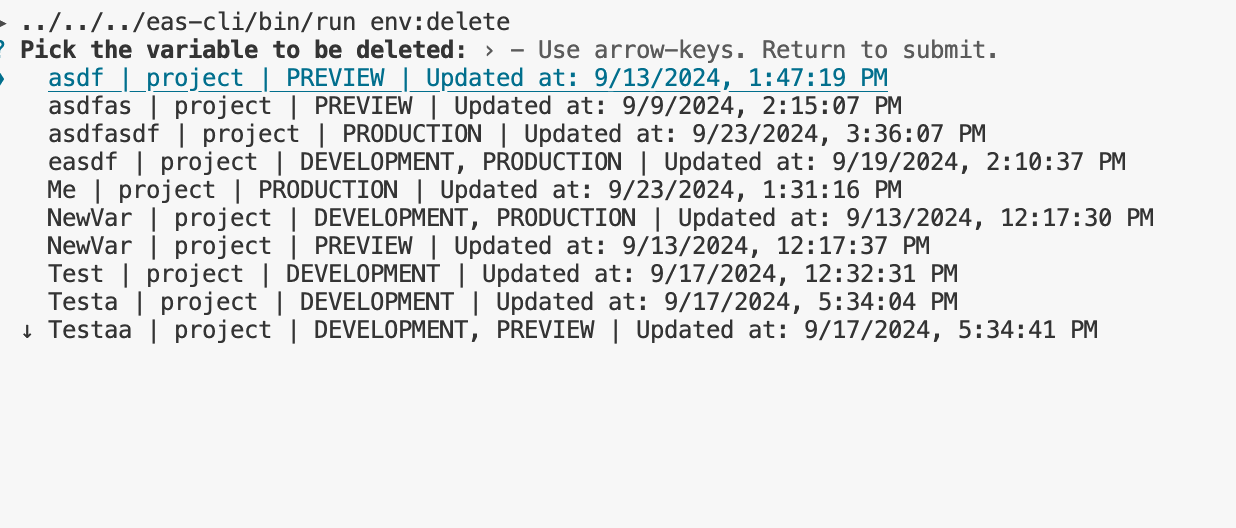
Improve the selector for the variable to delete, rename parameter `name` to `variable-name`.
All commands that were using name parameter to identify a single variable will use variable-name and variable-environment instead. This change will enable user to distinguish between name and environment that is identifying variable that is acted upon, and name and environment that is a parameter for command.
For example, when the user wants to update variable TEST that has environment production and change its name and change its environment, they can use:
eas env:update --variable-name TEST --variable-environment production --name TEST-update --environment production --environment preview
# Test Plan
Added tests
<!-- If this PR requires a changelog entry, add it by commenting the PR with the command `/changelog-entry [breaking-change|new-feature|bug-fix|chore] [message]`. -->
<!-- You can skip the changelog check by labeling the PR with "no changelog". -->

# Why

[ENG-13525: Update EAS-CLI for new EnvVar features](https://linear.app/expo/issue/ENG-13525/update-eas-cli-for-new-envvar-features)

Polished the interface:

 - user is prompted for environment only when the name is ambiguous.
- changed `name` parameter to `variable-name`.

All commands that were using `name` parameter to identify a single variable will use `variable-name` and `variable-environment` instead. This change will enable user to distinguish between `name` and `environment` that is identifying variable that is acted upon, and `name` and `environment` that is a parameter for command.

For example, when the user wants to update variable `TEST` that has environment `production` and change its name and change its environment, they can use:

`eas env:update --variable-name TEST --variable-environment production --name TEST-update --environment production --environment preview`

# Test Plan

Added tests
<!-- If this PR requires a changelog entry, add it by commenting the PR with the command `/changelog-entry [breaking-change|new-feature|bug-fix|chore] [message]`. -->
<!-- You can skip the changelog check by labeling the PR with "no changelog". -->

# Why

[ENG-13525: Update EAS-CLI for new EnvVar features](https://linear.app/expo/issue/ENG-13525/update-eas-cli-for-new-envvar-features)

Update `eas env:create` to accept multiple `--environment` parameters.

# How

* Use `EASMultiEnvironmentFlag` in `EnvironmentVariableCreate`
* Update variable display with `environment` and `updatedAt` fields

# Test Plan

Added tests
<!-- If this PR requires a changelog entry, add it by commenting the PR with the command `/changelog-entry [breaking-change|new-feature|bug-fix|chore] [message]`. -->
<!-- You can skip the changelog check by labeling the PR with "no changelog". -->

# Why

[ENG-13525: Update EAS-CLI for new EnvVar features](https://linear.app/expo/issue/ENG-13525/update-eas-cli-for-new-envvar-features)

EnvVar will support having multiple environments, CLI should support this.

# How

* Add an optional parameter `multiple` to `promptVariableEnvironmentAsync`
* Update commands using `promptVariableEnvironmentAsync`
* Add a new flag `EASMultiEnvironmentFlag`

# Test Plan

Tested manually, tests will be added in the following PRs
<!-- If this PR requires a changelog entry, add it by commenting the PR with the command `/changelog-entry [breaking-change|new-feature|bug-fix|chore] [message]`. -->
<!-- You can skip the changelog check by labeling the PR with "no changelog". -->

# Why

[ENG-13525 Update EAS-CLI for new EnvVar features](https://linear.app/expo/issue/ENG-13525/update-eas-cli-for-new-envvar-features)

Bring up to date `create` and `update` EnvVar mutations.

# How

* Use `updateEnvironmentVariable` operation instead of `createEnvironmentVariable` with an 'overwrite' option.
* Add `type` parameter
* Add `environment` parameter for shared variables

# Test Plan

Tested manually, tests will be added in the following PRs
<!-- If this PR requires a changelog entry, add it by commenting the PR with the command `/changelog-entry [breaking-change|new-feature|bug-fix|chore] [message]`. -->
<!-- You can skip the changelog check by labeling the PR with "no changelog". -->

# Why

[ENG-13525 Update EAS-CLI for new EnvVar features
](https://linear.app/expo/issue/ENG-13525/update-eas-cli-for-new-envvar-features)

Update EnvVar queries - allow quering using environments.

# How

* Added optional `environment` parameter to queries
* Fix typing of the `--environment` parameter

# Test Plan

Tested manually
* Update API functions for new upload endpoint and deploy result

* Fix listWorkerFilesAsync file type

* Add call to finalize deployment

* Update CHANGELOG

* Add retries to /deploy/finalize call

* Apply lints
<!-- If this PR requires a changelog entry, add it by commenting the PR with the command `/changelog-entry [breaking-change|new-feature|bug-fix|chore] [message]`. -->
<!-- You can skip the changelog check by labeling the PR with "no changelog". -->

# Why

https://exponent-internal.slack.com/archives/C017N0N99RA/p1726226230206999

Right now the only way to exit the `eas credentials` command is to kill the process by doing ctrl+c. Let's add an `exit` option to the interactive menu.

# How

Add exit option to menu.

# Test Plan

Test manually
<!-- If this PR requires a changelog entry, add it by commenting the PR with the command `/changelog-entry [breaking-change|new-feature|bug-fix|chore] [message]`. -->
<!-- You can skip the changelog check by labeling the PR with "no changelog". -->

# Why

On Friday's meeting, we agreed that having both a flag and a field in the build profile for setting the environment might be too much. Additionally, we already have a `--profile` flag that has a `-e` alias which makes it even more confusing. We decided to delete the flag to avoid confusion and make it as straightforward as possible.

# How

Delete the `--environment` flag for build-related commands, rely only on the `environment` field in eas.json.

# Test Plan

Tests
<!-- If this PR requires a changelog entry, add it by commenting the PR with the command `/changelog-entry [breaking-change|new-feature|bug-fix|chore] [message]`. -->
<!-- You can skip the changelog check by labeling the PR with "no changelog". -->
# Why
Add the `eas env:exec` command. This command allows you to run any arbitrary bash command with env vars from a given environment.
# How
Add `eas env:exec` command
# Test Plan
Test manually

* refactor(eas-cli): split prompt from dev domain assignment and support it non-interactive

* docs: add changelog entry

* docs: fix changelog entry

* fix(eas-cli): use proper name in "already taken" prompt

* chore: resolve linting issue
# Why

Almost a year ago we've migrated from using a single file for submission logs to multi-file logs, accommodating need to display logs from both the worker and the scheduler that is starting the worker VM.

Companion to https://github.com/expo/universe/pull/16873.

# How

Replaced `logsUrl` with `logFiles`, adjusted code.

# Test Plan

Logs printed

<img width="1055" alt="Zrzut ekranu 2024-09-24 o 23 06 22" src="https://github.com/user-attachments/assets/6c9a45c0-6760-4629-82e3-a79d5ef99ebe">
<!-- If this PR requires a changelog entry, add it by commenting the PR with the command `/changelog-entry [breaking-change|new-feature|bug-fix|chore] [message]`. -->
<!-- You can skip the changelog check by labeling the PR with "no changelog". -->

# Why

I want to add support for submissions as part of workflows, where, when we start the job, we don't have access to the repository. So, we need to resolve submission config _somewhere_, ideally where we are isolated, can easily clone project, install dependencies and resolve dynamic config.

As we do with `eas build:internal`, I expect it will make sense to do `eas submit:internal` which will do what `eas submit` does usually — resolve all the credentials, using local filesystem or Expo servers  and then fetch the _actual_ keys from Expo servers.

# How

First, I changed structure of `SubmitCommand`/`Submitter` a bit — previously, `SubmitCommand` would create the `Submitter` and call `submitAsync` _inside_ `runAsync()`. After my changes `SubmitCommand` will create _and return_ the `Submitter` and the call site will need to call `submitAsync`.

By doing it this way I was able to add a `getSubmissionInputAsync` to `BaseSubmitter` which returns all-resolved submission input, as-it-would-have-been-used-in-submission-mutation. This ensures the same behavior for `eas submit` and `eas submit:internal`.

Once we have that, `eas submit:internal` is relatively straightforward:
1. create `SubmitCommand`, get `Submitter`.
2. `getSubmissionInputAsync`.
3. fetch necessary credentials by IDs from `www` (https://github.com/expo/universe/pull/16793).
4. validate that we have it all (https://github.com/expo/eas-build/pull/443) and print the JSON.

# Test Plan

I was able to run `easd submit:internal` locally and got the JSON output.
<!-- If this PR requires a changelog entry, add it by commenting the PR with the command `/changelog-entry [breaking-change|new-feature|bug-fix|chore] [message]`. -->
<!-- You can skip the changelog check by labeling the PR with "no changelog". -->

# Why

In a submit job we're going to have an IPA/APK to submit. We don't want to resolve any bundle identifiers from the project, we can use one from that IPA/APK.

# How

Let the override env variable override bundle identifier resolution if the workflow is managed too.

# Test Plan

I used it to submit an IPA with workflows.
 Piotr Szeremeta

