# Semantic Kernel
## Status
- Python
[](https://pypi.org/project/semantic-kernel/)
- .NET
[](https://www.nuget.org/packages/Microsoft.SemanticKernel/)[](https://github.com/microsoft/semantic-kernel/actions/workflows/dotnet-ci-docker.yml)[](https://github.com/microsoft/semantic-kernel/actions/workflows/dotnet-ci-windows.yml)
- Java
[](https://github.com/microsoft/semantic-kernel/actions/workflows/java-build.yml)[](https://maven-badges.herokuapp.com/maven-central/com.microsoft.semantic-kernel/semantickernel-api)
## Overview
[](https://github.com/microsoft/semantic-kernel/blob/main/LICENSE)
[](https://aka.ms/SKDiscord)
[Semantic Kernel](https://learn.microsoft.com/en-us/semantic-kernel/overview/)
is an SDK that integrates Large Language Models (LLMs) like
[OpenAI](https://platform.openai.com/docs/introduction),
[Azure OpenAI](https://azure.microsoft.com/en-us/products/ai-services/openai-service),
and [Hugging Face](https://huggingface.co/)
with conventional programming languages like C#, Python, and Java. Semantic Kernel achieves this
by allowing you to define [plugins](https://learn.microsoft.com/en-us/semantic-kernel/concepts/plugins)
that can be chained together
in just a [few lines of code](https://learn.microsoft.com/en-us/semantic-kernel/ai-orchestration/chaining-functions?tabs=Csharp#using-the-runasync-method-to-simplify-your-code).
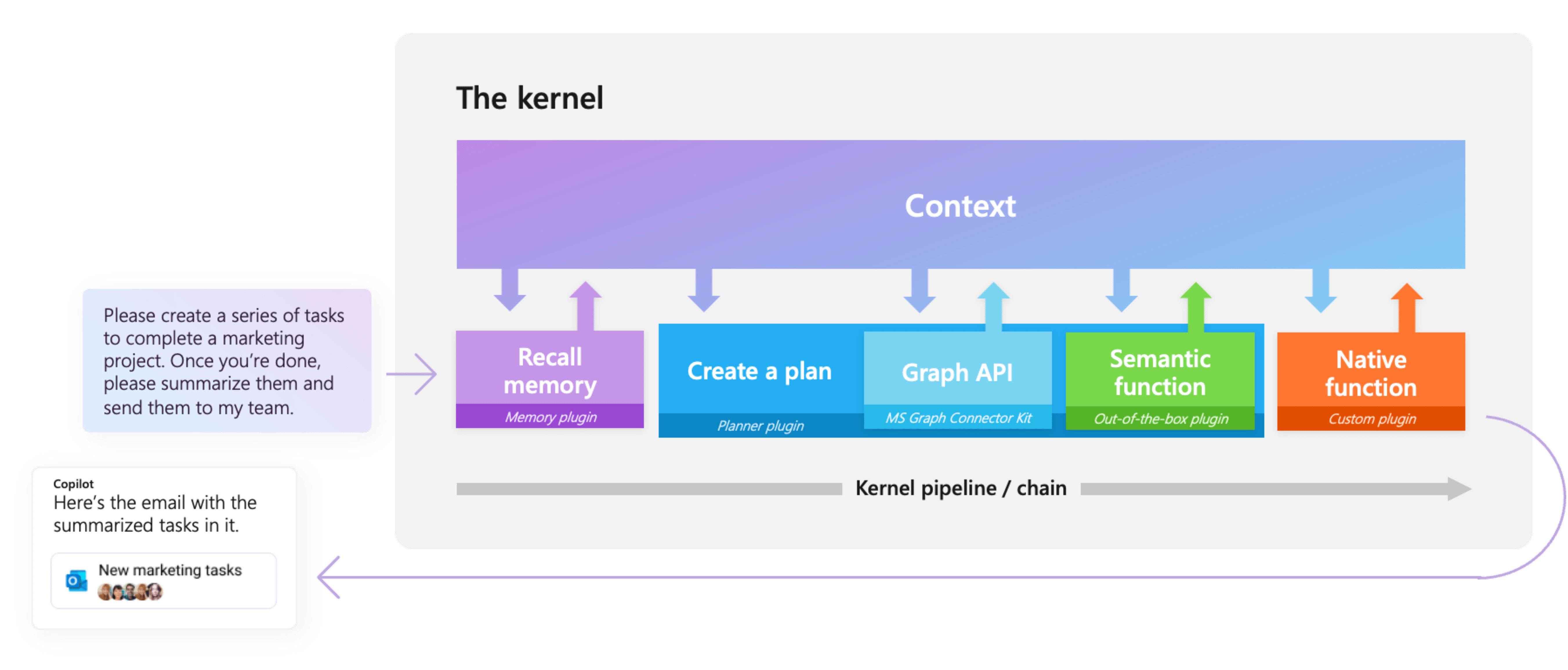
What makes Semantic Kernel _special_, however, is its ability to _automatically_ orchestrate
plugins with AI. With Semantic Kernel
[planners](https://learn.microsoft.com/en-us/semantic-kernel/ai-orchestration/planner), you
can ask an LLM to generate a plan that achieves a user's unique goal. Afterwards,
Semantic Kernel will execute the plan for the user.
#### Please star the repo to show your support for this project!
## Getting started with Semantic Kernel
The Semantic Kernel SDK is available in C#, Python, and Java. To get started, choose your preferred language below. See the [Feature Matrix](https://learn.microsoft.com/en-us/semantic-kernel/get-started/supported-languages) to see a breakdown of
feature parity between our currently supported languages.
The quickest way to get started with the basics is to get an API key
from either OpenAI or Azure OpenAI and to run one of the C#, Python, and Java console applications/scripts below.
### For C#:
1. Create a new console app.
2. Add the semantic kernel nuget [Microsoft.SemanticKernel](https://www.nuget.org/packages/Microsoft.SemanticKernel/).
3. Copy the code from [here](dotnet/README.md) into the app `Program.cs` file.
4. Replace the configuration placeholders for API key and other params with your key and settings.
5. Run with `F5` or `dotnet run`
### For Python:
1. Install the pip package: `python -m pip install semantic-kernel`.
2. Create a new script e.g. `hello-world.py`.
3. Store your API key and settings in an `.env` file as described [here](python/README.md).
4. Copy the code from [here](python/README.md) into the `hello-world.py` script.
5. Run the python script.
### For Java:
1. Clone the repository: `git clone https://github.com/microsoft/semantic-kernel.git`
1. To access the latest Java code, clone and checkout the Java development branch: `git clone -b java-development https://github.com/microsoft/semantic-kernel.git`
2. Follow the instructions [here](https://github.com/microsoft/semantic-kernel/blob/main/java/samples/sample-code/README.md)
## Learning how to use Semantic Kernel
The fastest way to learn how to use Semantic Kernel is with our C# and Python Jupyter notebooks. These notebooks
demonstrate how to use Semantic Kernel with code snippets that you can run with a push of a button.
- [Getting Started with C# notebook](dotnet/notebooks/00-getting-started.ipynb)
- [Getting Started with Python notebook](python/samples/getting_started/00-getting-started.ipynb)
Once you've finished the getting started notebooks, you can then check out the main walkthroughs
on our Learn site. Each sample comes with a completed C# and Python project that you can run locally.
1. 📖 [Overview of the kernel](https://learn.microsoft.com/en-us/semantic-kernel/ai-orchestration/)
1. 🔌 [Understanding AI plugins](https://learn.microsoft.com/en-us/semantic-kernel/ai-orchestration/plugins)
1. 👄 [Creating semantic functions](https://learn.microsoft.com/en-us/semantic-kernel/ai-orchestration/semantic-functions)
1. 💽 [Creating native functions](https://learn.microsoft.com/en-us/semantic-kernel/ai-orchestration/native-functions)
1. ⛓️ [Chaining functions together](https://learn.microsoft.com/en-us/semantic-kernel/ai-orchestration/chaining-functions)
1. 🤖 [Auto create plans with planner](https://learn.microsoft.com/en-us/semantic-kernel/ai-orchestration/planner)
1. 💡 [Create and run a ChatGPT plugin](https://learn.microsoft.com/en-us/semantic-kernel/ai-orchestration/chatgpt-plugins)
Finally, refer to our API references for more details on the C# and Python APIs:
- [C# API reference](https://learn.microsoft.com/en-us/dotnet/api/microsoft.semantickernel?view=semantic-kernel-dotnet)
- Python API reference (coming soon)
- Java API reference (coming soon)
## Join the community
We welcome your contributions and suggestions to SK community! One of the easiest
ways to participate is to engage in discussions in the GitHub repository.
Bug reports and fixes are welcome!
For new features, components, or extensions, please open an issue and discuss with
us before sending a PR. This is to avoid rejection as we might be taking the core
in a different direction, but also to consider the impact on the larger ecosystem.
To learn more and get started:
- Read the [documentation](https://aka.ms/sk/learn)
- Learn how to [contribute](https://learn.microsoft.com/en-us/semantic-kernel/get-started/contributing) to the project
- Join the [Discord community](https://aka.ms/SKDiscord)
- Attend [regular office hours and SK community events](COMMUNITY.md)
- Follow the team on our [blog](https://aka.ms/sk/blog)
## Contributor Wall of Fame
[](https://github.com/microsoft/semantic-kernel/graphs/contributors)
## Code of Conduct
This project has adopted the
[Microsoft Open Source Code of Conduct](https://opensource.microsoft.com/codeofconduct/).
For more information see the
[Code of Conduct FAQ](https://opensource.microsoft.com/codeofconduct/faq/)
or contact [opencode@microsoft.com](mailto:opencode@microsoft.com)
with any additional questions or comments.
## License
Copyright (c) Microsoft Corporation. All rights reserved.
Licensed under the [MIT](LICENSE) license.