# t2stack
## Description
t2stack is a collective name for the simplified network protocol stack and its supporting middleware for intelligent terminal scenarios. It mainly provides three core capabilities: file transmission, audio and video stream transmission, and device discovery, while being compatible with various operating system platforms.
File transfer capability: Mainly for file transfer, and provide a variety of optimizations in file transfer, such as large and small file collaboration, small file packaging and other purposes.
Streaming capability: Mainly for video streaming and audio streaming scenarios, it implements three competitive solutions, including semi-reliable transmission, adaptive bandwidth evaluation bitrate, and dynamic caching for weak network detection, to optimize user experience.
Device discovery capability: It mainly provides the ability to discover between devices in the local area network, and realizes reliable unicast, power-reducing filtering, and scalable packet structure.
## System Architecture
### Instructions
t2stack main code directory structure is as follows:
```text
//t2stack
├── fillp # Streaming protocol code
│ ├── include # Dstream External interface code
│ ├── src # Dstream Core code
├── nstackx_congestion # congestion algorithms public module
│ ├── interface # External interface code
│ ├── core # Core code
│ ├── platform # Adaptation code for different platforms
├── nstackx_core # File transfer protocol code
│ ├── dfile # DFile protocol code
│ | ├── include # DFile External interface code
│ | ├── src # DFile Core code
│ ├── platform # Adaptation code for different platforms
├── nstackx_ctrl # ctrl module
│ ├── interface # External interface code
│ ├── core # Core code
│ ├── platform # Adaptation code for different platforms
├── nstackx_util # public module
│ ├── interface # External interface code
│ ├── core # Core code
│ ├── platform # Adaptation code for different platforms
```
## Introduction to the main interface functions
### File Transfer
#### 1. Set up a connection.
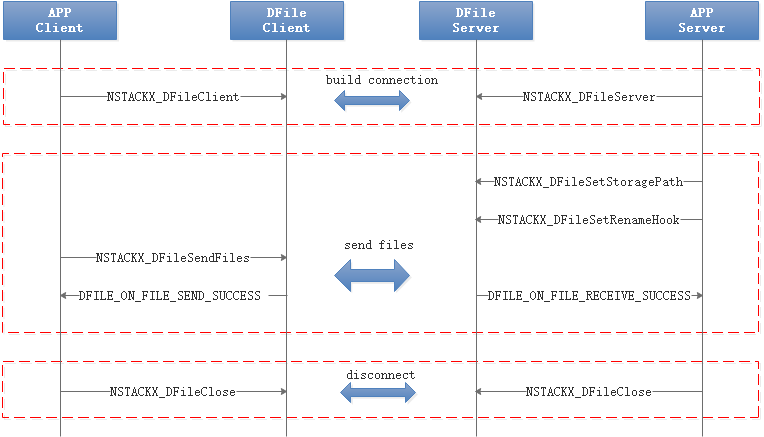
Step 1: NSTACKX_DFileServer: Create a file transfer server.
Step 2: NSTACKX_DFileClient: Create a file transfer client and connect it to the server.
#### 2. Close the connection.
NSTACKX_DFileClose: closes a file transfer session instance.
#### 3. Transferring Files
NSTACKX_DFileSendFiles: The client sends a file.
NSTACKX_DFileSetStoragePath: Sets the root path for storing received files on the recipient side.
NSTACKX_DFileSetRenameHook: The receiver sets a callback function to rename the file with the same name in the same path to prevent the file from being overwritten.
#### 4. Obtains and sets supported functions.
NSTACKX_DFileGetCapabilities: Obtains the functions supported by the DFile.
NSTACKX_DFileSetCapabilities: Sets the functions to be enabled for the DFile.
#### 5. Interaction Process
### Stream Transfer
#### 1. Initialization and Destruction
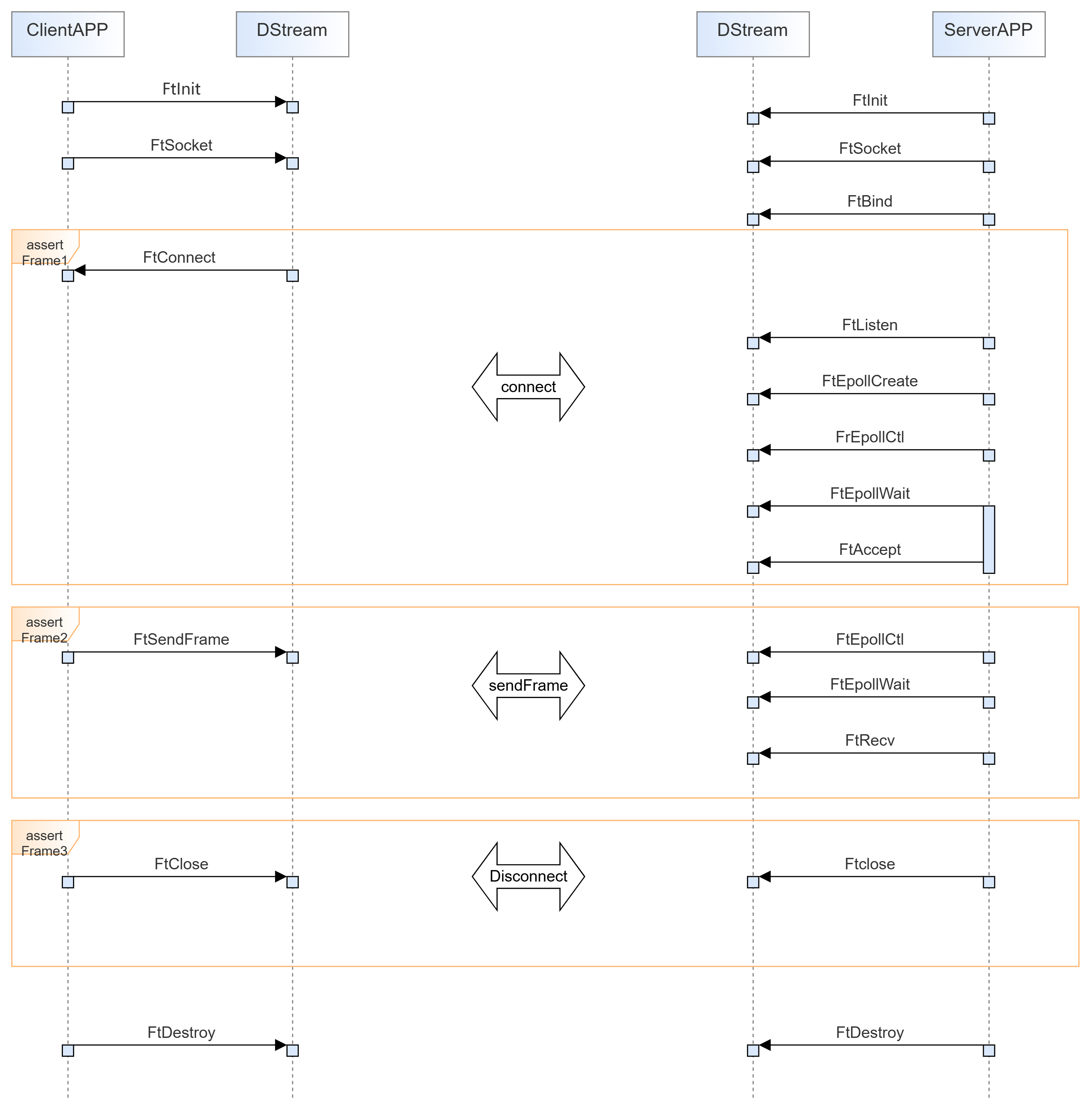
FtInit: Initializes Fillp before use.
FtDestroy: Destroys Fillp after use.
#### 2. Establish a connection.
FtSocket: creates a socket.
FtBind: The server binds the socket to the address.
FtListen: The server enables the socket to enter the listening state.
FtAccept: The server starts to receive the connection request from the client.
FtConnect: The client invokes this interface to connect to the server.
#### 3. Sending and Receiving
FtSendFrame: The client invokes this interface to send a video frame.
FtRecv: The receiver calls this interface to receive video frames.
#### 4. Close the connection.
FtClose: This interface is invoked to close a connection.
#### 5. Interaction Process
## For more information about APIs, see API Documentation
[Interface doc of t2stack](https://gitcode.com/openharmony-sig/communication_t2stack/blob/master/%E6%8E%A5%E5%8F%A3%E8%AF%B4%E6%98%8E%E6%96%87%E6%A1%A3.md)