 openharmony_ci
def7ff60bf
openharmony_ci
def7ff60bf
Decimal support previewer

Created-by: chen-hantao123
Commit-by: chen-hantao123
Merged-by: openharmony_ci
Description: ### 一、内容说明(相关的Issue)
https://gitcode.com/openharmony/commonlibrary_ets_utils/issues/2326


### 二、建议测试周期和提测地址
  建议测试完成时间:xxxx.xx.xx
  投产上线时间:xxxx.xx.xx
  提测地址:CI环境/压测环境
  测试账号:

### 三、变更内容
  * 3.1 关联PR列表

  * 3.2 数据库和部署说明
    1. 常规更新
    2. 重启unicorn
    3. 重启sidekiq
    4. 迁移任务:是否有迁移任务,没有写 "无"
    5. rake脚本:`bundle exec xxx RAILS_ENV = production`;没有写 "无"

  * 3.4 其他技术优化内容(做了什么,变更了什么)
    - 重构了 xxxx 代码
    - xxxx 算法优化


  * 3.5 废弃通知(什么字段、方法弃用?)


  * 3.6  后向不兼容变更(是否有无法向后兼容的变更?)


### 四、研发自测点(自测哪些?冒烟用例全部自测?)
  自测测试结论:


### 五、测试关注点(需要提醒QA重点关注的、可能会忽略的地方)
  检查点:

| 需求名称 | 是否影响xx公共模块 | 是否需要xx功能 | 需求升级是否依赖其他子产品 |
|------|------------|----------|---------------|
| xxx  | 否          | 需要       | 不需要           |
|      |            |          |               |

  接口测试:

  性能测试:

  并发测试:

  其他:


See merge request: openharmony/third_party_decimal.js!33
An arbitrary-precision Decimal type for JavaScript.




Features
- Integers and floats
- Simple but full-featured API
- Replicates many of the methods of JavaScript's
Number.prototypeandMathobjects - Also handles hexadecimal, binary and octal values
- Faster, smaller, and perhaps easier to use than JavaScript versions of Java's BigDecimal
- No dependencies
- Wide platform compatibility: uses JavaScript 1.5 (ECMAScript 3) features only
- Comprehensive documentation and test set
- Used under the hood by math.js
- Includes a TypeScript declaration file: decimal.d.ts
The library is similar to bignumber.js, but here precision is specified in terms of significant digits rather than decimal places, and all calculations are rounded to the precision (similar to Python's decimal module) rather than just those involving division.
This library also adds the trigonometric functions, among others, and supports non-integer powers, which makes it a significantly larger library than bignumber.js and the even smaller big.js.
For a lighter version of this library without the trigonometric functions see decimal.js-light.
Load
The library is the single JavaScript file decimal.js or ES module decimal.mjs.
Browser:
<script src='path/to/decimal.js'></script>

<script type="module">
  import Decimal from './path/to/decimal.mjs';
  ...
</script>
npm install decimal.js
const Decimal = require('decimal.js');

import Decimal from 'decimal.js';

import {Decimal} from 'decimal.js';
Use
In all examples below, semicolons and toString calls are not shown.
If a commented-out value is in quotes it means toString has been called on the preceding expression.
The library exports a single constructor function, Decimal, which expects a single argument that is a number, string or Decimal instance.
x = new Decimal(123.4567)
y = new Decimal('123456.7e-3')
z = new Decimal(x)
x.equals(y) && y.equals(z) && x.equals(z)        // true
If using values with more than a few digits, it is recommended to pass strings rather than numbers to avoid a potential loss of precision.
// Precision loss from using numeric literals with more than 15 significant digits.
new Decimal(1.0000000000000001)         // '1'
new Decimal(88259496234518.57)          // '88259496234518.56'
new Decimal(99999999999999999999)       // '100000000000000000000'

// Precision loss from using numeric literals outside the range of Number values.
new Decimal(2e+308)                     // 'Infinity'
new Decimal(1e-324)                     // '0'

// Precision loss from the unexpected result of arithmetic with Number values.
new Decimal(0.7 + 0.1)                  // '0.7999999999999999'
As with JavaScript numbers, strings can contain underscores as separators to improve readability.
x = new Decimal('2_147_483_647')
String values in binary, hexadecimal or octal notation are also accepted if the appropriate prefix is included.
x = new Decimal('0xff.f')            // '255.9375'
y = new Decimal('0b10101100')        // '172'
z = x.plus(y)                        // '427.9375'

z.toBinary()                         // '0b110101011.1111'
z.toBinary(13)                       // '0b1.101010111111p+8'

// Using binary exponential notation to create a Decimal with the value of `Number.MAX_VALUE`.
x = new Decimal('0b1.1111111111111111111111111111111111111111111111111111p+1023')
// '1.7976931348623157081e+308'
Decimal instances are immutable in the sense that they are not changed by their methods.
0.3 - 0.1                     // 0.19999999999999998
x = new Decimal(0.3)
x.minus(0.1)                  // '0.2'
x                             // '0.3'
The methods that return a Decimal can be chained.
x.dividedBy(y).plus(z).times(9).floor()
x.times('1.23456780123456789e+9').plus(9876.5432321).dividedBy('4444562598.111772').ceil()
Many method names have a shorter alias.
x.squareRoot().dividedBy(y).toPower(3).equals(x.sqrt().div(y).pow(3))     // true
x.comparedTo(y.modulo(z).negated() === x.cmp(y.mod(z).neg())              // true
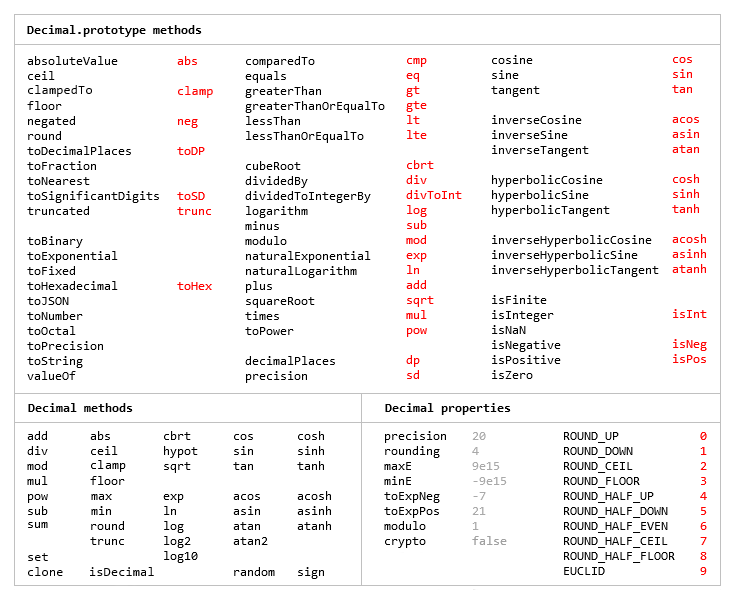
Most of the methods of JavaScript's Number.prototype and Math objects are replicated.
x = new Decimal(255.5)
x.toExponential(5)                       // '2.55500e+2'
x.toFixed(5)                             // '255.50000'
x.toPrecision(5)                         // '255.50'

Decimal.sqrt('6.98372465832e+9823')      // '8.3568682281821340204e+4911'
Decimal.pow(2, 0.0979843)                // '1.0702770511687781839'

// Using `toFixed()` to avoid exponential notation:
x = new Decimal('0.0000001')
x.toString()                             // '1e-7'
x.toFixed()                              // '0.0000001'
And there are isNaN and isFinite methods, as NaN and Infinity are valid Decimal values.
x = new Decimal(NaN)                                           // 'NaN'
y = new Decimal(Infinity)                                      // 'Infinity'
x.isNaN() && !y.isNaN() && !x.isFinite() && !y.isFinite()      // true
There is also a toFraction method with an optional maximum denominator argument.
z = new Decimal(355)
pi = z.dividedBy(113)        // '3.1415929204'
pi.toFraction()              // [ '7853982301', '2500000000' ]
pi.toFraction(1000)          // [ '355', '113' ]
All calculations are rounded according to the number of significant digits and rounding mode specified
by the precision and rounding properties of the Decimal constructor.
For advanced usage, multiple Decimal constructors can be created, each with their own independent configuration which applies to all Decimal numbers created from it.
// Set the precision and rounding of the default Decimal constructor
Decimal.set({ precision: 5, rounding: 4 })

// Create another Decimal constructor, optionally passing in a configuration object
Dec = Decimal.clone({ precision: 9, rounding: 1 })

x = new Decimal(5)
y = new Dec(5)

x.div(3)                           // '1.6667'
y.div(3)                           // '1.66666666'
The value of a Decimal is stored in a floating point format in terms of its digits, exponent and sign, but these properties should be considered read-only.
x = new Decimal(-12345.67);
x.d                            // [ 12345, 6700000 ]    digits (base 10000000)
x.e                            // 4                     exponent (base 10)
x.s                            // -1                    sign
For further information see the API reference in the doc directory.
Test
To run the tests using Node.js from the root directory:
npm test
Each separate test module can also be executed individually, for example:
node test/modules/toFraction
To run the tests in a browser, open test/test.html.
Minify
Two minification examples:
Using uglify-js to minify the decimal.js file:
npm install uglify-js -g
uglifyjs decimal.js --source-map url=decimal.min.js.map -c -m -o decimal.min.js
Using terser to minify the ES module version, decimal.mjs:
npm install terser -g
terser decimal.mjs --source-map url=decimal.min.mjs.map -c -m --toplevel -o decimal.min.mjs
import Decimal from './decimal.min.mjs';