

Proxmox VE Heretek-Scripts
A Heretek Forge of Proxmox VE Scripts
Experimental scripts beyond the orthodox canon






Experimental AI/ML and specialized scripts for Proxmox VE
Originally created by tteck, maintained by the community, extended by hereteks
⚙️ The Heretek's Forge
"The Omnissiah guides our scripts, but innovation demands we venture beyond established doctrine."
While the orthodox community-scripts/ProxmoxVE maintains the sacred canon of stable, community-vetted scripts, this Heretek repository serves as a forge for experimental and specialized tools that may one day prove worthy of the main temple.
What makes this a Heretek forge:
- 🧪 Experimental AI/ML Scripts — Cutting-edge AI tooling before mainstream adoption
- 🔧 Niche Applications — Specialized tools for specific use cases
- ⚡ Rapid Iteration — Faster release cycles for emerging technologies
- 🔄 Upstream Path — Successful scripts may ascend to the orthodox repository
🏛️ Relationship to the Orthodox Repository
This fork maintains synchronization with community-scripts/ProxmoxVE while adding experimental scripts that may not yet meet the stability requirements for upstream inclusion.
| Aspect | Orthodox (Upstream) | Heretek (This Fork) |
|---|---|---|
| Stability | Production-ready | Experimental/Bleeding-edge |
| Focus | Broad community needs | AI/ML & specialized tools |
| Release Cycle | Stable & tested | Rapid iteration |
| Best For | General users | Early adopters |
Scripts that prove stable and gain community interest may be submitted upstream to join the orthodox canon.
🧪 Heretek Scripts
These scripts are exclusive to this forge, focusing on AI/ML workloads and specialized applications:
AI & Machine Learning
| Script | Description | Resources |
|---|---|---|
| MCPHub | Model Context Protocol Hub for AI tooling integration | 2 CPU / 2GB RAM |
| Hermes | Nous Research Hermes AI Agent | 8 CPU / 16GB RAM |
| Lemonade | Local AI inference server with GPU support | 2 CPU / 4GB RAM + GPU |
| SwarmUI | Stable Diffusion Swarm interface | 8 CPU / 16GB RAM + GPU |
Media & Gaming
| Script | Description | Resources |
|---|---|---|
| Agregarr | Media aggregation and streaming | 2 CPU / 4GB RAM |
| Drop | Gaming and media server | 2 CPU / 4GB RAM |
⚠️ Note: Heretek scripts may require more resources or additional configuration. Check individual script documentation for requirements.
🎯 Key Features
⚡ Quick SetupOne-command installations for popular services and containers |
⚙️ Flexible ConfigSimple mode for beginners, advanced options for power users |
🔄 Auto UpdatesKeep your installations current with built-in update mechanisms |
🛠️ Easy ManagementPost-install scripts for configuration and troubleshooting |
👥 Community DrivenActively maintained with contributions from users worldwide |
📖 Well DocumentedComprehensive guides and community support |
🔒 SecureRegular security updates and best practices |
⚡ PerformanceOptimized configurations for best performance |
📋 Requirements
🖥️ Proxmox VEVersion: 8.4.x | 9.0.x | 9.1.x |
🐧 Operating SystemDebian-based with Proxmox Tools |
🌐 NetworkInternet connection required |
📥 Getting Started
Choose your preferred installation method:
Method 1: One-Click Web Installer
The fastest way to get started:
- Visit helpful-scripts.com 🌐
- Search for your desired script (e.g., "MCPHub", "Hermes", "Lemonade")
- Copy the bash command displayed on the script page
- Open your Proxmox Shell and paste the command
- Press Enter and follow the interactive prompts
Method 2: Direct Script Execution
For Heretek scripts, use the Heretek-AI repository:
# Example: Install MCPHub
bash -c "$(curl -fsSL https://raw.githubusercontent.com/Heretek-AI/ProxmoxVE/main/ct/mcphub.sh)"
Method 3: PVEScripts-Local
Install a convenient script manager directly in your Proxmox UI:
bash -c "$(curl -fsSL https://raw.githubusercontent.com/Heretek-AI/ProxmoxVE/main/ct/pve-scripts-local.sh)"
This adds a menu to your Proxmox interface for easy script access without visiting the website.
📖 Learn more: ProxmoxVE-Local Repository
💬 Join the Community
💬 DiscordReal-time chat, support, and discussions 
|
💭 DiscussionsFeature requests, Q&A, and ideas 
|
🐛 IssuesBug reports and issue tracking 
|
🛠️ Contribute
💻 CodeAdd new scripts or improve existing ones |
📝 DocumentationWrite guides, improve READMEs, translate content |
🧪 TestingTest scripts and report compatibility issues |
💡 IdeasSuggest features or workflow improvements |
👉 Check our Contributing Guidelines to get started
❤️ Support the Project
This project is maintained by volunteers in memory of tteck. Your support helps us maintain infrastructure, improve documentation, and give back to important causes.
🎗️ 30% of all donations go directly to cancer research and hospice care

Every contribution helps keep this project alive and supports meaningful causes
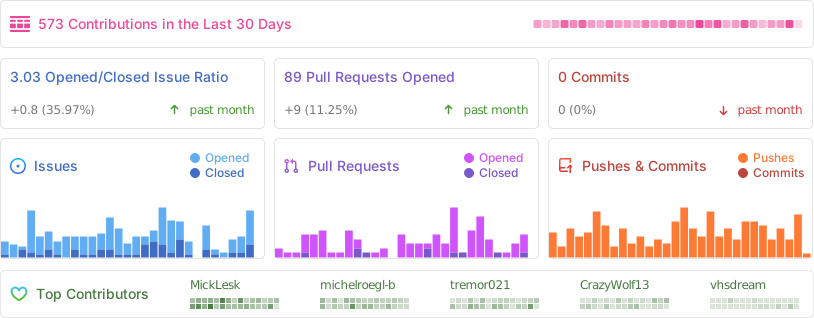
📈 Project Statistics
📜 License
This project is licensed under the MIT License — feel free to use, modify, and distribute.
In memory of tteck, whose scripts lit the way
Proxmox® is a registered trademark of Proxmox Server Solutions GmbH