---
title: How to track GitHub stars in PostHog
date: 2024-03-27
author: ["ian-vanagas"]
tags:
- events
---
GitHub stars are a popular way to track the success of open-sourced projects. Beyond seeing how many stars a repo has, GitHub does little to help you track or analyze these stars.
To help you make better use of stars, this tutorial shows you how to capture them using a combination of PostHog, GitHub webhooks, and [Val Town](https://val.town/), a platform for writing, running, and scheduling JavaScript functions in your browser.
## Creating a webhook handler in Val Town
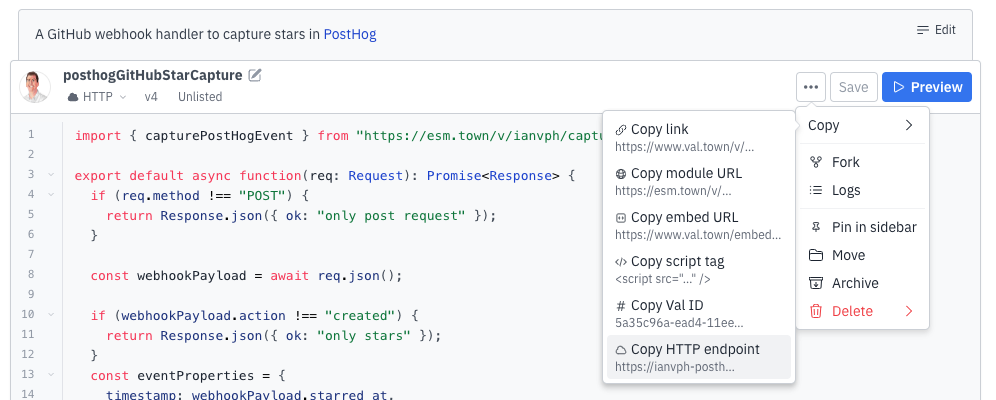
Our webhook handler will accept a `POST` request and capture a PostHog event with the data from the request. Val Town is great for doing this because you can reuse [the code I already wrote here](https://www.val.town/v/ianvph/posthogGitHubStarCapture) (just click **Fork** in the three-dot menu beside **Save**):
Now create a `phProjectAPIKey` environment variable in [your Val Town settings](https://www.val.town/settings/environment-variables). Set this value to your PostHog project API key, which you can find in [your project settings](https://us.posthog.com/settings/project#variables). Finally, click the three-dot menu next to the**Save** button then copy the HTTP endpoint link.
## Setting up your webhook in GitHub
With the HTTP endpoint link from Val Town, go the settings page of the repository you want to track. Once there:
1. Click **Webhooks** in the sidebar and then **Add webhook**.
2. Paste your HTTP endpoint link into the Payload URL and choose `application/json` as the content type.
3. Change events that trigger the webhook to selected events, then unselect **Pushes** and select **Stars**.
4. Click **Add webhook**.

> **Note:** You can also choose other GitHub events like deployments, forks, issues, pushes, pull requests, releases, and more.
Now, go to your repo and star it. You should see an event with the relevant information captured in PostHog.
## Analyzing GitHub stars in PostHog
To visualize star data in PostHog, create an insight by going to the [product analytics tab](https://us.posthog.com/insights) and clicking **New insight**. Select `GitHub Star` as the event for your series and visualize it using a time series line chart or total value number.
You can also [set up up the Slack destination](/docs/cdp/destinations/slack) to send a message every time you receive a new star.
## Further reading
- [How to capture events from Calendly webhooks](/tutorials/calendly-webhooks)
- [How to capture new RSS items in PostHog (releases, blogs, status)](/tutorials/rss-item-capture)
- [Using the PostHog API to capture events](/tutorials/api-capture-events)