 0e2fd4332b
* feat(tui): add thinking overlay viewer with alternate screen

Fix thinking blocks always expanded after PR #5354 regression
(expanded={!compactMode} → expanded={false}), and add a mouse-
clickable thinking viewer overlay that opens in the terminal
alternate screen buffer with scroll and ESC-to-close support.

Generated with AI

Co-authored-by: Qwen-Coder <[email protected]>

* fix(tui): add thoughtExpanded prop to fix SessionPreview test

SessionPreview needs thinking blocks expanded for session review.
Add thoughtExpanded prop (default false) to HistoryItemDisplay,
and gate useMouseEvents on !thoughtExpanded to avoid SGR escape
sequence leakage in test environments.

Generated with AI

Co-authored-by: Qwen-Coder <[email protected]>

* fix(tui): address review findings for thinking overlay

- Fix SGR 1-based to yoga 0-based coordinate conversion in click
  hit-testing (subtract 1 from col/row)
- Add process.on('exit') fallback to AlternateScreen to restore
  terminal state on abnormal exit
- Conditionally render App vs ThinkingViewer (not both) to avoid
  layout overflow and stale cursor tracking
- Block all non-ESC keypresses while ThinkingViewer is open to
  prevent background state mutations
- Restrict click-to-open to gemini_thought items only (not
  gemini_thought_content) since continuations have no clickable
  header
- Clamp scrollOffset on terminal resize to prevent blank content

Generated with AI

Co-authored-by: Qwen-Coder <[email protected]>

* fix(tui): use viewport-position key to avoid Text remount on scroll

Generated with AI

Co-authored-by: Qwen-Coder <[email protected]>

* fix(tui): aggregate continuation text into thinking viewer

When a thinking session exceeds the stream chunk limit, it splits into
a header (gemini_thought) and one or more continuations
(gemini_thought_content). The thinking viewer previously only showed
the header text, making continuation content inaccessible.

Compute aggregated text in MainContent by scanning for consecutive
continuation items following each thought header, and pass it through
to HistoryItemDisplay for the viewer overlay.

Generated with AI

Co-authored-by: Qwen-Coder <[email protected]>

* feat(tui): use lightbulb emoji for thinking icon with fallback

Use 💡 for the thinking indicator across all states (streaming,
collapsed, expanded, viewer overlay). Falls back to ⟡ in CI
environments or non-UTF-8 locales where emoji may not render.

Generated with AI

Co-authored-by: Qwen-Coder <[email protected]>

* fix(tui): address code review findings for thinking viewer

1. Allow Ctrl+C/Ctrl+D to pass through while ThinkingViewer is open,
   closing the viewer and falling through to quit/exit handling.
   Removes duplicate ESC handling from AppContainer (ThinkingViewer
   already handles ESC via its own useKeypress).

2. Add thinkingFullText aggregation to AgentChatContent so agent
   sub-views can open the thinking viewer with complete continuation
   text.

3. Memoize data.text.split('\n') in ThinkingViewer to avoid O(N)
   string work on every scroll re-render.

4. Extract mouse click handling into ClickableThinkMessage sub-component
   so non-thought HistoryItemDisplay instances don't allocate
   useMouseEvents/useRef/useCallback hooks.

5. Apply trimEnd() consistently to text passed to the viewer, matching
   the collapsed display's behavior.

Generated with AI

Co-authored-by: Qwen-Coder <[email protected]>

* fix(tui): sanitize aggregated thinking text before passing to viewer

thinkingFullText is built from raw mergedHistory text and bypasses
the escapeAnsiCtrlCodes sanitization applied to individual items.
Apply escapeAnsiCtrlCodes to the aggregated viewer text to prevent
terminal-control injection from model-produced escape sequences.

Generated with AI

Co-authored-by: Qwen-Coder <[email protected]>

* feat(tui): add alt+t shortcut to expand/collapse thinking blocks

Replace click-to-view with alt+t inline expansion. The click approach
was non-functional in default Static render mode because Ink unmounts
Static components, killing all useMouseEvents hooks.

Changes:
- Add OPEN_THINKING_VIEWER command bound to Alt+T (meta+t)
- Add ThoughtExpandedContext for thinking expansion state
- Alt+T toggles all thinking blocks between collapsed/expanded inline
- Update hint text: "(alt+t to expand)" / "(alt+t to collapse)"
- Three-tier icon fallback: 💡 (emoji) → ⟡ (UTF-8) → none (ASCII)
- Fix thinking block marginTop (0 → 1) for vertical spacing

Generated with AI

Co-authored-by: Qwen-Coder <[email protected]>

* fix(tui): enable alternate screen in VP mode for mouse scroll support

Without alternate screen, terminals like Ghostty capture mouse wheel
events for their native scrollback instead of forwarding them to the
app, making VP mode scroll completely non-functional.

Generated with AI

Co-authored-by: Qwen-Coder <[email protected]>

* refactor(tui): extract buildThinkingFullTextMap to shared utility

Dedup the 18-line thinking-text aggregation loop that was copy-pasted
between MainContent.tsx and AgentChatContent.tsx. Also fix
ThinkingViewer footer hint: Home/End → Ctrl+Home/End to match actual
keybindings.

Generated with AI

Co-authored-by: Qwen-Coder <[email protected]>

* fix(tui): skip AlternateScreen escape writes when Ink owns alt screen

In VP mode (useTerminalBuffer=true), Ink's root renderer already owns
the alternate screen. ThinkingViewer's nested AlternateScreen would
write ?1049l on close, exiting back to the primary buffer while Ink
still believes it owns the alt screen — corrupting VP UI state.

Add a `disabled` prop to AlternateScreen that skips escape writes, and
pass `useAlternateScreen={!useTerminalBuffer}` from AppContainer.

Generated with AI

Co-authored-by: Qwen-Coder <[email protected]>

* refactor(tui): address R4 review — rename command, dedup formatDuration, add expanded test

- Rename OPEN_THINKING_VIEWER → TOGGLE_THINKING_EXPANDED to match
  actual behavior (inline toggle, not overlay open)
- Extract duplicated formatDuration to displayUtils.ts
- Add test for expanded thinking state via ThoughtExpandedProvider

Generated with AI

Co-authored-by: Qwen-Coder <[email protected]>

* fix(tui): route SGR mouse events through KeypressContext instead of ink useInput

readline's emitKeypressEvents drains stdin in flowing mode before ink's
readable + stdin.read() reader can consume it, so useInput never fires
when KeypressContext is active. This caused useMouseEvents to silently
receive nothing — mouse scroll was dead in VP mode.

Fix: KeypressContext's existing SGR swallowing code now buffers the
readline-fragmented sequence, reconstructs it, parses via
parseSGRMouseEvent, and forwards to registered mouse subscribers.
useMouseEvents subscribes through this channel instead of ink's useInput.

Generated with AI

Co-authored-by: Qwen-Coder <[email protected]>

---------

Co-authored-by: 秦奇 <[email protected]>
Co-authored-by: Qwen-Coder <[email protected]>


The open-source AI coding agent that lives in your terminal.
中文 | Deutsch | français | 日本語 | Русский | Português (Brasil)
Why Qwen Code?
- Agentic out of the box — Auto-Memory, Auto-Skills, SubAgents, Agent Teams, and MCP. Dynamic workflows, zero setup.
- Open-source, inside and out — The framework and the Qwen models are open-source. They evolve together. No vendor lock-in.
- Multi-protocol — Supports OpenAI, Anthropic, Gemini, and Qwen APIs. Any third-party provider or local model (Ollama / vLLM). Switch at runtime.
- Beyond the terminal — IDE plugins, Desktop app, daemon mode, SDKs, and IM bots (Telegram / DingTalk / WeChat / Feishu).
Tip
Qwen Code is actively iterating on itself — using its own agent and models to file issues, submit PRs, review code, and run tests. Powered by the community, driven by AI.
Installation
Linux / macOS:
curl -fsSL https://qwen-code-assets.oss-cn-hangzhou.aliyuncs.com/installation/install-qwen-standalone.sh | bash
Windows:
irm https://qwen-code-assets.oss-cn-hangzhou.aliyuncs.com/installation/install-qwen-standalone.ps1 | iex
Restart your terminal after installation to ensure environment variables take effect.
NPM / Homebrew
NPM (requires Node.js 22+):
npm install -g @qwen-code/qwen-code@latest
Homebrew (macOS / Linux):
brew install qwen-code
Quick Start
qwen          # Launch interactive terminal UI
# Inside the session:
/auth         # Configure your provider and API key
See the Authentication Guide and Settings Reference for detailed setup.
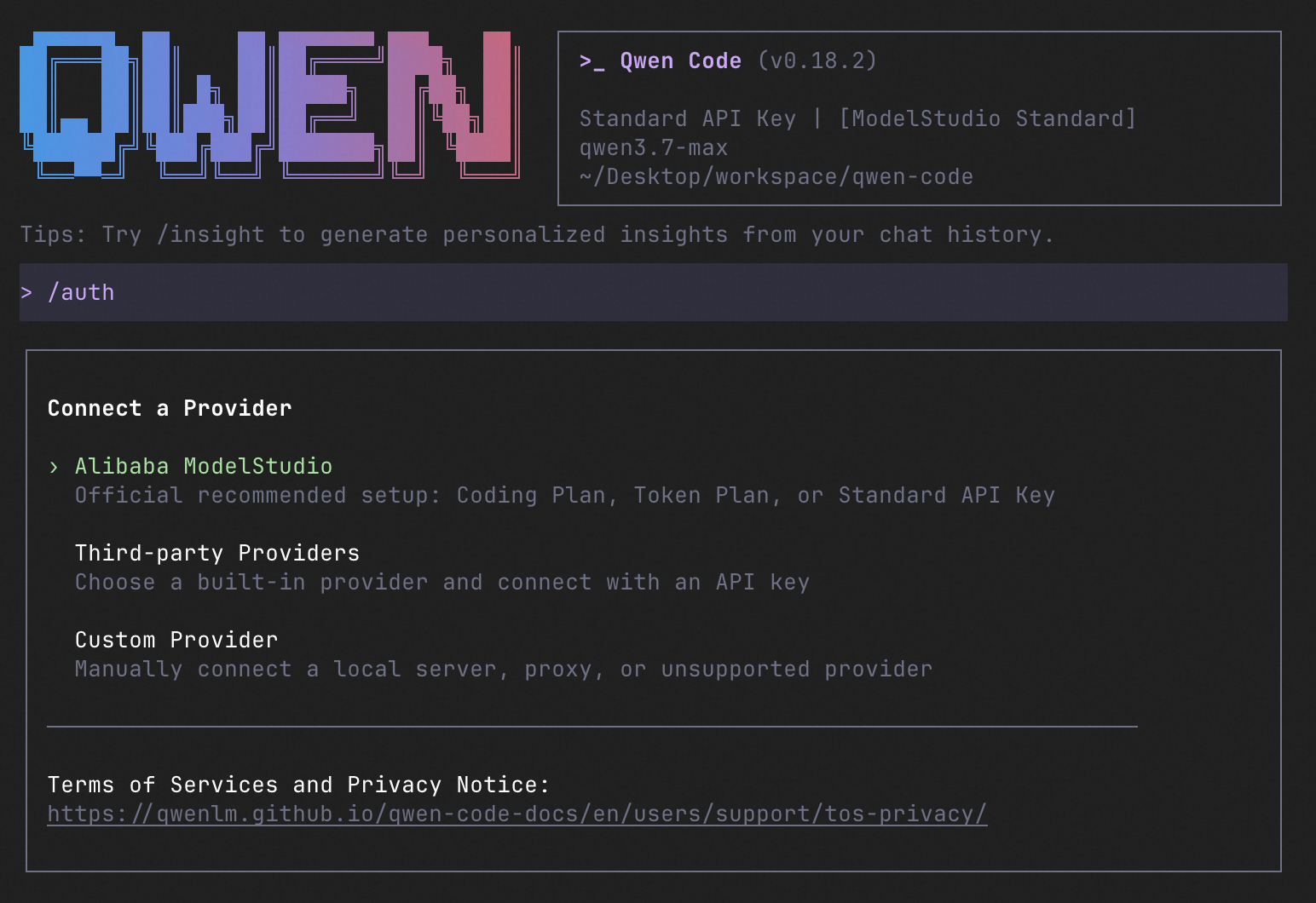
How to Use Qwen Code
| Mode | Command | Use Case |
|---|---|---|
| Interactive | qwen |
Terminal UI with rich rendering, @file references, slash commands |
| Headless | qwen -p "..." |
Scripts, CI/CD, batch processing — no UI |
| IDE | — | VS Code, Zed, JetBrains |
| Desktop | — | Qwen Code Desktop — GUI for macOS, Windows, Linux |
| Daemon | qwen serve |
Shared agent session over HTTP+SSE (ACP). Multiple clients, one agent. (experimental) Docs |
| SDK | — | TypeScript, Python, Java |
| IM Bot | qwen channel |
Connect to Telegram, DingTalk, WeChat, or Feishu |
SDK example (Python)
import asyncio

from qwen_code_sdk import is_sdk_result_message, query


async def main() -> None:
    result = query(
        "Summarize the repository layout.",
        {
            "cwd": "/path/to/project",
            "path_to_qwen_executable": "qwen",
        },
    )

    async for message in result:
        if is_sdk_result_message(message):
            print(message["result"])


asyncio.run(main())
Capabilities
If you know Claude Code, you already know Qwen Code — and then some. We've put significant effort into bringing Qwen Code to feature parity with Claude Code, improving both breadth and reliability across the board.
| Feature | Qwen Code | Claude Code |
|---|---|---|
| SubAgents, Agent Teams, Dynamic Workflows | ✓ | ✓ |
| Auto-Memory, Auto-Skills, Hooks | ✓ | ✓ |
| Built-in Skills (/review, /batch, /loop, /bugfix…) | ✓ | ✓ |
| MCP, Plan Mode, LSP Integration | ✓ | ✓ |
| Auto Mode, Sandbox, Git Worktrees | ✓ | ✓ |
| Computer Use (desktop automation) | ✓ | ✓ |
| IDE Plugins (VS Code / JetBrains / Zed) | ✓ | ✓ |
| SDK | ✓ | ✓ |
| Headless Mode, Session Management | ✓ | ✓ |
| Open-source — model and framework | ✓ | — |
| Multi-protocol (OpenAI / Anthropic / Gemini / Qwen + any provider) | ✓ | — |
| Agent Arena (multi-model head-to-head on same task) | ✓ | — |
Daemon Mode — qwen serve (multi-client shared agent) |
✓ | — |
| IM Channels (Telegram / DingTalk / WeChat / Feishu) | ✓ | — |
Ecosystem
-
Qwen Code Desktop — Official desktop app for macOS, Windows, and Linux
-
AionUi — A modern GUI for command-line AI tools including Qwen Code
-
Gemini CLI Desktop — A cross-platform desktop/web/mobile UI for Qwen Code
-
🦞 Qwen Code Claw — Let other agents (Claude, Codex, etc.) delegate coding tasks to Qwen Code via ACP. Paste this prompt into your agent:
Use Qwen Code as a coding agent. First, fetch and read this skill reference:
https://raw.githubusercontent.com/QwenLM/qwen-code/refs/heads/main/.qwen/skills/qwen-code-claw/SKILL.md
Then follow the instructions inside to install, authenticate, and use Qwen Code via acpx for all coding tasks.
Contributing
Contributions are welcome! See CONTRIBUTING.md for guidelines.
Acknowledgments
This project was originally based on Google Gemini CLI v0.8.2. We gratefully acknowledge the Gemini CLI team's excellent work. Starting from Qwen Code v0.1, we stopped syncing with upstream and began independent development as a multi-protocol, multi-platform agent framework with deep integrations for Qwen models and beyond.