 Shaojin WenandQwen-Coder
61aef512e7
* feat(web-shell): offer a details side task from pending AskUser questions

While an AskUserQuestion is pending, the Web Shell hides the composer and
the btw shortcut ignores the pending-approval state, so a user who does not
understand the options can only answer blindly or ignore the question.

Add an "Ask for details" action to the pending panel. It opens a side task
whose prefilled prompt snapshots the question and options and asks for a
verified explanation — background, per-option meaning, differences, impact
and risks, and a recommendation — delivered as a self-contained single-file
HTML in controlled ASD-STE100-style sentences under .qwen/tmp/, previewable
in the right panel. The side task inherits the parent context but never
answers the question or touches the main session; the question stays
pending until the user answers or ignores it.

The action is main-view-only and gated on the session_side_task capability,
matching /btw side. No daemon, protocol, or settings changes.

* fix(web-shell): one details side task per question, reachable on narrow panels

Post-publication audit of the AskUser details action found three issues:

- Repeat clicks provisioned duplicate side tasks for the same pending
  question, each burning a model turn. Give the details tab a stable id
  derived from the parent session and the permission request id and upsert
  it, reusing the artifact panel's open-or-focus pattern; /btw side keeps
  its unique per-invocation draft id.
- The question snapshot dropped multiSelect, so the explanation prompt did
  not say options can combine. Append a [multiSelect] marker (strict true).
- On a 320px two-question panel the actions row overflowed to the left and
  pushed the details button out of the panel (left: -103px in a real-browser
  probe; scrollWidth misses left overflow on a flex-end row). Let the row
  wrap and pin a narrow-viewport regression test asserting every action
  button stays inside the panel and stays clickable.

Each fix carries a red/green witness: the repeat-click App test, the
multiSelect unit test, and a flex-wrap mutation of the narrow visuals test.

* fix(web-shell): keep the details tab id within the daemon clientId budget

The dedup fix derived the details tab id from the parent session id AND the
request id. SideTaskPanel derives the pane's daemon clientId as
side-task:<parentSessionId>:<tabId>, which with two uuids reached 138 chars —
over the daemon's MAX_CLIENT_ID_LENGTH (128). The child session load then
400s, the pane never connects, and the prefilled prompt is never sent.
Caught by re-running the real-daemon scenario on the post-fix head; mocked
unit tests could not see it.

Derive the stable id from the permission request id alone (a uuid; tabs are
already bucketed per parent session), bringing the clientId to 101 chars.
Add a SideTaskPanel regression test asserting the derived clientId stays
within 128 for uuid-length inputs; the old id shape fails it with 138.

* fix(web-shell): retain the details question-to-child association across tab close

Review found that deduplicating only against open tabs loses the existing
child when the details tab closes: clicking "Ask for details" again for the
same pending request provisioned a second child, and reopening the child
from the side-task catalog first did not deduplicate either (its tab id is
side-task:<sessionId>, not the details-request id).

Persist the pending-request-to-child association per parent session in
localStorage, written when the details child is created. On click, focus
whichever open tab shows the known child (details tab or catalog tab);
with no tab open, reopen one attached to the existing child session — no
draft, no initial prompt, so nothing is provisioned or sent again. One
entry per parent supersedes the resolved question's association, keeping
the store bounded; the association also survives reloads.

Regression tests cover both reported paths (close + re-click keeps exactly
one createSideTaskSession call and reopens with the child's sessionId and
no initialPrompt; catalog reopen + click focuses the single existing tab).
Red witness: dropping the association lookup fails the close + re-click
test with two creation calls.

* fix(web-shell): close the details association lifecycle gaps

Re-review of the association persistence found three lifecycle gaps, all
fixed here with regression tests and mutation witnesses:

- A child exists before its explanation prompt is admitted. Reopening a
  closed details tab now retains the prompt on the tab; the pane's existing
  empty-session guard delivers it exactly once (only while the child has no
  user prompt) and never re-sends it.
- Archiving a details child left its persisted association pointing at an
  unloadable session (the daemon's load route 409s session_archived).
  archiveSideTasks now invalidates associations pointing at archived
  children, so the next click provisions a fresh child.
- Closing the draft tab before creation resolved skipped the association
  write, orphaning the child and provisioning a duplicate on the next click.
  The parent identity is captured when creation starts, and the write no
  longer depends on the tab still existing.

Also pin two invariants the deep-verification report found unasserted:
the derived clientId budget with uuid-length inputs through the real tab-id
derivation (App test), and the formatter's array guard against non-array
objects (formatter test).

* fix(web-shell): supply the unsent details prompt to a catalog-reopened tab

Co-authored-by: Qwen-Coder <[email protected]>

* fix(web-shell): treat media-only user prompts as interaction in the side-task guard

Co-authored-by: Qwen-Coder <[email protected]>

* fix(web-shell): validate details child archive state at the read site and address review suggestions

Co-authored-by: Qwen-Coder <[email protected]>

* fix(web-shell): replace stale details tab on fresh draft and re-check pending after the liveness query

Co-authored-by: Qwen-Coder <[email protected]>

* fix(web-shell): replace a details tab bound to a different child than the validated binding

Co-authored-by: Qwen-Coder <[email protected]>

---------

Co-authored-by: Qwen-Coder <[email protected]>


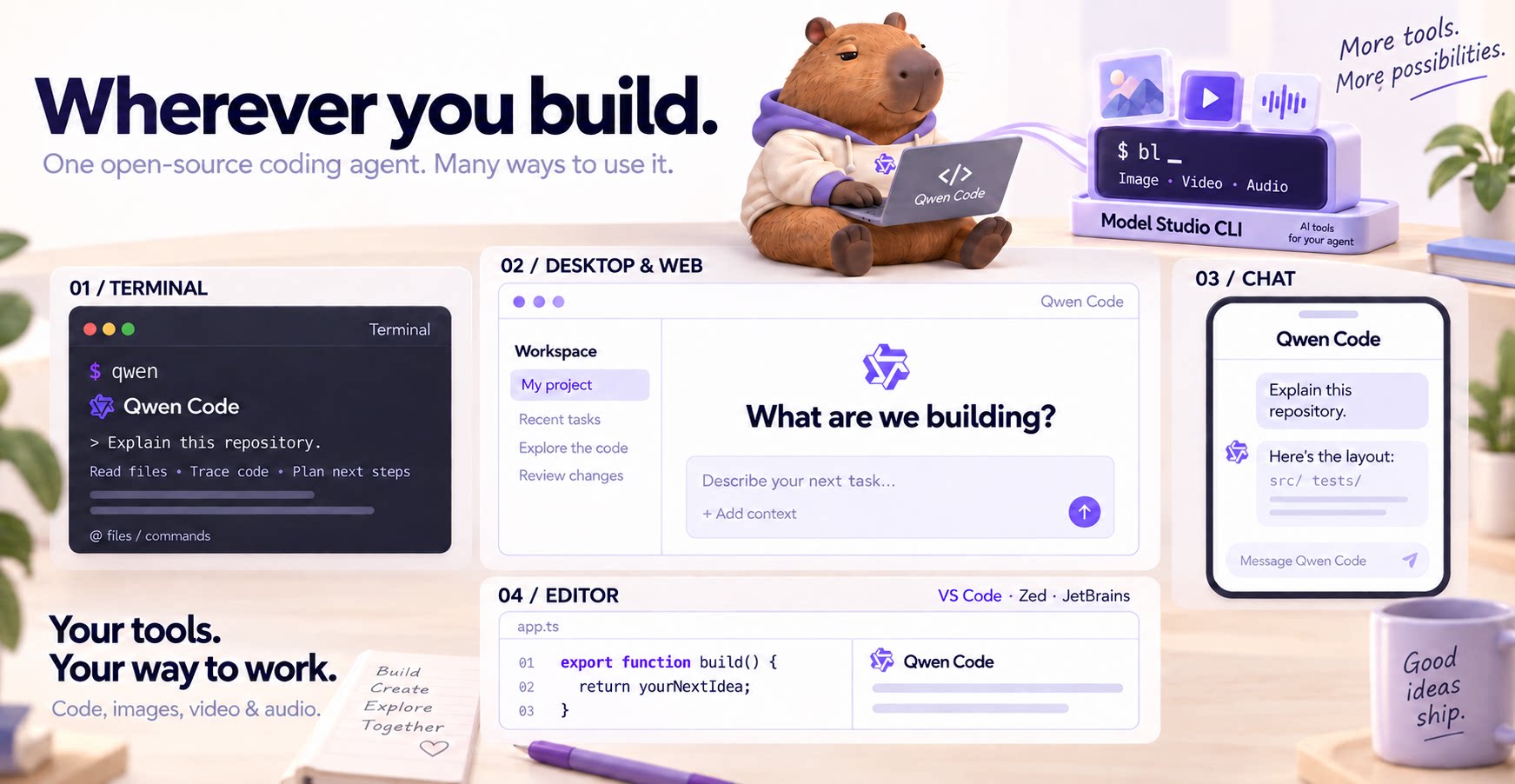
The open-source AI coding agent for your terminal, editor, desktop, browser, and chat.
中文 | Deutsch | français | 日本語 | Русский | Português (Brasil) | 한국어
Why Qwen Code?
- Agentic out of the box — Auto-Memory, Auto-Skills, SubAgents, Agent Teams, and MCP. Dynamic workflows, zero setup.
- Open-source, inside and out — The framework and the Qwen models are open-source. They evolve together. No vendor lock-in.
- Multi-protocol — Supports OpenAI, Anthropic, Gemini, and Qwen APIs. Any third-party provider or local model (Ollama / vLLM). Switch at runtime.
- Beyond the terminal — IDE plugins, Desktop app, Web UI, SDKs, and chat integrations (Telegram / DingTalk / WeChat / Feishu).
Tip
Qwen Code is actively iterating on itself — using its own agent and models to file issues, submit PRs, review code, and run tests. Powered by the community, driven by AI.
Installation
Linux / macOS:
curl -fsSL https://qwen-code-assets.oss-cn-hangzhou.aliyuncs.com/installation/install-qwen-standalone.sh | bash
Windows:
irm https://qwen-code-assets.oss-cn-hangzhou.aliyuncs.com/installation/install-qwen-standalone.ps1 | iex
Restart your terminal after installation to ensure environment variables take effect.
NPM / Homebrew
NPM (requires Node.js 22+):
npm install -g @qwen-code/qwen-code@latest
Homebrew (macOS / Linux):
brew install qwen-code
Quick Start
Open a terminal in your project and start Qwen Code:
cd /path/to/your-project
qwen
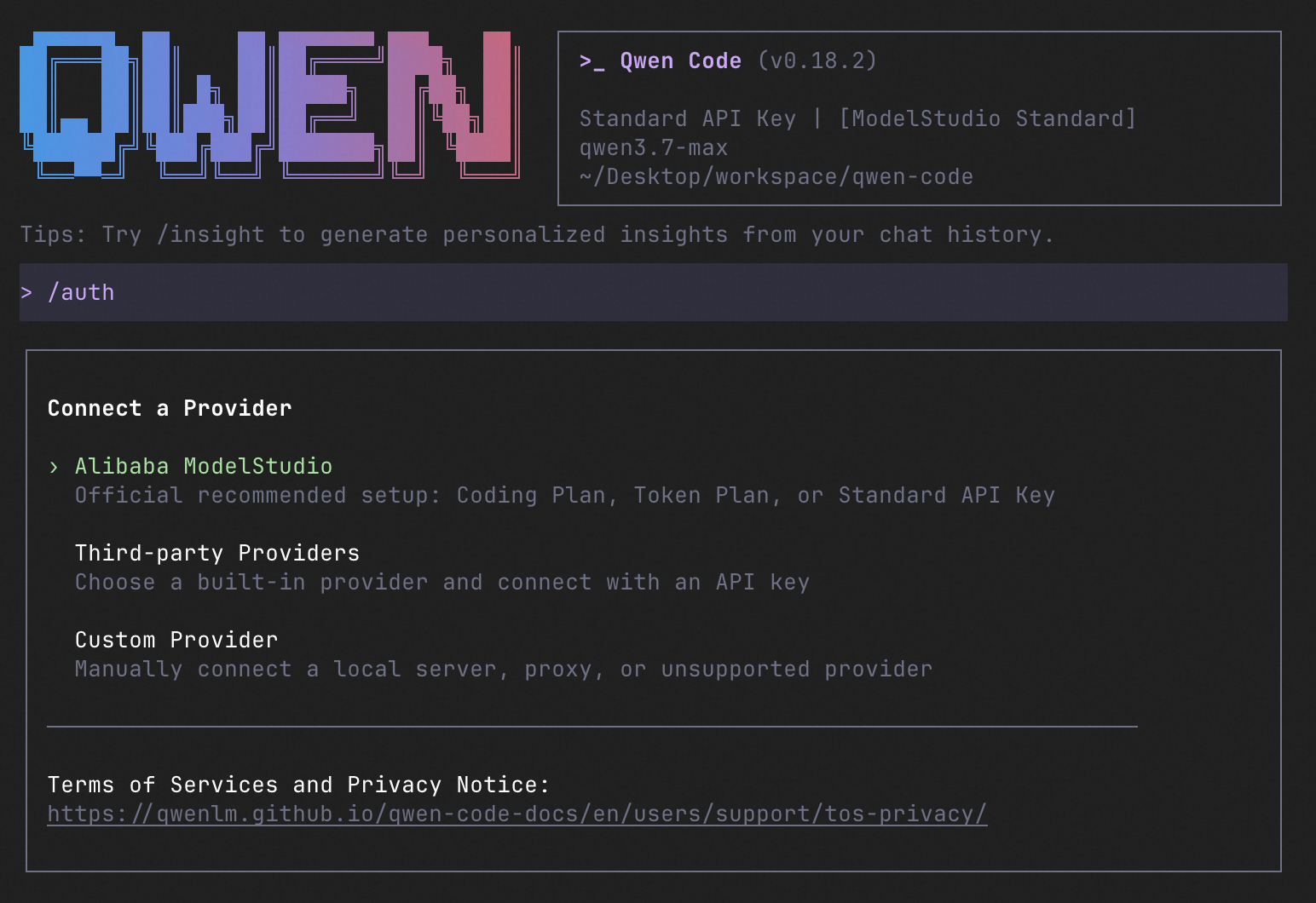
Inside the session, run /auth and choose Qwen Account with Subscription to sign in with your Plus or Pro subscription, or configure a provider with an API key. Then try:
Explain this repository and show me where to start.
See the Authentication Guide and Settings Reference for detailed setup.
See the terminal interface
How to Use Qwen Code
Choose the interface that fits your workflow:
| Interface | Get started |
|---|---|
| Terminal | Run qwen in your project — see Quick Start. |
| Desktop | Download Qwen Code Desktop for macOS, Windows, and Linux. |
| Web | Run qwen serve --open to open the Web UI in your browser. (experimental) |
| Editor | Set up VS Code, Zed, or JetBrains. |
| Chat | Connect Telegram, DingTalk, WeChat, or Feishu, then run qwen channel start. |
For automation and custom integrations:
- Headless — Run
qwen -p "..."in scripts, CI/CD, or batch jobs. - SDKs — Build with TypeScript, Python, or Java.
- Daemon — Run
qwen serveto connect clients over HTTP + SSE (ACP). (experimental) Daemon guide. - Computer Use — Set up native MCP tools or Node REPL + SDK in Qwen Code, Claude Code, or Codex.
SDK example (Python)
import asyncio

from qwen_code_sdk import is_sdk_result_message, query


async def main() -> None:
    result = query(
        "Summarize the repository layout.",
        {
            "cwd": "/path/to/project",
            "path_to_qwen_executable": "qwen",
        },
    )

    async for message in result:
        if is_sdk_result_message(message):
            print(message["result"])


asyncio.run(main())
Daemon Mode
Run Qwen Code as a long-lived service when you want browser, editor, SDK, and automation clients to share agent sessions without each starting a separate process. The daemon provides the built-in Web Shell and an HTTP + SSE API, supports multiple workspaces, and lets clients reconnect to active sessions.
Start it in the foreground and open the Web Shell:
qwen serve --open
The default address is http://127.0.0.1:4170. To run and manage it in the background instead:
qwen daemon start
qwen daemon status
qwen daemon logs -f
qwen daemon stop
By default, the daemon listens on loopback without bearer authentication; any local process that can reach it can use the full API, including code execution. On shared or untrusted hosts, set QWEN_SERVER_TOKEN and use --require-auth. See the Daemon guide for workspaces, authentication, remote access, and the API.
Capabilities
If you know Claude Code, you already know Qwen Code — and then some. We've put significant effort into bringing Qwen Code to feature parity with Claude Code, improving both breadth and reliability across the board.
| Feature | Qwen Code | Claude Code |
|---|---|---|
| SubAgents, Agent Teams, Dynamic Workflows | ✓ | ✓ |
| Auto-Memory, Auto-Skills, Hooks | ✓ | ✓ |
| Built-in Skills (/review, /batch, /loop, /bugfix…) | ✓ | ✓ |
| MCP, Plan Mode, LSP Integration | ✓ | ✓ |
| Auto Mode, Sandbox, Git Worktrees | ✓ | ✓ |
| Computer Use (desktop automation) | ✓ | ✓ |
| IDE Plugins (VS Code / JetBrains / Zed) | ✓ | ✓ |
| SDK | ✓ | ✓ |
| Headless Mode, Session Management | ✓ | ✓ |
| Open-source — model and framework | ✓ | — |
| Multi-protocol (OpenAI / Anthropic / Gemini / Qwen + any provider) | ✓ | — |
| Agent Arena (multi-model head-to-head on same task) | ✓ | — |
Daemon Mode — qwen serve (multi-client shared agent) |
✓ | — |
| IM Channels (Telegram / DingTalk / WeChat / Feishu) | ✓ | — |
Qwen Code Evaluation
On SWE-bench Verified, seven Qwen Code versions scored 76.40%–77.80% on average using the same Qwen 3.7 Max model (500 tasks, three trials per version).

Full results and evaluation configuration →
Ecosystem
-
Qwen Code Desktop — Official desktop app for macOS, Windows, and Linux
-
AionUi — A modern GUI for command-line AI tools including Qwen Code
-
Gemini CLI Desktop — A cross-platform desktop/web/mobile UI for Qwen Code
-
qwen-audio-agent — Realtime full-duplex voice frontend for Qwen Code over ACP — talk hands-free with barge-in and a local wake word
-
🦞 Qwen Code Claw — Let other agents (Claude, Codex, etc.) delegate coding tasks to Qwen Code via ACP. Paste this prompt into your agent:
Use Qwen Code as a coding agent. First, fetch and read this skill reference:
https://raw.githubusercontent.com/QwenLM/qwen-code/refs/heads/main/.qwen/skills/qwen-code-claw/SKILL.md
Then follow the instructions inside to install, authenticate, and use Qwen Code via acpx for all coding tasks.
- Aliyun Model Studio CLI — Official CLI for Aliyun's AI platform (
bailian-cli). Extends Qwen Code with image/video generation, knowledge retrieval, app orchestration, and model deployment
Privacy
See the Terms of Service and Privacy Notice, including Chrome extension and Browser Use data handling.
Contributing
Contributions are welcome! See CONTRIBUTING.md for guidelines.
Acknowledgments
This project was originally based on Google Gemini CLI v0.8.2. We gratefully acknowledge the Gemini CLI team's excellent work. Starting from Qwen Code v0.1, we stopped syncing with upstream and began independent development as a multi-protocol, multi-platform agent framework with deep integrations for Qwen models and beyond.