 Shaojin Wen
9336986835
* feat(web-shell): make GitHub channel configuration usable

The channel editor rendered every platform through one generic form, which
left the GitHub channel hard to configure and persisted settings its adapter
never reads.

- Render string-list fields that declare options as a checkbox list, so the
  fifteen notification reasons are pickable and explained instead of typed
  from memory. Unknown values written by hand stay visible and removable
  rather than disappearing on the next save.
- Lock the token input while local gh authentication is selected, clear a
  stored token when that switch is turned on, and drop a token that an
  existing useLocalGh selection has already overridden.
- Hide and stop persisting the direct-message policy for repository-scoped
  channels: the registry injects privatePolicy into every manageable channel,
  but the GitHub adapter only produces group envelopes, so the value never
  gates anything and only misleads.
- Name allowlisted groups repositories, validate owner/repo, and show the
  GitHub Enterprise API base URL shape.
- Split the catch-all credentials section into credentials, connection, and
  notification routing.

* test(web-shell): pin the GitHub editor capture to the reason checklist

The screenshot scenario now fails if the filter falls back to a free-text
input, so the published picture cannot drift away from the behaviour the
pull request claims.

* test(web-shell): pin the section split on a non-GitHub channel

The connection and routing sections key on field names, so they regroup gitlab and wecom fields too. Assert that split on a gitlab descriptor instead of leaving it implied by the GitHub assertions.

* fix(web-shell): match GitHub channel values the way the adapter reads them

Review round 1 on the editor found three places where the new controls
disagreed with the runtime or left dead configuration behind.

- The reason checklist compared values case-sensitively while the adapter
  lowercases both sides, so a stored COMMENT rendered as a stray sixteenth
  box beside an unchecked canonical one; ticking only mention then left
  comment notifications flowing. Compare case-insensitively and keep unknown
  entries in their original spelling.
- The pairing guard had no test witness: deleting it left the whole suite
  green while a legacy privatePolicy reopened the direct-message panel for a
  repository channel. Pin both directions — legacy private pairing must not
  open the panel, group pairing still must.
- Only privatePolicy was cleaned up; the equally unread allowedUsers survived
  every save and was still presented as an authoritative allowlist in the
  pairing panel. Drop the whole private-access set and stop showing it there.

* fix(channels): match GitHub repository groups regardless of case

The editor started validating repository allowlists as owner/repo, but a
repository path is case-insensitive while the runtime matched the group key
verbatim. An operator who typed qwenlm/qwen-code passed validation, saved, and
got a channel that connected and then dropped every notification as
not_allowlisted — the exact failure the validation was added to prevent.

Normalize on both sides so neither can drift:

- The editor writes the canonical lower-case key and shows stored allowlists
  in that form, so re-saving an older mixed-case entry migrates it. The
  per-repository settings are looked up under the normalized key, so retyping
  the case no longer discards that repository's sender policy.
- GroupGate and ChannelBase accept a platform group-ID normalizer, used for
  the allowlist, the sender policy and the per-group overrides alike.
  Normalizing only admission would have let a case-mismatched repository fall
  back to the open sender default, which is worse than dropping it.
- The GitHub adapter supplies the lower-casing normalizer; every other
  platform keeps matching group IDs verbatim.

Pairing approvals are unaffected: they are keyed by the chat ID the platform
reports, so they were already self-consistent.

* fix(channels): resolve the group history limit through the same lookup

Self-audit of the repository-casing fix found a third direct read of
config.groups: the per-group history limit still matched the key verbatim, so
a platform with case-insensitive IDs silently lost that override while the
allowlist and sender policy honoured it. Route it through groupConfigFor and
pin it with a case-insensitive channel test.

* fix(web-shell): keep the gh switch reversible and refuse ambiguous repositories

Review round 2 plus the independent verification round found three defects.

- Turning local gh authentication on queues the stored token for removal,
  because a token outranks gh. Turning it back off left that intent in place,
  so Save demanded a credential the operator never chose to delete and the
  switch could not be undone without retyping a PAT. Flipping it back now
  restores the stored token.
- Collapsing repository aliases could widen access. A stored allowlist may
  hold Owner/repo and owner/repo with different settings; the runtime resolves
  an exact key first, so keeping only one of them on an unrelated save dropped
  the effective sender restriction. The editor now refuses to save until the
  operator resolves the duplicate, and shows the allowlist without repeating
  the same repository twice.
- The reason descriptions described event types instead of the subscription
  reasons GitHub actually reports: comment means the account commented on the
  thread, state_change that the account changed its state, ci_activity that a
  workflow it triggered completed, and manual that it subscribed by hand.
  Rewritten in both languages against the REST notification contract.

The visual scenario also captured the dialog without scrolling, so the
checklist sat below the fold and the published picture did not show the
feature. It now scrolls the filter into view, asserts it is fully on screen,
and captures it separately.


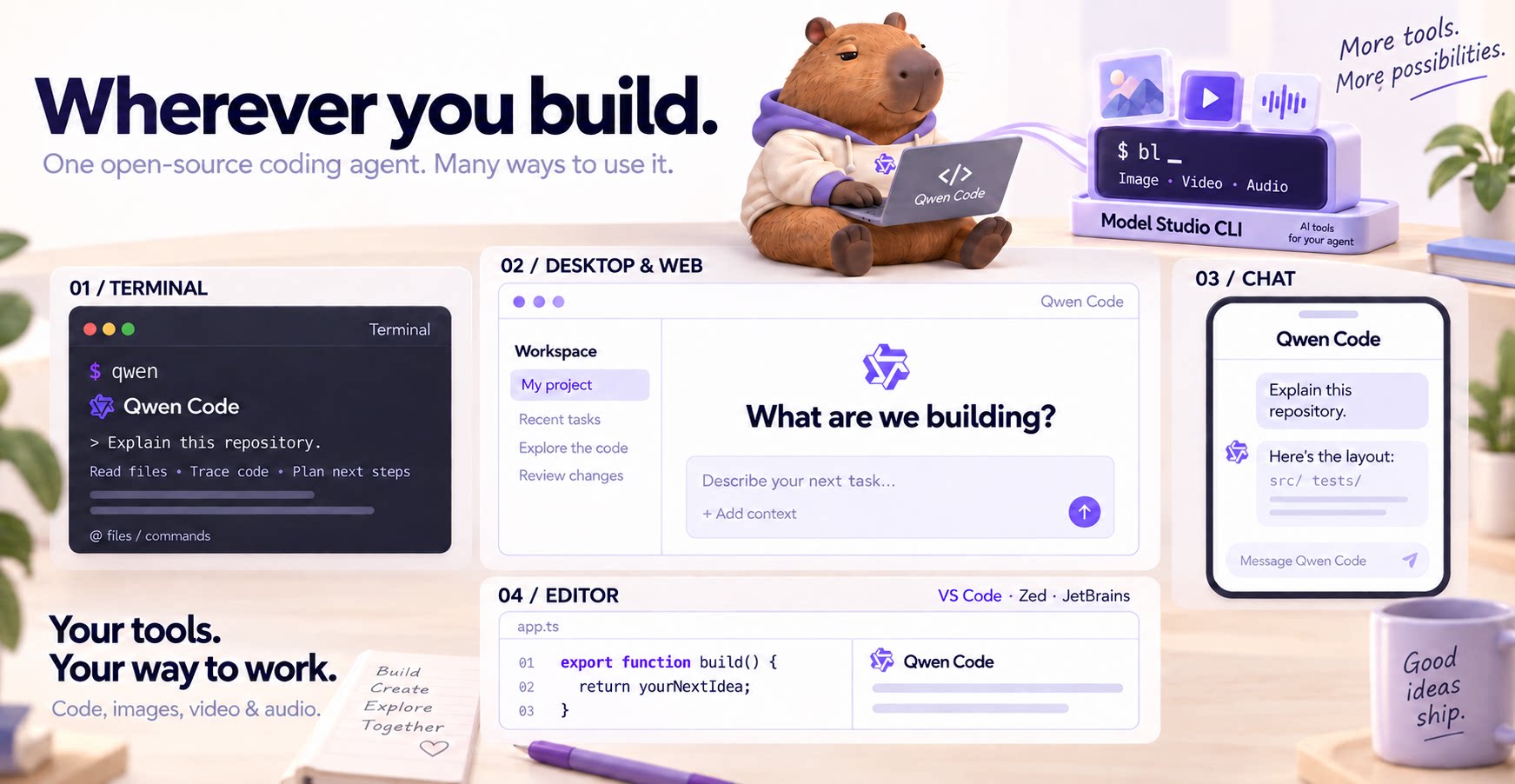
The open-source AI coding agent for your terminal, editor, desktop, browser, and chat.
中文 | Deutsch | français | 日本語 | Русский | Português (Brasil) | 한국어
Why Qwen Code?
- Agentic out of the box — Auto-Memory, Auto-Skills, SubAgents, Agent Teams, and MCP. Dynamic workflows, zero setup.
- Open-source, inside and out — The framework and the Qwen models are open-source. They evolve together. No vendor lock-in.
- Multi-protocol — Supports OpenAI, Anthropic, Gemini, and Qwen APIs. Any third-party provider or local model (Ollama / vLLM). Switch at runtime.
- Beyond the terminal — IDE plugins, Desktop app, Web UI, SDKs, and chat integrations (Telegram / DingTalk / WeChat / Feishu).
Tip
Qwen Code is actively iterating on itself — using its own agent and models to file issues, submit PRs, review code, and run tests. Powered by the community, driven by AI.
Installation
Linux / macOS:
curl -fsSL https://qwen-code-assets.oss-cn-hangzhou.aliyuncs.com/installation/install-qwen-standalone.sh | bash
Windows:
irm https://qwen-code-assets.oss-cn-hangzhou.aliyuncs.com/installation/install-qwen-standalone.ps1 | iex
Restart your terminal after installation to ensure environment variables take effect.
NPM / Homebrew
NPM (requires Node.js 22+):
npm install -g @qwen-code/qwen-code@latest
Homebrew (macOS / Linux):
brew install qwen-code
Quick Start
Open a terminal in your project and start Qwen Code:
cd /path/to/your-project
qwen
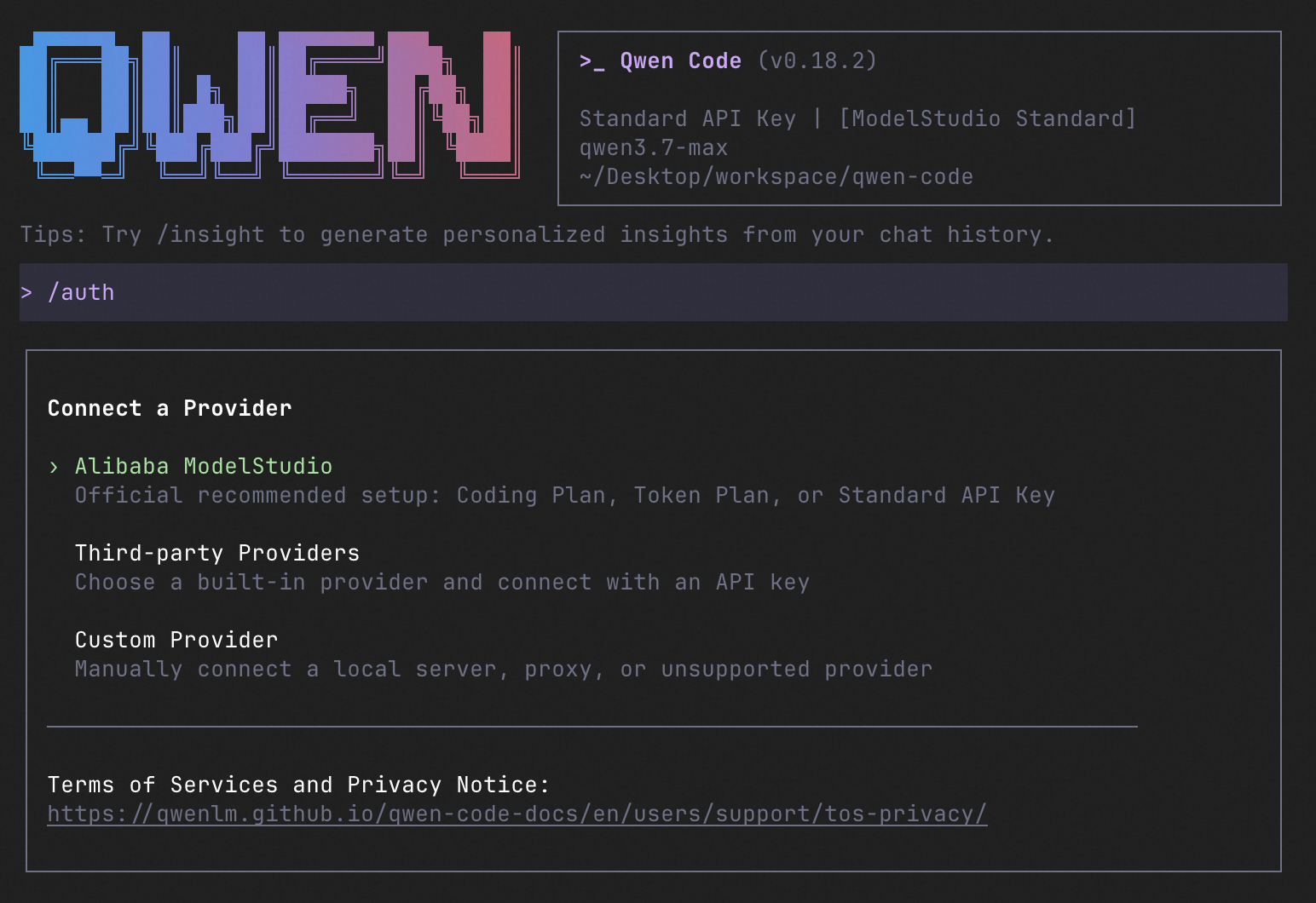
Inside the session, run /auth to configure your provider and API key. Then try:
Explain this repository and show me where to start.
See the Authentication Guide and Settings Reference for detailed setup.
See the terminal interface
How to Use Qwen Code
Choose the interface that fits your workflow:
| Interface | Get started |
|---|---|
| Terminal | Run qwen in your project — see Quick Start. |
| Desktop | Download Qwen Code Desktop for macOS, Windows, and Linux. |
| Web | Run qwen serve --open to open the Web UI in your browser. (experimental) |
| Editor | Set up VS Code, Zed, or JetBrains. |
| Chat | Connect Telegram, DingTalk, WeChat, or Feishu, then run qwen channel start. |
For automation and custom integrations:
- Headless — Run
qwen -p "..."in scripts, CI/CD, or batch jobs. - SDKs — Build with TypeScript, Python, or Java.
- Daemon — Run
qwen serveto connect clients over HTTP + SSE (ACP). (experimental) Daemon guide. - Computer Use — Set up native MCP tools or Node REPL + SDK in Qwen Code, Claude Code, or Codex.
SDK example (Python)
import asyncio

from qwen_code_sdk import is_sdk_result_message, query


async def main() -> None:
    result = query(
        "Summarize the repository layout.",
        {
            "cwd": "/path/to/project",
            "path_to_qwen_executable": "qwen",
        },
    )

    async for message in result:
        if is_sdk_result_message(message):
            print(message["result"])


asyncio.run(main())
Daemon Mode
Run Qwen Code as a long-lived service when you want browser, editor, SDK, and automation clients to share agent sessions without each starting a separate process. The daemon provides the built-in Web Shell and an HTTP + SSE API, supports multiple workspaces, and lets clients reconnect to active sessions.
Start it in the foreground and open the Web Shell:
qwen serve --open
The default address is http://127.0.0.1:4170. To run and manage it in the background instead:
qwen daemon start
qwen daemon status
qwen daemon logs -f
qwen daemon stop
By default, the daemon listens on loopback without bearer authentication; any local process that can reach it can use the full API, including code execution. On shared or untrusted hosts, set QWEN_SERVER_TOKEN and use --require-auth. See the Daemon guide for workspaces, authentication, remote access, and the API.
Capabilities
If you know Claude Code, you already know Qwen Code — and then some. We've put significant effort into bringing Qwen Code to feature parity with Claude Code, improving both breadth and reliability across the board.
| Feature | Qwen Code | Claude Code |
|---|---|---|
| SubAgents, Agent Teams, Dynamic Workflows | ✓ | ✓ |
| Auto-Memory, Auto-Skills, Hooks | ✓ | ✓ |
| Built-in Skills (/review, /batch, /loop, /bugfix…) | ✓ | ✓ |
| MCP, Plan Mode, LSP Integration | ✓ | ✓ |
| Auto Mode, Sandbox, Git Worktrees | ✓ | ✓ |
| Computer Use (desktop automation) | ✓ | ✓ |
| IDE Plugins (VS Code / JetBrains / Zed) | ✓ | ✓ |
| SDK | ✓ | ✓ |
| Headless Mode, Session Management | ✓ | ✓ |
| Open-source — model and framework | ✓ | — |
| Multi-protocol (OpenAI / Anthropic / Gemini / Qwen + any provider) | ✓ | — |
| Agent Arena (multi-model head-to-head on same task) | ✓ | — |
Daemon Mode — qwen serve (multi-client shared agent) |
✓ | — |
| IM Channels (Telegram / DingTalk / WeChat / Feishu) | ✓ | — |
Qwen Code Evaluation
On SWE-bench Verified, seven Qwen Code versions scored 76.40%–77.80% on average using the same Qwen 3.7 Max model (500 tasks, three trials per version).

Full results and evaluation configuration →
Ecosystem
-
Qwen Code Desktop — Official desktop app for macOS, Windows, and Linux
-
AionUi — A modern GUI for command-line AI tools including Qwen Code
-
Gemini CLI Desktop — A cross-platform desktop/web/mobile UI for Qwen Code
-
qwen-audio-agent — Realtime full-duplex voice frontend for Qwen Code over ACP — talk hands-free with barge-in and a local wake word
-
🦞 Qwen Code Claw — Let other agents (Claude, Codex, etc.) delegate coding tasks to Qwen Code via ACP. Paste this prompt into your agent:
Use Qwen Code as a coding agent. First, fetch and read this skill reference:
https://raw.githubusercontent.com/QwenLM/qwen-code/refs/heads/main/.qwen/skills/qwen-code-claw/SKILL.md
Then follow the instructions inside to install, authenticate, and use Qwen Code via acpx for all coding tasks.
- Aliyun Model Studio CLI — Official CLI for Aliyun's AI platform (
bailian-cli). Extends Qwen Code with image/video generation, knowledge retrieval, app orchestration, and model deployment
Privacy
See the Terms of Service and Privacy Notice, including Chrome extension and Browser Use data handling.
Contributing
Contributions are welcome! See CONTRIBUTING.md for guidelines.
Acknowledgments
This project was originally based on Google Gemini CLI v0.8.2. We gratefully acknowledge the Gemini CLI team's excellent work. Starting from Qwen Code v0.1, we stopped syncing with upstream and began independent development as a multi-protocol, multi-platform agent framework with deep integrations for Qwen models and beyond.