mirror of
https://github.com/QwenLM/qwen-code.git
synced 2026-11-07 06:19:43 -10:00
 1853b1505f
* fix(web-shell): wait for session before checking subscription commands

* fix(cli): keep signed-out subscription startup in the composer

* fix(subscription): preserve model selection across sign-in

* fix(subscription): align sign-in with model selection scope

* fix(subscription): apply reasoning defaults across models

* fix(subscription): tag Qwen web links by client

* fix(subscription): prefix Qwen web client tags

* fix(subscription): attribute Qwen web links by paywall scene

* fix(subscription): recover historical sessions with saved API models

* fix(cli): remove the signed-out subscription startup notice

* fix(subscription): support standalone desktop activation and expose errors

* fix(subscription): isolate activation and session model selection

* fix(subscription): enforce auth policy and restore home login

* test(cli): preserve the default initializer mock on restore

---------

Co-authored-by: luoyun <[email protected]>
Co-authored-by: 易良 <[email protected]>
216 lines
13 KiB
Markdown
216 lines
13 KiB
Markdown
<div align="center">
|
||
|
||
[](https://www.npmjs.com/package/@qwen-code/qwen-code)
|
||
[](./LICENSE)
|
||
[](https://nodejs.org/)
|
||
[](https://www.npmjs.com/package/@qwen-code/qwen-code)
|
||
|
||
<a href="https://trendshift.io/repositories/15287" target="_blank"><img src="https://trendshift.io/api/badge/repositories/15287" alt="QwenLM%2Fqwen-code | Trendshift" style="width: 250px; height: 55px;" width="250" height="55"/></a>
|
||
|
||
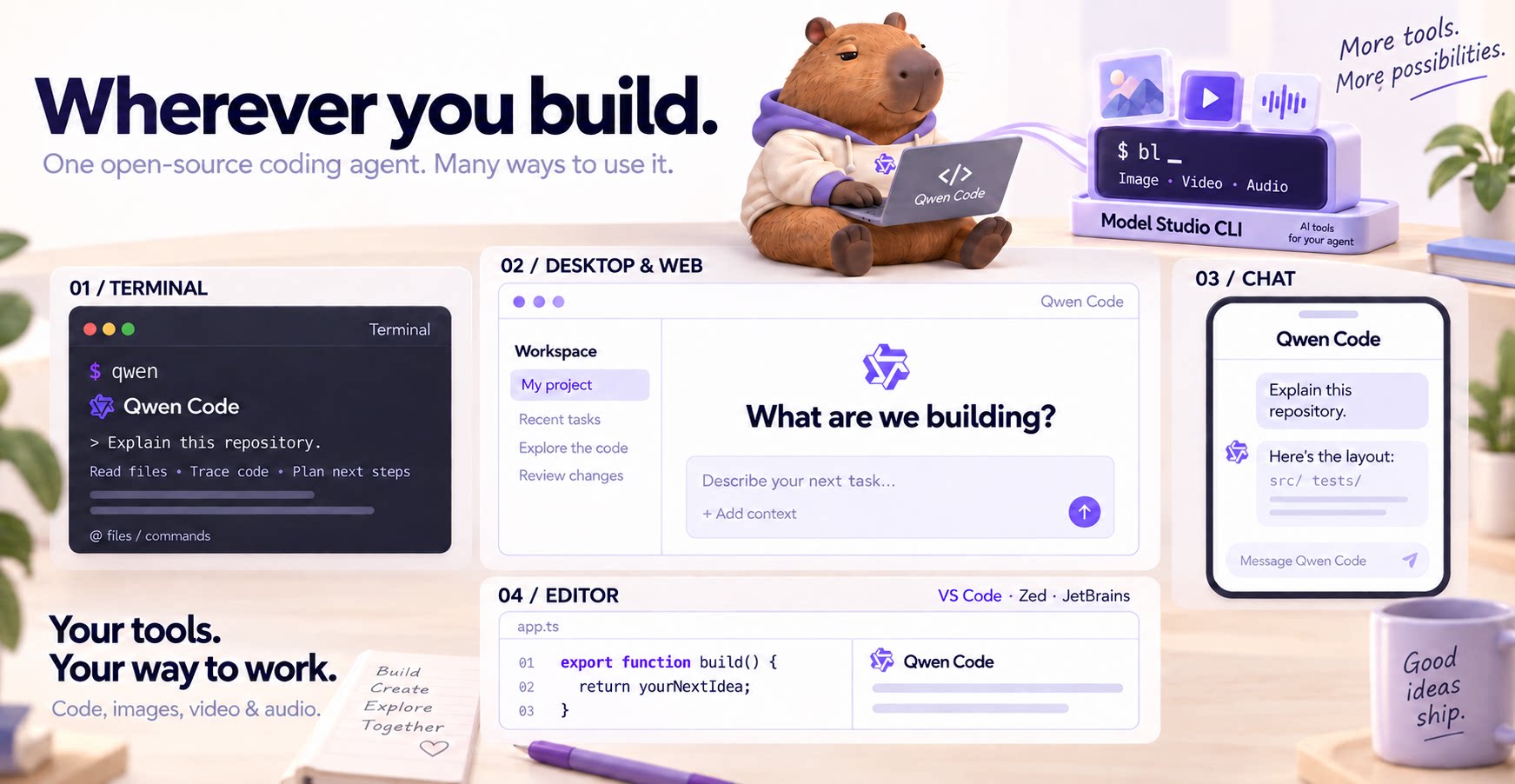
**The open-source AI coding agent for your terminal, editor, desktop, browser, and chat.**
|
||
|
||
<a href="https://qwenlm.github.io/qwen-code-docs/zh/users/overview">中文</a> |
|
||
<a href="https://qwenlm.github.io/qwen-code-docs/de/users/overview">Deutsch</a> |
|
||
<a href="https://qwenlm.github.io/qwen-code-docs/fr/users/overview">français</a> |
|
||
<a href="https://qwenlm.github.io/qwen-code-docs/ja/users/overview">日本語</a> |
|
||
<a href="https://qwenlm.github.io/qwen-code-docs/ru/users/overview">Русский</a> |
|
||
<a href="https://qwenlm.github.io/qwen-code-docs/pt-BR/users/overview">Português (Brasil)</a> |
|
||
<a href="https://qwenlm.github.io/qwen-code-docs/ko/users/overview">한국어</a>
|
||
|
||
</div>
|
||
|
||
|
||
|
||
## Why Qwen Code?
|
||
|
||
- **Agentic out of the box** — Auto-Memory, Auto-Skills, SubAgents, Agent Teams, and MCP. Dynamic workflows, zero setup.
|
||
- **Open-source, inside and out** — The framework and the Qwen models are open-source. They evolve together. No vendor lock-in.
|
||
- **Multi-protocol** — Supports OpenAI, Anthropic, Gemini, and Qwen APIs. Any third-party provider or local model (Ollama / vLLM). Switch at runtime.
|
||
- **Beyond the terminal** — IDE plugins, Desktop app, Web UI, SDKs, and chat integrations (Telegram / DingTalk / WeChat / Feishu).
|
||
|
||
> [!TIP]
|
||
> Qwen Code is actively iterating on itself — using its own agent and models to file issues, submit PRs, review code, and run tests. Powered by the community, driven by AI.
|
||
|
||
## Installation
|
||
|
||
**Linux / macOS:**
|
||
|
||
```bash
|
||
curl -fsSL https://qwen-code-assets.oss-cn-hangzhou.aliyuncs.com/installation/install-qwen-standalone.sh | bash
|
||
```
|
||
|
||
**Windows:**
|
||
|
||
```powershell
|
||
irm https://qwen-code-assets.oss-cn-hangzhou.aliyuncs.com/installation/install-qwen-standalone.ps1 | iex
|
||
```
|
||
|
||
> Restart your terminal after installation to ensure environment variables take effect.
|
||
|
||
<details>
|
||
<summary>NPM / Homebrew</summary>
|
||
|
||
**NPM** (requires [Node.js 22+](https://nodejs.org/)):
|
||
|
||
```bash
|
||
npm install -g @qwen-code/qwen-code@latest
|
||
```
|
||
|
||
**Homebrew** (macOS / Linux):
|
||
|
||
```bash
|
||
brew install qwen-code
|
||
```
|
||
|
||
</details>
|
||
|
||
## Quick Start
|
||
|
||
Open a terminal in your project and start Qwen Code:
|
||
|
||
```bash
|
||
cd /path/to/your-project
|
||
qwen
|
||
```
|
||
|
||
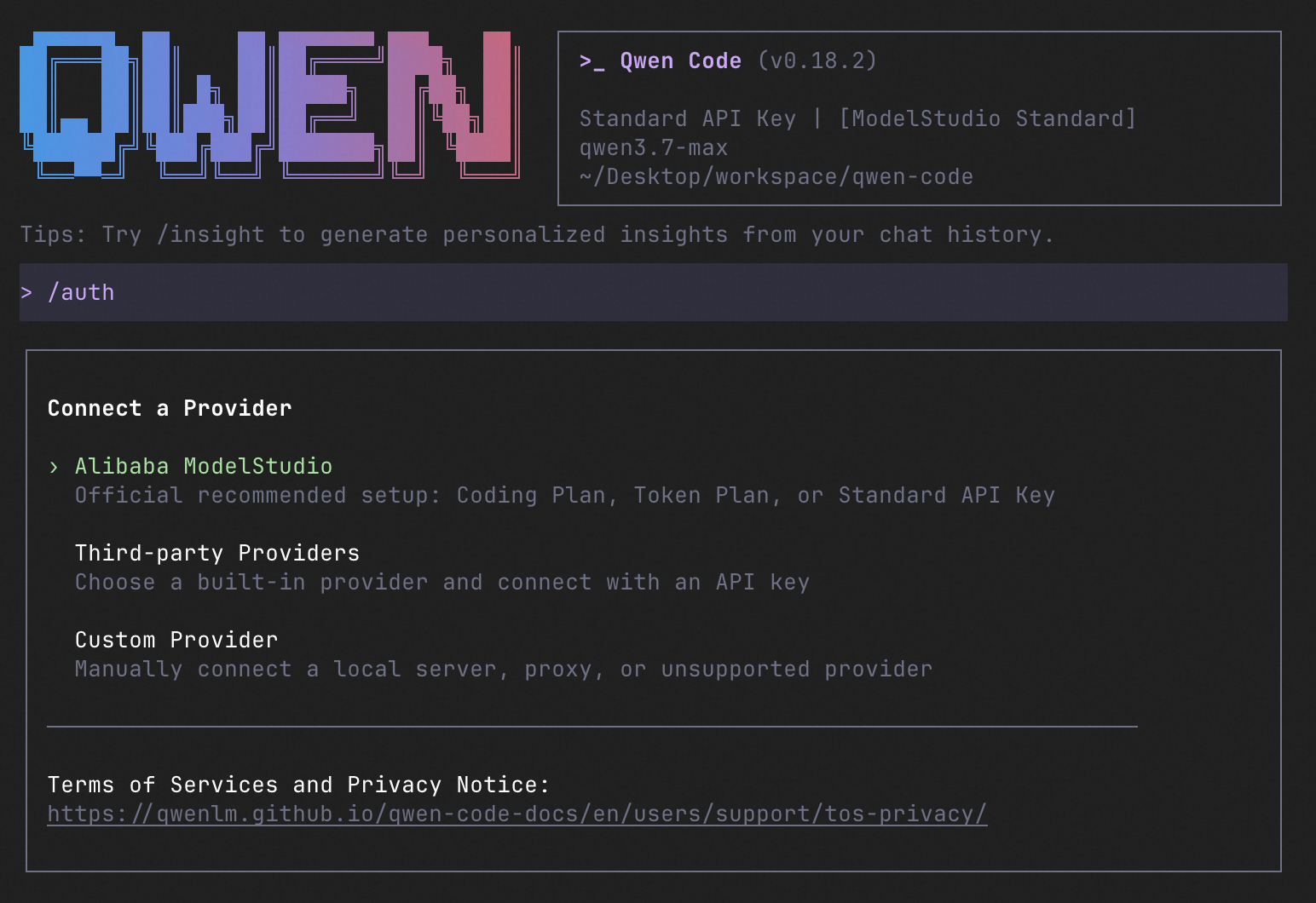
Inside the session, run `/auth` and choose [**Qwen Account with Subscription**](https://chat.qwen.ai/?memberPlan=qwen_code&entry=qwen_code&paywallScene=cli) to sign in with your **Plus or Pro subscription**, or configure a provider with an API key. Then try:
|
||
|
||
```text
|
||
Explain this repository and show me where to start.
|
||
```
|
||
|
||
See the [Authentication Guide](https://qwenlm.github.io/qwen-code-docs/en/users/configuration/auth/) and [Settings Reference](https://qwenlm.github.io/qwen-code-docs/en/users/configuration/settings/) for detailed setup.
|
||
|
||
<details>
|
||
<summary>See the terminal interface</summary>
|
||
|
||
|
||
|
||
</details>
|
||
|
||
## How to Use Qwen Code
|
||
|
||
Choose the interface that fits your workflow:
|
||
|
||
| Interface | Get started |
|
||
| ------------ | --------------------------------------------------------------------------------------------------------------------------------------------------------------------------------------------------------------------------------------------------------------------------------------------------------------------------------------------------------------------------------------------------------- |
|
||
| **Terminal** | Run `qwen` in your project — see [Quick Start](#quick-start). |
|
||
| **Desktop** | [Download Qwen Code Desktop](https://github.com/QwenLM/qwen-code/releases/tag/desktop-latest) for macOS, Windows, and Linux. |
|
||
| **Web** | Run `qwen serve --open` to open the [Web UI](https://qwenlm.github.io/qwen-code-docs/en/users/qwen-serve/) in your browser. _(experimental)_ |
|
||
| **Editor** | Set up [VS Code](https://qwenlm.github.io/qwen-code-docs/en/users/integration-vscode/), [Zed](https://qwenlm.github.io/qwen-code-docs/en/users/integration-zed/), or [JetBrains](https://qwenlm.github.io/qwen-code-docs/en/users/integration-jetbrains/). |
|
||
| **Chat** | Connect [Telegram](https://qwenlm.github.io/qwen-code-docs/en/users/features/channels/telegram/), [DingTalk](https://qwenlm.github.io/qwen-code-docs/en/users/features/channels/dingtalk/), [WeChat](https://qwenlm.github.io/qwen-code-docs/en/users/features/channels/weixin/), or [Feishu](https://qwenlm.github.io/qwen-code-docs/en/users/features/channels/feishu/), then run `qwen channel start`. |
|
||
|
||
For automation and custom integrations:
|
||
|
||
- **Headless** — Run `qwen -p "..."` in scripts, CI/CD, or batch jobs.
|
||
- **SDKs** — Build with [TypeScript](./packages/sdk-typescript/README.md), [Python](./packages/sdk-python/README.md), or [Java](./packages/sdk-java/qwencode/README.md).
|
||
- **Daemon** — Run `qwen serve` to connect clients over HTTP + SSE (ACP). _(experimental)_ [Daemon guide](https://qwenlm.github.io/qwen-code-docs/en/users/qwen-serve/).
|
||
- **Computer Use** — Set up [native MCP tools](./packages/cua-driver/README.md#agent-integration) or [Node REPL + SDK](./packages/node-repl/README.md#usage) in Qwen Code, Claude Code, or Codex.
|
||
|
||
<details>
|
||
<summary>SDK example (Python)</summary>
|
||
|
||
```python
|
||
import asyncio
|
||
|
||
from qwen_code_sdk import is_sdk_result_message, query
|
||
|
||
|
||
async def main() -> None:
|
||
result = query(
|
||
"Summarize the repository layout.",
|
||
{
|
||
"cwd": "/path/to/project",
|
||
"path_to_qwen_executable": "qwen",
|
||
},
|
||
)
|
||
|
||
async for message in result:
|
||
if is_sdk_result_message(message):
|
||
print(message["result"])
|
||
|
||
|
||
asyncio.run(main())
|
||
```
|
||
|
||
</details>
|
||
|
||
## Daemon Mode
|
||
|
||
Run Qwen Code as a long-lived service when you want browser, editor, SDK, and automation clients to share agent sessions without each starting a separate process. The daemon provides the built-in Web Shell and an HTTP + SSE API, supports multiple workspaces, and lets clients reconnect to active sessions.
|
||
|
||
Start it in the foreground and open the Web Shell:
|
||
|
||
```bash
|
||
qwen serve --open
|
||
```
|
||
|
||
The default address is `http://127.0.0.1:4170`. To run and manage it in the background instead:
|
||
|
||
```bash
|
||
qwen daemon start
|
||
qwen daemon status
|
||
qwen daemon logs -f
|
||
qwen daemon stop
|
||
```
|
||
|
||
By default, the daemon listens on loopback without bearer authentication; any local process that can reach it can use the full API, including code execution. On shared or untrusted hosts, set `QWEN_SERVER_TOKEN` and use `--require-auth`. See the [Daemon guide](./docs/users/qwen-serve.md) for workspaces, authentication, remote access, and the API.
|
||
|
||
## Capabilities
|
||
|
||
If you know Claude Code, you already know Qwen Code — and then some. We've put significant effort into [bringing Qwen Code to feature parity with Claude Code](https://github.com/wenshao/codeagents/blob/main/docs/comparison/qwen-code-improvement-report.md), improving both breadth and reliability across the board.
|
||
|
||
| Feature | Qwen Code | Claude Code |
|
||
| ------------------------------------------------------------------ | :-------: | :---------: |
|
||
| SubAgents, Agent Teams, Dynamic Workflows | ✓ | ✓ |
|
||
| Auto-Memory, Auto-Skills, Hooks | ✓ | ✓ |
|
||
| Built-in Skills (/review, /batch, /loop, /bugfix…) | ✓ | ✓ |
|
||
| MCP, Plan Mode, LSP Integration | ✓ | ✓ |
|
||
| Auto Mode, Sandbox, Git Worktrees | ✓ | ✓ |
|
||
| Computer Use (desktop automation) | ✓ | ✓ |
|
||
| IDE Plugins (VS Code / JetBrains / Zed) | ✓ | ✓ |
|
||
| SDK | ✓ | ✓ |
|
||
| Headless Mode, Session Management | ✓ | ✓ |
|
||
| Open-source — model and framework | ✓ | — |
|
||
| Multi-protocol (OpenAI / Anthropic / Gemini / Qwen + any provider) | ✓ | — |
|
||
| Agent Arena (multi-model head-to-head on same task) | ✓ | — |
|
||
| Daemon Mode — `qwen serve` (multi-client shared agent) | ✓ | — |
|
||
| IM Channels (Telegram / DingTalk / WeChat / Feishu) | ✓ | — |
|
||
|
||
## Qwen Code Evaluation
|
||
|
||
On **SWE-bench Verified**, seven Qwen Code versions scored **76.40%–77.80%** on average using the same Qwen 3.7 Max model (500 tasks, three trials per version).
|
||
|
||

|
||
|
||
[Full results and evaluation configuration →](./docs/evaluation.md)
|
||
|
||
## Ecosystem
|
||
|
||
- [**Qwen Code Desktop**](https://github.com/QwenLM/qwen-code/releases/tag/desktop-latest) — Official desktop app for macOS, Windows, and Linux
|
||
- [**AionUi**](https://github.com/iOfficeAI/AionUi) — A modern GUI for command-line AI tools including Qwen Code
|
||
- [**Gemini CLI Desktop**](https://github.com/Piebald-AI/gemini-cli-desktop) — A cross-platform desktop/web/mobile UI for Qwen Code
|
||
- [**qwen-audio-agent**](https://github.com/QwenAudio/qwen-audio-agent) — Realtime full-duplex voice frontend for Qwen Code over ACP — talk hands-free with barge-in and a local wake word
|
||
|
||
- [**🦞 Qwen Code Claw**](https://github.com/openclaw/acpx) — Let other agents (Claude, Codex, etc.) delegate coding tasks to Qwen Code via ACP. Paste this prompt into your agent:
|
||
|
||
```text
|
||
Use Qwen Code as a coding agent. First, fetch and read this skill reference:
|
||
https://raw.githubusercontent.com/QwenLM/qwen-code/refs/heads/main/.qwen/skills/qwen-code-claw/SKILL.md
|
||
Then follow the instructions inside to install, authenticate, and use Qwen Code via acpx for all coding tasks.
|
||
```
|
||
|
||
- [**Aliyun Model Studio CLI**](https://github.com/modelstudioai/cli) — Official CLI for Aliyun's AI platform (`bailian-cli`). Extends Qwen Code with image/video generation, knowledge retrieval, app orchestration, and model deployment
|
||
|
||
## Privacy
|
||
|
||
See the [Terms of Service and Privacy Notice](./docs/users/support/tos-privacy.md), including [Chrome extension and Browser Use data handling](./docs/users/support/tos-privacy.md#chrome-extension-and-browser-use).
|
||
|
||
## Contributing
|
||
|
||
Contributions are welcome! See [CONTRIBUTING.md](./CONTRIBUTING.md) for guidelines.
|
||
|
||
## Acknowledgments
|
||
|
||
This project was originally based on [Google Gemini CLI](https://github.com/google-gemini/gemini-cli) v0.8.2. We gratefully acknowledge the Gemini CLI team's excellent work. Starting from Qwen Code v0.1, we stopped syncing with upstream and began independent development as a multi-protocol, multi-platform agent framework with deep integrations for Qwen models and beyond.
|