 a7b9c5d915
* feat(tui): remove tool group borders and collapse completed tool results

Remove round borders from ToolGroupMessage, CompactToolGroupDisplay, and
InlineParallelAgentsDisplay. Completed tools now default to a single
collapsed header line with dimColor styling. Executing/error/confirming
tools continue to show their full result block.

Part of #4588 (Track 3: Simplify tool-call rendering).

Generated with AI

Co-authored-by: Qwen-Coder <[email protected]>

* fix(tui): gate collapse on compact mode and fix innerWidth calculation

- Only collapse completed tool results in compact mode, preserving
  full visibility in non-compact mode
- Subtract 2 from innerWidth to account for ToolMessage paddingX={1}
- Update snapshots to reflect removed borders

Generated with AI

Co-authored-by: Qwen-Coder <[email protected]>

* fix(tui): address review feedback on collapse and visual alignment

- Gate isDim on compact mode so non-compact tools stay fully styled
- Add paddingX={1} to CompactToolGroupDisplay for left-edge alignment
- Delete Border Color Logic test block (borders removed)
- Add compact-mode test coverage for Error/Executing/Pending/forceShowResult
- Clean up stale border references in comments

Generated with AI

Co-authored-by: Qwen-Coder <[email protected]>

* feat(tui): unify tool output with semantic summaries

Replace the dual compact/normal mode tool output with a single unified
mode. Completed tools always show a semantic overview line
("Read 3 files, edited 2 files") instead of dumping full results.

- Add buildToolSummary() for category-based semantic summaries
- Remove compactMode gate from shouldCollapse and isDim in ToolMessage
- Make all-completed tool groups use CompactToolGroupDisplay
- Remove unused useCompactMode hook calls from ToolMessage

Generated with AI

Co-authored-by: Qwen-Coder <[email protected]>

* test(tui): add buildToolSummary unit tests and fix stale comment

- Add 10 dedicated unit tests for buildToolSummary covering edge cases
- Fix stale comment referencing old compactMode gate logic

Generated with AI

Co-authored-by: Qwen-Coder <[email protected]>

* fix(tui): address audit findings for unified tool output

- Add Canceled status to allComplete check in ToolGroupMessage
- Move memory-only group rendering before showCompact to prevent
  them being swallowed by CompactToolGroupDisplay
- Fix LLM summary duplication: absorbedCallIds now tracks completed
  groups in non-compact mode; HistoryItemDisplay no longer bypasses
  summaryAbsorbed when !compactMode
- Update StandaloneSessionPicker test for new compact rendering
- Fix design doc category order example and add missing rendering rules

Generated with AI

Co-authored-by: Qwen-Coder <[email protected]>

* fix(tui): address inline review findings

- Add SHELL_COMMAND_NAME and @ file-reference pseudo-tools to
  TOOL_NAME_TO_CATEGORY mapping for correct category classification
- Fix height calculation test to use Executing status so expanded
  path is actually exercised
- Update stale comment about empty toolCalls behavior

Generated with AI

Co-authored-by: Qwen-Coder <[email protected]>

* fix(tui): remove unused compactMode import in HistoryItemDisplay

Fixes CI build failure caused by TS6133 (noUnusedLocals) — the
compactMode destructure became dead code after the summary gating
was moved to summaryAbsorbed.

Generated with AI

Co-authored-by: Qwen-Coder <[email protected]>

* ci: trigger re-run with updated merge ref

Generated with AI

Co-authored-by: Qwen-Coder <[email protected]>

* refactor(tui): partition tools by type instead of completion status

Align tool display with read/search collapse pattern: only
information-gathering tools (read, search, list) are collapsed into a
summary line; mutation tools (edit, write, command, agent) always
render individually with their results.

- Remove compactLabel prop and cross-group merge logic from MainContent
- Add isCollapsibleTool predicate and partition in ToolGroupMessage
- Remove shouldCollapse gate from ToolMessage (results always shown)
- Update CATEGORY_ORDER to search → read → list → command → ...
- Update tests and snapshots to match partition-based rendering

Generated with AI

Co-authored-by: Qwen-Coder <[email protected]>

* fix(tui): collapse text/ANSI output for completed tools

Only string and ANSI results are hidden for completed (Success/Canceled)
tools — diff, plan, todo, and task results always render since they
carry non-repeatable information the user needs to review inline.

Generated with AI

Co-authored-by: Qwen-Coder <[email protected]>

* fix(tui): unify summary format and show results in error-expanded groups

- buildToolSummary always uses count format ("Read 1 file") instead of
  description for single tools, ensuring consistent display across all
  collapsible tool groups
- Pass forceExpandAll to forceShowResult so sibling Success tools in
  error-expanded groups keep their results visible for diagnostics
- Add memory-only group test coverage (Recalled N memories / Wrote N)

Generated with AI

Co-authored-by: Qwen-Coder <[email protected]>

* test(tui): improve coverage for partition logic and result collapse

- Add isCollapsibleTool unit tests (read/search/list → true, others → false)
- Add partition tests: pure collapsible → summary, mixed → summary + individual
- Add forceExpandAll tests: error group bypasses partition, all siblings get forceShowResult
- Add diff bypass test: completed Success tool with diff result is not collapsed
- Update MockTool to surface forceShowResult flag for assertion
- Update snapshots reflecting forceExpandAll → forceShowResult propagation

Generated with AI

Co-authored-by: Qwen-Coder <[email protected]>

* fix(tui): align CompactToolGroupDisplay style with ToolInfo

Replace dimColor={!isActive} with bold to match ToolInfo's styling in
ToolMessage. Completed summary lines now render at normal brightness
with bold text, consistent with sibling non-collapsible tools in the
same group.

Generated with AI

Co-authored-by: Qwen-Coder <[email protected]>

* fix(tui): address review findings on result collapse and memory safety

- Only collapse results for collapsible tools (read/search/list), not
  MCP/WebFetch/other tools whose output is the answer
- Only collapse on Success, not Canceled (partial output may be useful)
- Exclude errored memory ops from allMemOpsComplete early return so
  error details remain visible
- Add memory badge to all-collapsible early return path
- Simplify forceShowResult to forceExpandAll (per-tool conditions were
  already subsumed by group-level flags)
- Account for collapsible summary row in height budget
- Remove vestigial mergedHistory alias
- Remove tool_group from compactToggleHasVisualEffect (compact mode no
  longer affects tool rendering)
- Fix outdated JSDoc in buildToolSummary

Generated with AI

Co-authored-by: Qwen-Coder <[email protected]>

* docs(tui): sync design doc with actual implementation

Update unified-tool-output.md to reflect:
- Type-based partition (isCollapsibleTool) instead of completion-based
- Count format for all summaries ("Read 1 file" not "Read package.json")
- shouldCollapseResult gated on collapsible tools and Success only
- Bold styling for all tool names (isDim removed)
- tool_use_summary renders unconditionally (absorption removed)
- forceShowResult simplified to forceExpandAll
- compactToggleHasVisualEffect no longer triggers on tool_group

Generated with AI

Co-authored-by: Qwen-Coder <[email protected]>

* test(tui): update AppContainer test for compactToggleHasVisualEffect change

tool_group no longer triggers a visual effect on Ctrl+O, so the test
now expects refreshStatic to be skipped for tool-group-only histories.

Generated with AI

Co-authored-by: Qwen-Coder <[email protected]>

* fix(tui): restore per-tool forceShowResult and harden edge cases

- Revert forceShowResult to per-tool computation so shell output
  capping is preserved for successful siblings in force-expanded groups
- Exclude Canceled tools from collapsible partition so partial output
  stays visible via individual ToolMessage rendering
- Extract shared MemoryBadge (deduplicate IIFE in all-collapsible and
  mixed paths)
- Add memory badge height to staticHeight budget in mixed path
- Add legacy ToolDisplayNamesMigration entries (SearchFiles, FindFiles,
  ReadFolder, Task, TodoWrite) to TOOL_NAME_TO_CATEGORY
- Fix stale comment referencing removed showCompact

Generated with AI

Co-authored-by: Qwen-Coder <[email protected]>

* test(tui): add coverage for canceled partition, memory badge, and legacy names

- Canceled collapsible tool renders individually (not absorbed into
  summary line), preserving partial output visibility
- Mixed group with memory counts renders memory badge alongside
  collapsible summary and individual tools
- Legacy display names (SearchFiles, FindFiles, ReadFolder, Task,
  TodoWrite) map to correct categories in isCollapsibleTool and
  buildToolSummary

Generated with AI

Co-authored-by: Qwen-Coder <[email protected]>

* fix(tui): document dual effect of isCollapsibleTool and add ANSI collapse test

Update isCollapsibleTool JSDoc to document both decision points
(ToolGroupMessage partition and ToolMessage.shouldCollapseResult) so
future maintainers understand that adding a category suppresses both
grouping and result output.

Add test for ANSI renderer branch of shouldCollapseResult to ensure
ANSI output from collapsible tools is also collapsed.

Generated with AI

Co-authored-by: Qwen-Coder <[email protected]>

* fix(tui): address review round 6 — type fix, stale refs, and test gaps

- Fix TS2740: add required AnsiToken properties to ANSI collapse test
- Rename mergedLengthRef → visibleHistoryLengthRef to match removed
  mergedHistory concept
- Fix design doc Rule 5: forceExpandAll forces results only for
  triggering tools, not all siblings
- Update compactToggleHasVisualEffect JSDoc: tool_group no longer
  checked, only gemini_thought items affected by compact mode
- Fix diff bypass test: use collapsible tool name (ReadFile) so
  shouldCollapseResult is actually exercised
- Add all-collapsible memory badge test covering the early-return path

Generated with AI

Co-authored-by: Qwen-Coder <[email protected]>

* test(tui): add isUserInitiated and memory-only error test coverage

- Add test: user-initiated group renders all collapsible tools
  individually (bypasses partition into summary line)
- Add test: memory-only group with errored tool falls through to
  expanded path instead of showing compact badge

Generated with AI

Co-authored-by: Qwen-Coder <[email protected]>

---------

Co-authored-by: 秦奇 <[email protected]>
Co-authored-by: Qwen-Coder <[email protected]>
Co-authored-by: Shaojin Wen <[email protected]>


The open-source AI coding agent that lives in your terminal.
中文 | Deutsch | français | 日本語 | Русский | Português (Brasil)
Why Qwen Code?
- Agentic out of the box — Auto-Memory, Auto-Skills, SubAgents, Agent Teams, and MCP. Dynamic workflows, zero setup.
- Open-source, inside and out — The framework and the Qwen models are open-source. They evolve together. No vendor lock-in.
- Multi-protocol — Supports OpenAI, Anthropic, Gemini, and Qwen APIs. Any third-party provider or local model (Ollama / vLLM). Switch at runtime.
- Beyond the terminal — IDE plugins, Desktop app, daemon mode, SDKs, and IM bots (Telegram / DingTalk / WeChat / Feishu).
Tip
Qwen Code is actively iterating on itself — using its own agent and models to file issues, submit PRs, review code, and run tests. Powered by the community, driven by AI.
Installation
Linux / macOS:
curl -fsSL https://qwen-code-assets.oss-cn-hangzhou.aliyuncs.com/installation/install-qwen-standalone.sh | bash
Windows:
irm https://qwen-code-assets.oss-cn-hangzhou.aliyuncs.com/installation/install-qwen-standalone.ps1 | iex
Restart your terminal after installation to ensure environment variables take effect.
NPM / Homebrew
NPM (requires Node.js 22+):
npm install -g @qwen-code/qwen-code@latest
Homebrew (macOS / Linux):
brew install qwen-code
Quick Start
qwen          # Launch interactive terminal UI
# Inside the session:
/auth         # Configure your provider and API key
See the Authentication Guide and Settings Reference for detailed setup.
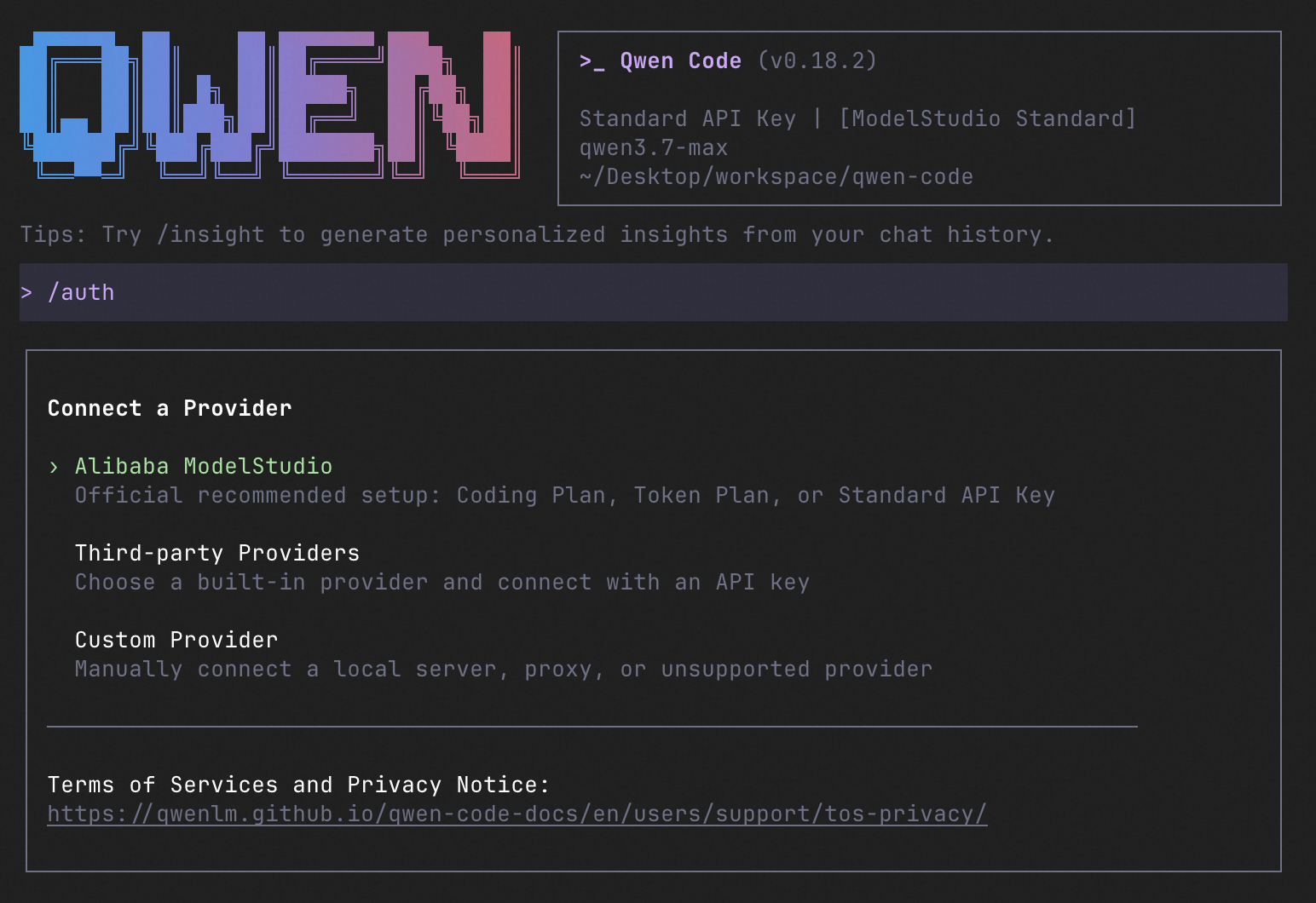
How to Use Qwen Code
| Mode | Command | Use Case |
|---|---|---|
| Interactive | qwen |
Terminal UI with rich rendering, @file references, slash commands |
| Headless | qwen -p "..." |
Scripts, CI/CD, batch processing — no UI |
| IDE | — | VS Code, Zed, JetBrains |
| Desktop | — | Qwen Code Desktop — GUI for macOS, Windows, Linux |
| Daemon | qwen serve |
Shared agent session over HTTP+SSE (ACP). Multiple clients, one agent. (experimental) Docs |
| SDK | — | TypeScript, Python, Java |
| IM Bot | qwen channel |
Connect to Telegram, DingTalk, WeChat, or Feishu |
SDK example (Python)
import asyncio

from qwen_code_sdk import is_sdk_result_message, query


async def main() -> None:
    result = query(
        "Summarize the repository layout.",
        {
            "cwd": "/path/to/project",
            "path_to_qwen_executable": "qwen",
        },
    )

    async for message in result:
        if is_sdk_result_message(message):
            print(message["result"])


asyncio.run(main())
Capabilities
If you know Claude Code, you already know Qwen Code — and then some. We've put significant effort into bringing Qwen Code to feature parity with Claude Code, improving both breadth and reliability across the board.
| Feature | Qwen Code | Claude Code |
|---|---|---|
| SubAgents, Agent Teams, Dynamic Workflows | ✓ | ✓ |
| Auto-Memory, Auto-Skills, Hooks | ✓ | ✓ |
| Built-in Skills (/review, /batch, /loop, /bugfix…) | ✓ | ✓ |
| MCP, Plan Mode, LSP Integration | ✓ | ✓ |
| Auto Mode, Sandbox, Git Worktrees | ✓ | ✓ |
| Computer Use (desktop automation) | ✓ | ✓ |
| IDE Plugins (VS Code / JetBrains / Zed) | ✓ | ✓ |
| SDK | ✓ | ✓ |
| Headless Mode, Session Management | ✓ | ✓ |
| Open-source — model and framework | ✓ | — |
| Multi-protocol (OpenAI / Anthropic / Gemini / Qwen + any provider) | ✓ | — |
| Agent Arena (multi-model head-to-head on same task) | ✓ | — |
Daemon Mode — qwen serve (multi-client shared agent) |
✓ | — |
| IM Channels (Telegram / DingTalk / WeChat / Feishu) | ✓ | — |
Ecosystem
-
Qwen Code Desktop — Official desktop app for macOS, Windows, and Linux
-
AionUi — A modern GUI for command-line AI tools including Qwen Code
-
Gemini CLI Desktop — A cross-platform desktop/web/mobile UI for Qwen Code
-
🦞 Qwen Code Claw — Let other agents (Claude, Codex, etc.) delegate coding tasks to Qwen Code via ACP. Paste this prompt into your agent:
Use Qwen Code as a coding agent. First, fetch and read this skill reference:
https://raw.githubusercontent.com/QwenLM/qwen-code/refs/heads/main/.qwen/skills/qwen-code-claw/SKILL.md
Then follow the instructions inside to install, authenticate, and use Qwen Code via acpx for all coding tasks.
Contributing
Contributions are welcome! See CONTRIBUTING.md for guidelines.
Acknowledgments
This project was originally based on Google Gemini CLI v0.8.2. We gratefully acknowledge the Gemini CLI team's excellent work. Starting from Qwen Code v0.1, we stopped syncing with upstream and began independent development as a multi-protocol, multi-platform agent framework with deep integrations for Qwen models and beyond.