 ChiGaoand秦奇
b30a4c27d9
* fix(cli): align all TUI icon columns to a uniform 2-col width

Remove the extra left padding (paddingX=1) from ToolMessage and
CompactToolGroupDisplay that caused tool status icons (✓, ✗) to be
indented relative to the assistant message prefix (◆).

Reduce STATUS_INDICATOR_WIDTH from 3 to 2 so the tool status indicator
column matches the prefix width used by conversation and status
messages. Add flexShrink={0} to prefix boxes that were missing it.

Unify CompressionMessage, SummaryMessage, and MemorySavedMessage to
use the same fixed-width prefix box pattern (width=2, flexShrink=0)
instead of ad-hoc marginRight or minWidth approaches.

Restructure tool_use_summary in HistoryItemDisplay to use the
standard prefix box pattern instead of inline paddingLeft.

This ensures all icons (◆, ✓, ✗, ●, △, etc.) start at the same
column and all text content begins at a uniform offset, regardless
of whether the icon glyph is 1 or 2 terminal columns wide.

* fix(cli): address review feedback on icon alignment PR

- Remove dead COMPACT_GROUP_HORIZONTAL_PADDING constant (now 0)
  and its no-op subtraction from the height estimation formula.
- Reduce TMUX_SPINNER_FRAMES from 3-char to 2-char equivalents
  ('. ' / '..') so they fit the narrowed 2-col indicator box
  without overflowing in tmux sessions.

* fix(cli): force narrow presentation for ambiguous-width TUI icons

Append VS15 (U+FE0E, Variation Selector 15) to all East-Asian-Width
'Ambiguous' icon glyphs (◆ ● △ ○ ◎ ※ ∴ ∵ ★ ◉) via a central ICON
constant map in constants.ts. VS15 forces the terminal to render these
glyphs in their narrow (1-column) text presentation, matching
string-width's default ambiguousIsNarrow=true calculation.

Without this, CJK terminals render ambiguous glyphs as 2 columns while
Ink's layout engine allocates 1, causing a 1-column visual drift that
breaks icon/text alignment in the conversation view.

25 files updated to use ICON.XXX constants instead of raw string
literals for ambiguous icons.

* fix(cli): update test assertions for VS15 icon changes

- Fix 17 inline test assertions across 7 test files to match
  VS15-appended icon output
- Fix MarkdownDisplay.tsx: use stringWidth(prefix) instead of
  prefix.length to correctly measure display width of icons
  that include VS15 (a zero-width code unit that .length counts
  but stringWidth ignores)

* fix(cli): update CronPill/SettingsDialog for VS15 icon changes

- Fix CronPill test assertion for ◎ with VS15
- Update SettingsDialog to use ICON.CIRCLE_FILLED instead of raw ●
- Fix 10 SettingsDialog test assertions for ● with VS15
- Update SettingsDialog snapshots

* fix(cli): address maintainer review feedback on PR #7633

- Fix ToolGroupMessage width regression: split innerWidth so
  ToolMessage gets full contentWidth (no longer needs -2 since
  paddingX was removed) while ToolConfirmationMessage keeps -2
  (it still has its own padding={1})
- Fix stale '3-char' comment in GeminiRespondingSpinner → '2-char'
- Add comment explaining minWidth vs width asymmetry in
  ToolStatusIndicator (minWidth allows growth for tmux spinner
  frames and test mocks)

* fix(cli): add VS15 to ◐ (U+25D0) ambiguous icon in todo components

◐ (CIRCLE WITH LEFT HALF BLACK) is East-Asian-Width Ambiguous.
Added ICON.CIRCLE_LEFT_HALF constant and updated StickyTodoList
and TodoDisplay to use it.

* fix(cli): strengthen test assertion and clarify VS15 comment

- HistoryItemDisplay test: restore spatial assertion to
  toContain('◆\uFE0E Hello') instead of split checks
- constants.ts: clarify that VS15 is zero-width in string-width
  but forces narrow terminal presentation

* fix(cli): update StickyTodoList test assertion for ◐ VS15

---------

Co-authored-by: 秦奇 <[email protected]>


The open-source AI coding agent that lives in your terminal.
中文 | Deutsch | français | 日本語 | Русский | Português (Brasil)
Why Qwen Code?
- Agentic out of the box — Auto-Memory, Auto-Skills, SubAgents, Agent Teams, and MCP. Dynamic workflows, zero setup.
- Open-source, inside and out — The framework and the Qwen models are open-source. They evolve together. No vendor lock-in.
- Multi-protocol — Supports OpenAI, Anthropic, Gemini, and Qwen APIs. Any third-party provider or local model (Ollama / vLLM). Switch at runtime.
- Beyond the terminal — IDE plugins, Desktop app, daemon mode, SDKs, and IM bots (Telegram / DingTalk / WeChat / Feishu).
Tip
Qwen Code is actively iterating on itself — using its own agent and models to file issues, submit PRs, review code, and run tests. Powered by the community, driven by AI.
Installation
Linux / macOS:
curl -fsSL https://qwen-code-assets.oss-cn-hangzhou.aliyuncs.com/installation/install-qwen-standalone.sh | bash
Windows:
irm https://qwen-code-assets.oss-cn-hangzhou.aliyuncs.com/installation/install-qwen-standalone.ps1 | iex
Restart your terminal after installation to ensure environment variables take effect.
NPM / Homebrew
NPM (requires Node.js 22+):
npm install -g @qwen-code/qwen-code@latest
Homebrew (macOS / Linux):
brew install qwen-code
Quick Start
qwen          # Launch interactive terminal UI
# Inside the session:
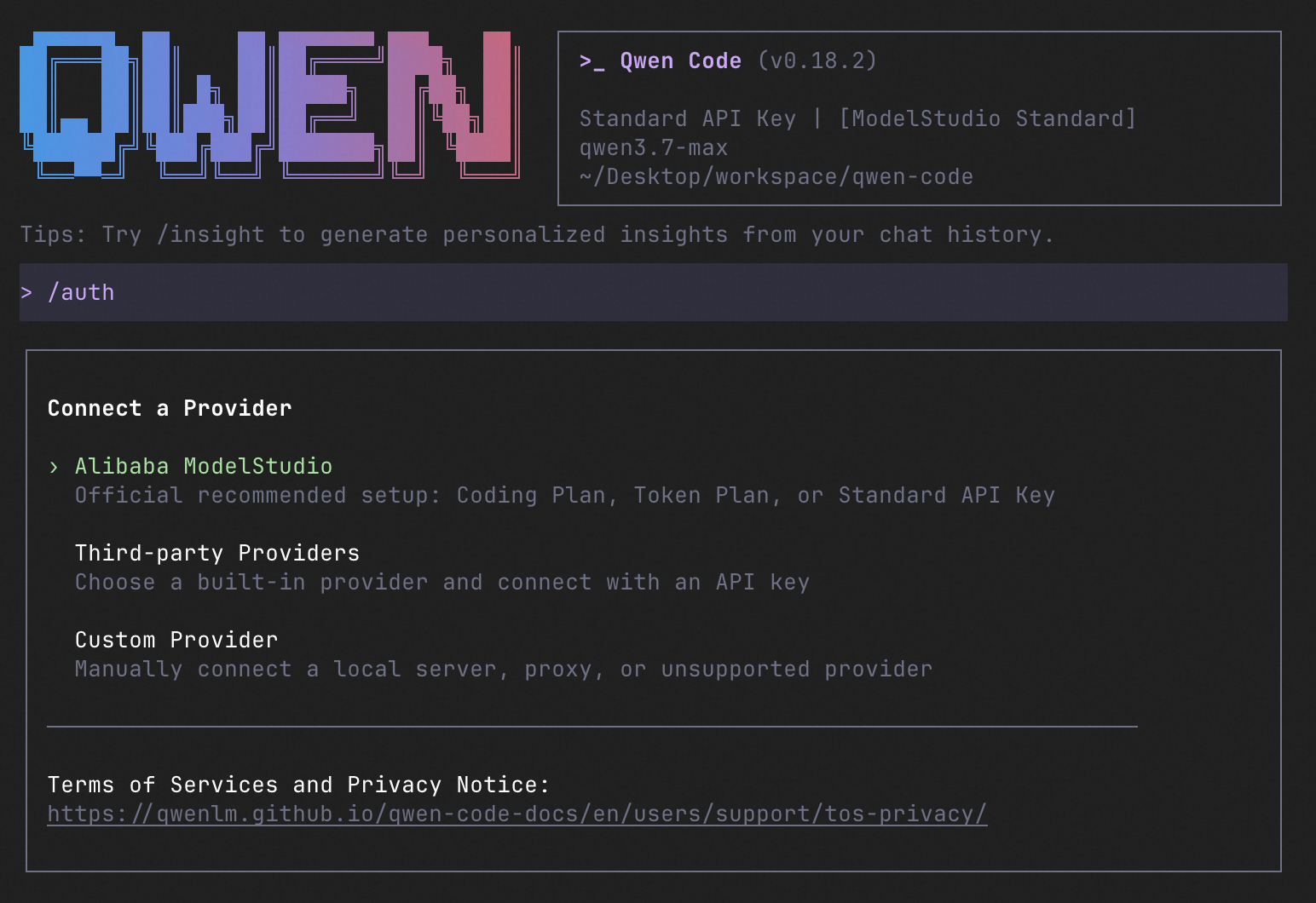
/auth         # Configure your provider and API key
See the Authentication Guide and Settings Reference for detailed setup.
How to Use Qwen Code
| Mode | Command | Use Case |
|---|---|---|
| Interactive | qwen |
Terminal UI with rich rendering, @file references, slash commands |
| Headless | qwen -p "..." |
Scripts, CI/CD, batch processing — no UI |
| IDE | — | VS Code, Zed, JetBrains |
| Desktop | — | Qwen Code Desktop — GUI for macOS, Windows, Linux |
| Daemon | qwen serve |
Shared agent session over HTTP+SSE (ACP). Multiple clients, one agent. (experimental) Docs |
| SDK | — | TypeScript, Python, Java |
| IM Bot | qwen channel |
Connect to Telegram, DingTalk, WeChat, or Feishu |
SDK example (Python)
import asyncio

from qwen_code_sdk import is_sdk_result_message, query


async def main() -> None:
    result = query(
        "Summarize the repository layout.",
        {
            "cwd": "/path/to/project",
            "path_to_qwen_executable": "qwen",
        },
    )

    async for message in result:
        if is_sdk_result_message(message):
            print(message["result"])


asyncio.run(main())
Capabilities
If you know Claude Code, you already know Qwen Code — and then some. We've put significant effort into bringing Qwen Code to feature parity with Claude Code, improving both breadth and reliability across the board.
| Feature | Qwen Code | Claude Code |
|---|---|---|
| SubAgents, Agent Teams, Dynamic Workflows | ✓ | ✓ |
| Auto-Memory, Auto-Skills, Hooks | ✓ | ✓ |
| Built-in Skills (/review, /batch, /loop, /bugfix…) | ✓ | ✓ |
| MCP, Plan Mode, LSP Integration | ✓ | ✓ |
| Auto Mode, Sandbox, Git Worktrees | ✓ | ✓ |
| Computer Use (desktop automation) | ✓ | ✓ |
| IDE Plugins (VS Code / JetBrains / Zed) | ✓ | ✓ |
| SDK | ✓ | ✓ |
| Headless Mode, Session Management | ✓ | ✓ |
| Open-source — model and framework | ✓ | — |
| Multi-protocol (OpenAI / Anthropic / Gemini / Qwen + any provider) | ✓ | — |
| Agent Arena (multi-model head-to-head on same task) | ✓ | — |
Daemon Mode — qwen serve (multi-client shared agent) |
✓ | — |
| IM Channels (Telegram / DingTalk / WeChat / Feishu) | ✓ | — |
Ecosystem
-
Qwen Code Desktop — Official desktop app for macOS, Windows, and Linux
-
AionUi — A modern GUI for command-line AI tools including Qwen Code
-
Gemini CLI Desktop — A cross-platform desktop/web/mobile UI for Qwen Code
-
🦞 Qwen Code Claw — Let other agents (Claude, Codex, etc.) delegate coding tasks to Qwen Code via ACP. Paste this prompt into your agent:
Use Qwen Code as a coding agent. First, fetch and read this skill reference:
https://raw.githubusercontent.com/QwenLM/qwen-code/refs/heads/main/.qwen/skills/qwen-code-claw/SKILL.md
Then follow the instructions inside to install, authenticate, and use Qwen Code via acpx for all coding tasks.
Contributing
Contributions are welcome! See CONTRIBUTING.md for guidelines.
Acknowledgments
This project was originally based on Google Gemini CLI v0.8.2. We gratefully acknowledge the Gemini CLI team's excellent work. Starting from Qwen Code v0.1, we stopped syncing with upstream and began independent development as a multi-protocol, multi-platform agent framework with deep integrations for Qwen models and beyond.