 mvschwarzandClaude Opus 4.7
1e0152f0ee
Three test failures had accumulated since the iter-30/iter-32 design
iterations. Each fix follows the dispatch rule: prefer fixing the code
when the test describes intended product behavior, rewrite the test
only when the original assertion is genuinely stale. All three are the
latter — production behavior is the deliberate intent; tests captured
the rejected alternative.

1. p5-3-activity-ring-hot-potato.test.tsx — 'source scan keeps
   activity and packet layers production-reachable'
   Assertion: TopologyTableView source must match /group-hover:opacity-100/
   Root cause: slice 14 walk-item 16 deliberately REMOVED the
   hover-gated `opacity-0` + `group-hover:!opacity-100` chain from
   action-column buttons — operators kept missing the cmux launcher
   when it was hidden off-mouse. The comment at
   TopologyTableView.tsx:80-83 documents the removal.
   Fix: replace the hover-class match with a positive assertion that
   the cmux action button data-testid is present (the actual
   production-reachability claim).

2. p5-topology-terminal.test.tsx — 'globals.css honors
   prefers-reduced-motion for terminal-card-active'
   Assertion: a @media (prefers-reduced-motion: reduce) block must
   include .terminal-card-active.
   Root cause: TEST BUG, not code regression. globals.css has multiple
   reduced-motion blocks (one per animation cluster); .terminal-card-
   active IS inside one of them (line 539). The prior single-match
   regex picked the FIRST block (vellum-scroll-x only) and failed.
   Fix: scan ALL reduced-motion blocks via matchAll + Array.some;
   assert that any block contains .terminal-card-active.

3. p5-slice-scope.test.tsx — 'default landing tab is story; mounts
   TimelineTab with events + phaseDefinitions'
   Assertion: project-tab-story has data-active='true' on initial
   load.
   Root cause: slice 12 walk-item 1 deliberately changed the default
   tab from 'story' to 'overview' so the first thing the operator
   sees on a slice is its README (current step + readiness), not a
   metric grid. The comment at ScopePages.tsx:1189-1192 documents
   the rationale.
   Fix: rename the test + assert overview is the default; verify
   story tab still activates TimelineTab when clicked (preserved
   coverage of the navigation path).

Verification:
- Each test file: green individually
- Full UI suite: 112 files / 1106 passing / 1 skipped / 0 failures
  (was 1093 passing + 3 failing on baseline; +13 net green, no new
  failures uncovered)
- tsc --noEmit: clean on touched files

Each fix carries an inline comment with the slice + walk-item that
made the design change, so future archeology stays cheap.

Co-Authored-By: Claude Opus 4.7 (1M context) <[email protected]>
OpenRig
Open source multi-agent harness for coding teams.
A harness wraps a model. A rig wraps your harnesses. Define your agent team in YAML, boot it with one command. Claude Code and Codex in the same rig, managed as one system.
Quick Start
# Install
npm install -g @openrig/cli

# Prepare the machine (attempts tmux, cmux, Claude Code, Codex, tmux defaults — reports what worked)
rig setup

# Boot the conveyor starter rig (4 seats, mixed runtimes)
rig up conveyor

# Open the UI
rig ui open
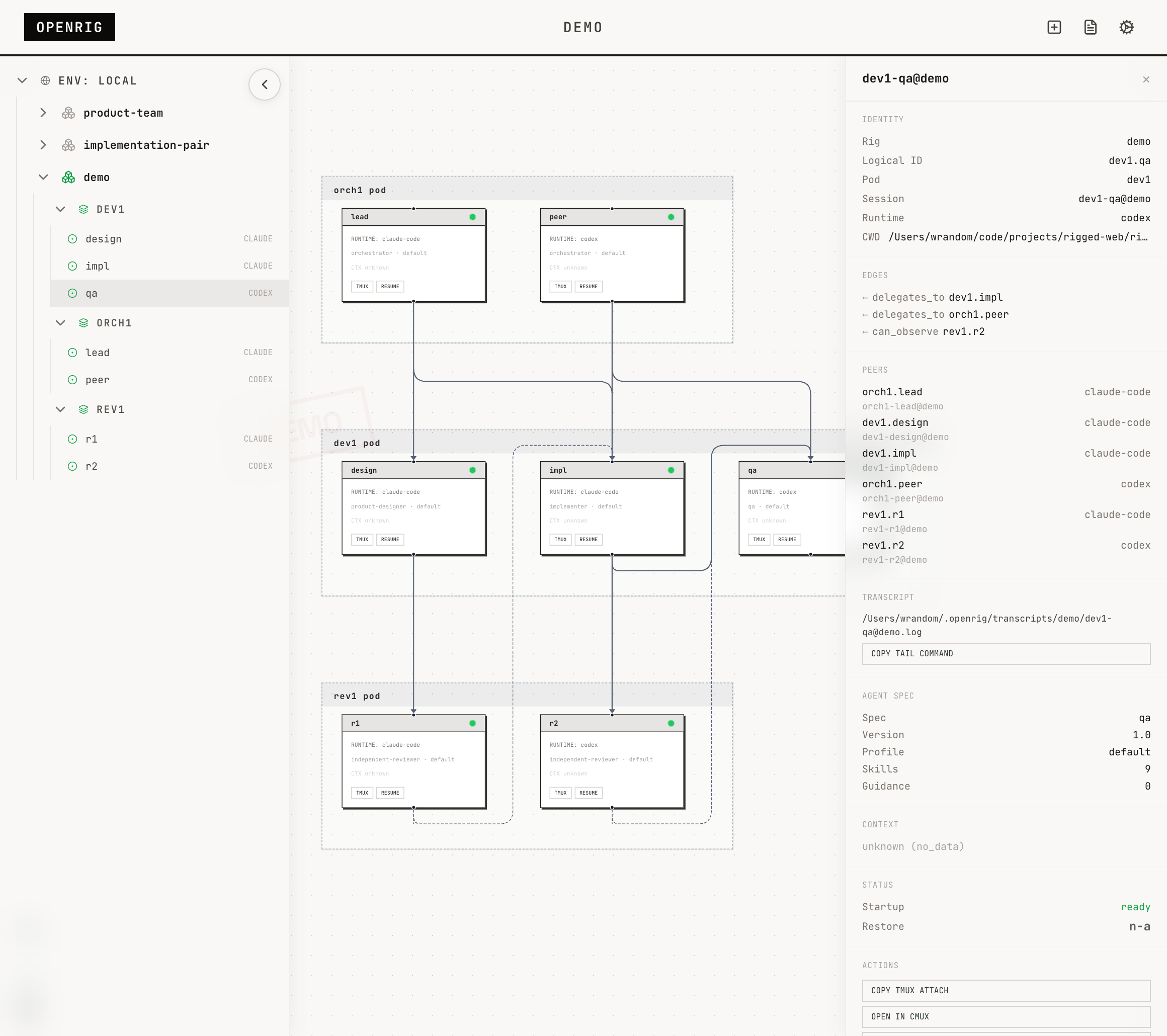
After the conveyor rig boots, open the UI and click intake.lead in the topology graph. Use Open CMUX to jump into a terminal for that node. If cmux is not available, use the tmux attach command shown in the node detail panel instead.
Launch Walkthrough
The launch path above has been walked end-to-end on fresh macOS VMs. The only thing your agent can't do would be the oauth logins for claude and openai and dealing with permission prompts.
1. Open the conveyor rig
When the UI opens, the explorer is already visible on the left. Click the conveyor rig to load its live topology.
2. Click CMUX on intake.lead
Once the topology loads, go to the intake.lead node and click its CMUX button. That opens the intake terminal directly.
From here, give the intake agent a packet of work and watch it move through planning, build, review, and closeout.
What It Does
OpenRig is a multi-agent harness — it manages the system that coding agents form when you run them together. Not the agents themselves, but the team they create: which sessions are running, how they relate, how to recover after a reboot, and how to stop it from becoming terminal sprawl.
- Define topologies in YAML (RigSpec) with pods, edges, and continuity policies
- Boot everything with
rig up— tmux sessions, harnesses, startup files, readiness checks - See the topology in a live graph with explorer, node detail, and system log
- Discover existing Claude Code and Codex sessions in tmux and adopt them into a managed rig
- Snapshot the full topology on
rig down, restore by name withrig up <name> - Communicate across agents with
rig send,rig broadcast, andrig chatroom - Evolve running topologies with
rig expand,rig shrink,rig launch,rig remove
Every agent runs in a tmux session you can attach to, inspect, and work with directly.
Starter Rigs
OpenRig ships with a conveyor starter rig for learning workflow handoff:
rig specs preview conveyor --kind rig
conveyor (rig, pod_aware)
  Starter workflow rig: a station pipeline that can move multiple
  work packets at once, with queue depth acting as natural backpressure.

  Pod: intake (1 member)
    lead — claude-code
  Pod: plan (1 member)
    planner — codex
  Pod: build (1 member)
    builder — claude-code
  Pod: review (1 member)
    reviewer — codex
For a larger human-operated product-development topology, inspect product-team:
rig specs preview product-team
Also ships: implementation-pair, adversarial-review, research-team, and secrets-manager (HashiCorp Vault managed by a specialist agent).
Browse the library: rig specs ls
How It Works
OpenRig is a local daemon + CLI + MCP server + React UI, built on tmux.
CLI / UI / MCP
      |
Hono HTTP daemon
      |
  Domain services (52)
      |
  SQLite + tmux + runtime adapters
- CLI: 40+ commands designed for both humans and agents. Every mutating command ends with what happened, current state, and next action.
- UI: Explorer sidebar, topology graph with pod grouping, node detail panel, system log, chatroom.
- MCP: 17 tools so agents can manage their own topology (
rig_up,rig_ps,rig_send,rig_chatroom_send, etc.) - Runtimes: Claude Code, Codex, and terminal nodes. Adapters for Pi and OpenCode in development.
Key Concepts
- RigSpec: Declarative multi-agent harness definition in YAML. Pods, members, edges, continuity policies, culture file.
- AgentSpec: Reusable agent blueprint with skills, guidance, hooks, profiles, and startup contracts.
- Pod: Bounded context group. Agents in a pod share memory and can maintain each other's context.
- Discovery:
rig discoverfingerprints existing tmux sessions.rig adoptbrings them under management. - Snapshot/Restore:
rig down --snapshotcaptures full state.rig up <name>restores from latest snapshot. Restore reports per-node outcomes (resumed, fresh, or failed). - RigBundle: Portable archive with vendored AgentSpecs and SHA-256 integrity. Share topologies across machines.
- Culture: CULTURE.md sets coordination norms for the group. Research rigs get exploratory culture. Implementation rigs get conservative, trust-but-verify culture.
Agent-Managed Software
A rig can package actual software alongside the agents that manage it. The shipped example is secrets-manager: a HashiCorp Vault instance operated by a specialist agent.
rig up secrets-manager
rig env status secrets-manager
rig send vault-specialist@secrets-manager "Check Vault health and report status." --verify
Requires Docker for service-backed rigs.
Requirements
- Node.js 20, 22, or 24 (even-numbered LTS releases; odd releases like 25 lack native addon prebuilds)
- tmux
Optional:
- cmux for
Open CMUXnode surface controls - Docker for service-backed rigs and managed apps
Setup and Troubleshooting
rig setupattempts core machine preparation: tmux, cmux, Claude Code, Codex, and tmux defaults. It reports what it tried and what actually succeeded. If something fails, it gives the local agent enough context to finish the job.rig setup --fullattempts a broader operator workstation setup (jq, gh) on top of core.rig doctorinspects current system health and helps diagnose problems after setup. Use it when something stops working or after machine changes.
Both commands support --json for agent-driven workflows.
Managed runtime boot (during rig up) may modify runtime config for core bootstrap and spec-selected runtime resources. rig setup discloses these paths so agents know what may be changed:
- global Claude:
~/.claude/settings.jsonfor minimal OpenRig command allowlisting - global Claude state:
~/.claude.jsonfor managed workspace trust and onboarding completion - project Claude:
.claude/settings.local.jsonfor context collector/activity hooks and selectedclaude_settings_fragmentresources - project Claude MCP:
.mcp.jsonfor selectedclaude_mcp_fragmentresources - global Codex:
~/.codex/config.tomlfor workspace trust and selectedcodex_config_fragmentresources
Already-running adopted sessions may need restart before they pick up newly written runtime config.
For agents: Ask the user whether they want core setup (rig setup) or the fuller workstation path (rig setup --full) before choosing the invocation. Inspect the result with --json and use rig doctor to finish any remaining machine-specific issues.
Comparison with Claude Managed Agents
Anthropic shipped Claude Managed Agents — a cloud-hosted, Claude-only runtime at $0.08/session-hour. OpenRig is the local side: open source, cross-harness, runs on your machine, costs nothing.
Links
- Website: openrig.dev
- Blog: Why I Built OpenRig
- Docs: openrig.dev/docs
- Open Specification: openrig.dev/specs
- Twitter: @_feralmachine
License
Apache 2.0