mirror of
https://github.com/mvschwarz/openrig.git
synced 2026-11-07 05:56:21 -10:00
 Mike Schwarz
c750304f73
Front-door documents re-verified against main for 0.6.6. Facts only; structure, voice and the README anchor are unchanged.

- README: rig setup installs a missing harness (and cmux on macOS); rig seat continue for a seat stopped at a prompt; the npm install table names rig and openrig-tui and adds a bundle-install row; Codex network access on the plain sandbox; the OPENRIG_YOLO, builtin:auto and --non-interruptive launch effects; restore outcomes, bundle links and checks, and the default culture; later release notes in CHANGELOG.md.
- CONTRIBUTING: tmux version in bug reports, the docs guard, context packs not committed, the UI suite runs in CI, and the skills locations.
- SUPPORT: the agent help page URL, the support email already published in help.md, and tmux and harness details in bug reports.
- SECURITY: the provider and project files OpenRig writes, and the tmux and cmux edits made by rig setup.
398 lines
28 KiB
Markdown
398 lines
28 KiB
Markdown
# OpenRig
|
||
|
||
[](https://www.npmjs.com/package/@openrig/cli) [](https://www.npmjs.com/package/@openrig/cli) [](LICENSE) [](https://github.com/mvschwarz/openrig/stargazers)
|
||
|
||
A harness wraps a model. A rig wraps your harnesses. Define your agent team in YAML, boot it with one command. Claude Code and Codex in the same rig, managed as one system.
|
||
|
||
OpenRig is open-source software for building and running your own network of agents. It turns AI coding agents from a pile of terminal sessions into a persistent, organized team. Talk to a lead agent about the outcome you want; it can coordinate specialists across teams and bring you results and decisions that need your attention. Start with a repository and one useful change, then keep the team's work and context at the same addresses.
|
||
|
||
It's the open-source system behind my AI civilization experiments.
|
||
|
||
**Guide:** [Getting started](docs/reference/getting-started.md) · **Stuck?** [Help](docs/reference/help.md) · **Questions:** [Q&A](https://github.com/mvschwarz/openrig/discussions/92) · **Updates and demos:** [@_feralmachine on X](https://x.com/_feralmachine)
|
||
|
||
## See it running
|
||
|
||

|
||
|
||
**Start here:** [the guided first-use path](docs/reference/getting-started.md): install, launch a two-agent team in your repository, and get one reviewed change.
|
||
|
||
Not setting this up today? Get the next walkthrough and occasional OpenRig updates → https://openrig.dev/follow
|
||
|
||
## Install and first run
|
||
|
||
Requires Node.js 22 or 24 and tmux, on macOS or Linux. On a Mac with Apple silicon, use Node.js 22 ([compatibility history](docs/releases/v0.5.15.md#known-compatibility-limitation)). Native Windows is not supported yet, and WSL2 has not been tested. Launching a rig writes provider hooks and workspace trust settings. Before running the commands below, read [what OpenRig changes on your machine](#what-openrig-changes-on-your-machine) and back up the relevant files.
|
||
|
||
```bash
|
||
npm install -g @openrig/cli
|
||
rig setup --dry-run
|
||
```
|
||
|
||
To install with Bun instead, run `bun add -g @openrig/cli`. OpenRig still runs on Node.js, so install Node.js 22 as well. Bun may block this package's postinstall script, in which case the Node.js and SQLite check described under [what OpenRig changes on your machine](#what-openrig-changes-on-your-machine) does not run at install time.
|
||
|
||
Choose the working account you already have: **Claude Code, Codex, or both**. Reuse an explicit choice; no second subscription is required. `rig setup --dry-run` previews the broader setup, but applying `rig setup` checks both harnesses and installs a missing one, and on macOS cmux too. It is optional for the [selected-provider path](docs/reference/getting-started.md#choose-your-providers).
|
||
|
||
Before launching, your agent asks once: **“Allow your agents to run OpenRig commands without repeated permission prompts?” Yes — recommended / No — keep prompts.** This covers every `rig` command, including starting/stopping agents and configuration, at personal project scope unless you explicitly choose user-wide sessions. It is not global YOLO or permission to invent work. On Yes, the agent [adds and verifies native rules](docs/reference/getting-started.md#have-your-agent-configure-permissions); No or no answer leaves settings unchanged. An existing explicit choice is reused. Say “Undo the OpenRig command allowances added by this setup” to remove only its additions.
|
||
|
||
Check `tmux -V` and only your selected CLI/login: `claude --version` plus
|
||
`claude auth status`, or `codex --version` plus `codex login status`. If needed,
|
||
sign in once with `claude auth login` or `codex login`; do not install or log in
|
||
to an unused provider.
|
||
|
||
| Team | Starter | Models |
|
||
| --- | --- | --- |
|
||
| Two Codex agents | `first-project` | Both `gpt-6-astra` (unchanged) |
|
||
| Two Claude agents | `first-project-claude` | Configured native Claude default |
|
||
| Claude owner + Codex checker | `first-project-mixed` | Claude default + `gpt-6-astra` |
|
||
|
||
All three use the same owner/checker roles and task. Show the selected runtime,
|
||
configured model and command before launch; confirm the account supports the
|
||
model instead of silently falling back. The kernel starts automatically and
|
||
selects from available authenticated providers independently of these two project
|
||
agents. A missing unused provider is not a setup requirement.
|
||
|
||
```bash
|
||
cd /path/to/your/repository
|
||
starter=first-project # or first-project-claude or first-project-mixed
|
||
rig specs preview "$starter" --kind rig
|
||
rig up "$starter" --cwd . --plan
|
||
rig up "$starter" --cwd .
|
||
rig tui --shared
|
||
```
|
||
|
||
The kernel provides separate operational support and the shared dashboard. To detach without stopping the dashboard, press Ctrl-b then d; `rig tui --shared` returns to that view. Plain `rig tui` opens an independent view. Closing a viewing terminal does not mean you should relaunch the team.
|
||
|
||
Check project-seat readiness with `rig ps --nodes --rig "$starter"` and resolve any authentication, trust or permission prompt before assigning work. If a seat stopped at such a prompt before its startup context arrived, `rig ps` shows the `rig seat continue <seat>` command that delivers it once the prompt is answered. Then give the owner one bounded outcome from your repository:
|
||
|
||
```bash
|
||
rig send "dev-owner@$starter" 'Implement <one useful change>. Track the task in the queue and return its ID. Keep it local, verify the behavior, ask dev-check in this rig to check the exact candidate, and record the result and how I can try it.'
|
||
rig queue list --destination "dev-owner@$starter" --limit 1000
|
||
```
|
||
|
||
Sending a message does not itself create a queue item; the owner records the task. Read the final artifact and the review of its exact candidate, then return to the same owner for the next change. [The guided first-use path](docs/reference/getting-started.md) covers readiness, a useful task, a reviewed result, Herdr/cmux terminals and recovery.
|
||
|
||
Not setting this up today? Get the next walkthrough and occasional OpenRig updates → https://openrig.dev/follow
|
||
|
||
## Community
|
||
|
||
- **Questions:** [Discussions › Q&A](https://github.com/mvschwarz/openrig/discussions/categories/q-a)
|
||
- **Bugs and feature requests:** [open an issue](https://github.com/mvschwarz/openrig/issues/new/choose)
|
||
- **Contributing:** [CONTRIBUTING.md](CONTRIBUTING.md) · [Code of Conduct](CODE_OF_CONDUCT.md) · [Security policy](SECURITY.md) · [Getting help](.github/SUPPORT.md)
|
||
- **Videos:** [youtube.com/@openrig](https://www.youtube.com/@openrig)
|
||
- **Releases:** [GitHub Releases](https://github.com/mvschwarz/openrig/releases) and npm `@openrig/cli`
|
||
|
||
We aim to acknowledge issues and pull requests within one day; see [CONTRIBUTING.md](CONTRIBUTING.md#what-to-expect-from-us) for review targets.
|
||
|
||
## What OpenRig changes on your machine
|
||
|
||
OpenRig writes instance state, provider integration and workspace files as part
|
||
of setup and operation. These include **trust settings and executable hooks**.
|
||
The summary below follows this source revision; check `rig --version` when
|
||
using a published package, since repository guidance can be ahead of npm.
|
||
|
||
| When | What changes and why |
|
||
| --- | --- |
|
||
| **npm installation** | Installs the CLI (`rig` and `openrig-tui`), bundled components and dependencies under your npm prefix (with Bun, under Bun's global directory). OpenRig's postinstall checks the Node.js version and that the SQLite module loads; Bun may block this script. It does not run daemon or provider setup. |
|
||
| **`rig setup`** | Attempts missing tools and writes an OpenRig block in `~/.tmux.conf` for mouse support and scrollback. On macOS it can install cmux and enable its automation socket control in `~/.config/cmux/settings.json`; cmux defaults `automation.socketControlMode` to `cmuxOnly`, which only accepts processes started inside cmux and so blocks OpenRig's control, so setup switches it to `automation`. `--full` adds workstation tools. `--dry-run` shows setup's plan without applying it. |
|
||
| **Daemon startup** | Creates/updates instance state under `OPENRIG_HOME` (normally `~/.openrig`), including its database and managed plugin resources. Seeds the `openrig-skills` discovery skill in `~/.claude/skills` and `~/.agents/skills`, subject to existing version ownership. With `runtime.codex.hooks_enabled` enabled (the default), writes Codex hook configuration and trust records as described below—even before a rig launches. |
|
||
| **Rig/seat launch and attachment** | Creates tmux sessions, supplies seat identity and daemon connection environment, and projects selected guidance, skills, plugins and runtime resources into the workspace. Managed startup pre-trusts the workspace. Claude context collection can also be provisioned for attached sessions and refreshed during monitoring. In a Git repository, newly created files under `.codex/plugins/openrig-core/` are added to the repository's Git `info/exclude` inside an `# BEGIN OpenRig generated files` block; new `AGENTS.md`, `CLAUDE.md` and `CLAUDE.local.md` files stay visible with a warning. |
|
||
| **Bundle install** (`rig bundle install`, or `rig up` with a `.rigbundle` or GitHub link) | Writes the bundle's files into the install target (`--target`, or the current directory) and routes its declared skills, plugins and context packs into your libraries. A GitHub link's archive is kept under `OPENRIG_HOME/bundle-imports/`, and installs are recorded in `OPENRIG_HOME/bundle-audit.jsonl`. A bundle that carries a project creates it under `workspace.projects_root` and records it, with the rig's association, in the workspace catalog. |
|
||
| **Explicit permission configuration** | The built-in bootstrap does **not** add `rig` command allow rules. Agent-guided setup recommends Yes and requires your actual answer before the agent [adds rules at your chosen scope](docs/reference/getting-started.md#have-your-agent-configure-permissions). No/no answer preserves settings; existing choices and stricter rules remain relevant. Broader access is separate. |
|
||
|
||
The provider files are separate from instance state. Here `~` means the daemon
|
||
user's home; changing `OPENRIG_HOME` alone does not isolate provider configuration.
|
||
|
||
- **Claude Code:** startup writes workspace trust and onboarding completion.
|
||
With an explicit permission mode, it uses the launch-selected `HOME/.claude.json`,
|
||
or `<CLAUDE_CONFIG_DIR>/.claude.json` when that variable is set. Classic startup
|
||
writes `HOME/.claude.json`, and also `<CLAUDE_CONFIG_DIR>/.claude.json` when the
|
||
daemon has that variable set. In the workspace, `.claude/settings.local.json` receives
|
||
the context collector's `statusLine` command and selected activity hooks;
|
||
helper scripts live under `.openrig/`. Selected settings/MCP resources can also
|
||
change that settings file and `.mcp.json`. The shared settings resource sets
|
||
`permissions.defaultMode` to `acceptEdits` and enables Exa/Context7 MCP entries;
|
||
selected MCP resources configure those external services. Built-in bootstrap
|
||
no longer writes a command allowlist to `~/.claude/settings.json` or removes
|
||
older allowances. `CLAUDE_CONFIG_DIR` does not relocate the project-local writes.
|
||
- **Codex:** writes the daemon's `CODEX_HOME/config.toml` (normally
|
||
`~/.codex/config.toml`). Startup enables hooks, adds the OpenRig activity relay
|
||
commands and pre-writes trust hashes for those commands. Seat startup adds
|
||
`trust_level = "trusted"` for the workspace; selected config resources can
|
||
add MCP settings. Recognized update notices can be skipped during launch,
|
||
recording the skipped version in Codex's cache; this is not an update install.
|
||
|
||
Activity relays send event type/subtype, seat/runtime identity, timestamps and
|
||
native session identity to the configured OpenRig daemon's `/api/activity/hooks`
|
||
endpoint, using its activity token. That payload excludes prompt text and tool
|
||
arguments. Claude's collector writes context/token usage, session/transcript-path
|
||
metadata and available rate-limit data to the instance's `state/context-usage`
|
||
and `state/provider-usage`. Provider and selected MCP connections have their own
|
||
data flows. Daemon plugin initialization also checks the OpenRig plugin release
|
||
endpoint on GitHub.
|
||
|
||
Managed launches supply `HOME`, `CODEX_HOME` and `OPENRIG_*` identity/connection
|
||
variables. Claude uses `--permission-mode acceptEdits` and defaults to the classic
|
||
renderer for terminal scrollback. Codex uses `-s workspace-write` unless a named
|
||
profile governs its sandbox; the default does not force an approval-policy flag.
|
||
On that plain launch OpenRig first asks Codex for its own configuration and adds
|
||
`-c sandbox_workspace_write.network_access=true` unless a configuration layer sets
|
||
network access or a managed requirement could restrict it, so the seat can reach
|
||
the local daemon.
|
||
Fresh Codex launches also add writable access to the workspace's `.git` and the
|
||
pod's shared queue-state directory with `--add-dir`; the shared root comes from
|
||
`OPENRIG_SHARED_DOCS_ROOT` or `~/.openrig/shared-docs`.
|
||
YOLO is **off by default**. An explicitly selected full-bypass policy selects
|
||
Claude's `--dangerously-skip-permissions` or Codex's
|
||
`-s danger-full-access -a never`. The legacy environment-only `OPENRIG_YOLO=1`
|
||
path, with no policy attached, selects Claude's bypass flag, Pi's `--approve` and
|
||
Codex's `-s danger-full-access` without `-a never`; a resolved policy overrides
|
||
that environment setting. The `builtin:auto` policy launches Claude with
|
||
`--permission-mode auto`; Codex and Pi seats stay at the floor.
|
||
`--non-interruptive` on `rig up` or `rig bundle install` additionally passes
|
||
per-launch flags to full-bypass seats so Claude's bypass warning and Codex's
|
||
full-access and GPT-5.1 migration notices don't stop startup; it writes nothing to
|
||
their settings files and is saved on the rig. See
|
||
[non-interruptive mode](docs/reference/non-interruptive-mode.md).
|
||
|
||
Permission mode controls native execution permissions; work posture is separate
|
||
project guidance. Use `rig policy permissions list|show|current|apply` for rig
|
||
policy configuration (the four `rig policy` aliases remain compatible). Use
|
||
`rig seat set-permissions <seat> --mode <mode> --reason <text>` for an audited
|
||
future-launch choice: `floor`, `full_bypass`, or `inherit` to clear the seat
|
||
override. Additional Claude modes such as `auto` require support from the exact
|
||
managed Claude executable at the seat's working directory; selection and launch
|
||
each check it. Unsupported or changed contexts refuse without a fallback.
|
||
This does not relaunch the seat
|
||
or change its current native process, history, rules or hooks. `rig seat status`
|
||
separates the desired selection from the last launch arguments; neither proves
|
||
native enforcement. See the [permission guide](docs/reference/getting-started.md#per-seat-permission-mode).
|
||
|
||
Managed hook blocks target OpenRig's entries and retain unrelated hooks, but
|
||
trust entries, selected resource keys and Claude's existing status-line command
|
||
can be replaced. Some writers recover unreadable settings as empty objects;
|
||
this is not a complete preservation or rollback guarantee. Back up relevant
|
||
files before first use. Daemon/bootstrap writes are automatic and do not each
|
||
have an interactive preview; `rig setup --dry-run` does not preview every later
|
||
startup effect.
|
||
|
||
## What It Does
|
||
|
||
OpenRig is a multi-agent harness — it manages the system that coding agents form when you run them together. Not the agents themselves, but the team they create: which sessions are running, how they relate, how to recover after a reboot, and how to stop it from becoming terminal sprawl.
|
||
|
||
- **Define** topologies in YAML (RigSpec) with pods, edges, and continuity policies
|
||
- **Boot** everything with `rig up` — tmux sessions, harnesses, startup files, readiness checks
|
||
- **See** rigs, pods, and seats in the TUI topology table and graph; inspect projects, specs, feeds, and instance health
|
||
- **Discover** existing Claude Code and Codex sessions in tmux and adopt them into a managed rig
|
||
- **Snapshot** the topology with `rig down --snapshot`, restore by name with `rig up <name>`
|
||
- **Communicate** across agents with `rig send`, `rig broadcast`, and `rig chatroom`
|
||
- **Protect** a seat where you type by hand: `rig seat set-typing-guard <seat> --enabled true --reason <text>` holds automatic messages and wakes instead of typing them into that seat (off by default; see `rig seat set-typing-guard --help`)
|
||
- **Connect** Slack through an app you create in your own workspace; the experimental `rig slack manifest` prints that app's manifest ([setup guide](docs/reference/slack-app-setup.md))
|
||
- **Evolve** running topologies with `rig grow`, `rig shrink`, `rig launch`, `rig remove`
|
||
|
||
Every agent runs in a tmux session you can attach to, inspect, and work with directly.
|
||
|
||
## Starter Rigs
|
||
|
||
Use `first-project`, `first-project-claude`, or `first-project-mixed` for the
|
||
same focused first-use path on your selected providers. `product-team` is an optional
|
||
larger product-development example:
|
||
|
||
```bash
|
||
rig specs preview product-team --kind rig
|
||
rig up product-team
|
||
```
|
||
|
||
Use it when you want a larger product squad: two orchestrators, implementation, QA, design, and two independent reviewers.
|
||
|
||
For a smaller starter, use `conveyor`:
|
||
|
||
```bash
|
||
rig specs preview conveyor --kind rig
|
||
rig up conveyor
|
||
```
|
||
|
||
`conveyor` is a four-seat starter mixing Claude Code and Codex. It shows a handoff path through intake, planning, build, and review; `first-project` remains the smaller two-seat starting point.
|
||
|
||
Also ships: `implementation-pair`, `adversarial-review`, `research-team`, and `secrets-manager` (HashiCorp Vault managed by a specialist agent).
|
||
|
||
Browse the library:
|
||
|
||
```bash
|
||
rig specs ls
|
||
```
|
||
|
||
## How It Works
|
||
|
||
OpenRig is a local daemon + CLI + terminal UI + MCP server, built on tmux. The older React web UI remains in maintenance mode with best-effort support.
|
||
|
||
```
|
||
CLI / TUI / MCP
|
||
|
|
||
Hono HTTP daemon
|
||
|
|
||
Domain services
|
||
|
|
||
SQLite + tmux + runtime adapters
|
||
```
|
||
|
||
- **CLI**: Commands for both humans and agents to launch teams, inspect state, send messages, track owned work, and manage context.
|
||
- **TUI**: Topology explorer, table and graph views, seat details, Specs, Projects, Terminals, Feed, and System. Navigate with the keyboard, mouse, or command bar.
|
||
- **MCP**: Tools so agents can manage their own topology (`rig_up`, `rig_ps`, `rig_send`, `rig_chatroom_send`, etc.)
|
||
- **Runtimes**: Native Claude Code and Codex sessions, terminal nodes, and Pi and Oh My Pi via RPC runners.
|
||
|
||
## Terminal UI and Workspaces
|
||
|
||
The TUI shows the team's coordination state; herdr and cmux show the actual agent terminals alongside it. Use `rig tui commands` to list the TUI's command-bar navigation, or [try the interactive TUI tour](https://openrig.dev/tour/workspace).
|
||
|
||

|
||
|
||
*Captured from the interactive TUI demo using fictional project data.*
|
||
|
||
With herdr installed and connected, open the starter's terminals together:
|
||
|
||
```bash
|
||
rig terminal open first-project --provider herdr
|
||
```
|
||
|
||
For cmux, use `--provider cmux`. In the TUI, a rig's detail view has a `term ▸ rig <name>` link that opens every running seat of that rig in the default terminal provider; with herdr that is up to 16 seats per tab, in a workspace named after the rig. The underlying sessions remain accessible through tmux. See the [terminal workspace guide](docs/reference/getting-started.md#share-the-dashboard-and-return-to-it) for setup and returning to an existing view.
|
||
|
||
## Key Concepts
|
||
|
||
- **RigSpec**: Declarative multi-agent harness definition in YAML. Pods, members, edges, continuity policies, culture file.
|
||
- **AgentSpec**: Reusable agent blueprint with skills, guidance, hooks, profiles, and startup contracts.
|
||
- **Seat**: A stable role and address in a rig, such as `dev-owner@first-project`. The conversation occupying it can change while its identity and authored context remain.
|
||
- **Pod**: A group of related seats with shared guidance and context. Each agent still has its own context window.
|
||
- **Discovery**: `rig discover` fingerprints existing tmux sessions. `rig adopt` brings them under management.
|
||
- **Snapshot/Restore**: `rig down --snapshot` captures full state. `rig up <name>` restores from latest snapshot. Restore reports per-node outcomes: resumed, fresh-primed, awaiting-decision (the original conversation can't resume; choose `--fresh`), attention_required, or failed.
|
||
- **RigBundle**: Portable archive with vendored AgentSpecs and SHA-256 integrity. Share topologies across machines. `rig up`, `rig bundle create`, `inspect` and `install` also take a GitHub folder link, `rig bundle check` checks a folder before you share it, and `rig bundle inspect` shows what a bundle will do before you install it. See [publishing a rig bundle](docs/reference/publishing-a-rig-bundle.md).
|
||
- **Culture**: A rig's `CULTURE.md` (its `culture_file`) sets coordination norms for the group, on top of OpenRig's default culture, which every seat receives.
|
||
|
||
## Agent-Managed Software
|
||
|
||
A rig can package actual software alongside the agents that manage it. The shipped example is `secrets-manager`: a HashiCorp Vault instance operated by a specialist agent.
|
||
|
||
```bash
|
||
rig up secrets-manager
|
||
rig env status secrets-manager
|
||
rig send vault-specialist@secrets-manager "Check Vault health and report status." --verify
|
||
```
|
||
|
||
Requires Docker for service-backed rigs.
|
||
|
||
## Upgrading an existing instance
|
||
|
||
For an existing installation, follow the [upgrade procedure](skills/_canonical/core/openrig-upgrade/SKILL.md) and the [0.5.14 release notes](docs/releases/v0.5.14.md); notes for later releases are in [CHANGELOG.md](CHANGELOG.md). Preserve live seats during the upgrade; `rig down` is not an upgrade step. Upgrading to 0.6.0 also requires Node.js 22 or 24: see [Moving off Node 20](#moving-off-node-20) and the [0.6.0 release notes](docs/releases/v0.6.0.md).
|
||
|
||
### Moving off Node 20
|
||
|
||
OpenRig 0.6.0 supports Node.js 22 and 24 only. Its SQLite binding
|
||
(better-sqlite3 13) requires Node 22 or newer. Node 20 is no longer supported;
|
||
the install check refuses it with an explanation.
|
||
|
||
If you run OpenRig on Node 20, switch Node first, then reinstall the CLI under
|
||
the new Node (a version manager keeps a separate global package set for each
|
||
Node):
|
||
|
||
```bash
|
||
nvm install 22 # or 24; fnm or your package manager work the same way
|
||
npm install -g @openrig/cli
|
||
rig --version
|
||
```
|
||
|
||
Your existing OpenRig data stays where it is. The daemon reopens the same
|
||
database under the new binding and applies any pending migrations in place.
|
||
Restart the daemon under the new Node by following the upgrade procedure above.
|
||
|
||
### Crossing the 0.5.9 layout boundary
|
||
|
||
The migration below still applies when upgrading from a pre-0.5.9 instance.
|
||
|
||
0.5.9 makes `$OPENRIG_HOME/context` the addressable context library, writes
|
||
Claude telemetry to `state/context-usage` (and provider telemetry to
|
||
`state/provider-usage`), and installs the default System World at
|
||
`context/system/system-world.yaml`. Existing instances cross this boundary by
|
||
an **Agent-Operated Migration** from the shipped `openrig-upgrade` skill. The
|
||
target runtime reads canonical-first with legacy-fallback while new writes use
|
||
the canonical roots; a custom context-library root stays stable during
|
||
activation. This is not a directory rename to do while an old collector writes.
|
||
|
||
```bash
|
||
# SKILL_DIR is the installed openrig-upgrade skill directory.
|
||
node "$SKILL_DIR/scripts/migrate-telemetry-state-0.5.9.mjs" --help
|
||
node "$SKILL_DIR/scripts/migrate-telemetry-state-0.5.9.mjs" --home "$OPENRIG_HOME"
|
||
node "$SKILL_DIR/scripts/migrate-telemetry-state-0.5.9.mjs" --home "$OPENRIG_HOME" --apply-state --preimage /safe/path/layout-0.5.9-before
|
||
|
||
# Activate the exact target runtime separately. After every bounded legacy tail is followed by newer paired samples at both new state roots:
|
||
node "$SKILL_DIR/scripts/migrate-telemetry-state-0.5.9.mjs" --home "$OPENRIG_HOME" --verify --preimage /safe/path/layout-0.5.9-before > /safe/path/layout-0.5.9-verify.json
|
||
|
||
# Run the separately invoked non-destructive finalizer only with that exact receipt:
|
||
node "$SKILL_DIR/scripts/migrate-telemetry-state-0.5.9.mjs" --home "$OPENRIG_HOME" --apply-library --preimage /safe/path/layout-0.5.9-before --verification /safe/path/layout-0.5.9-verify.json
|
||
|
||
# Restore only helper-owned preparation/finalizer effects if the observed upgrade must be reversed:
|
||
node "$SKILL_DIR/scripts/migrate-telemetry-state-0.5.9.mjs" --home "$OPENRIG_HOME" --rollback /safe/path/layout-0.5.9-before
|
||
```
|
||
|
||
`--help` prints the phase grammar without inventorying the instance. No phase
|
||
flag intentionally runs the read-only plan; unknown options fail nonzero before
|
||
plan or mutation.
|
||
|
||
Every phase emits JSON. Stop on any issue or incomplete receipt and follow its
|
||
`next` action; do not continue from copied legacy telemetry or retry a partial
|
||
mutation blindly. Preparation leaves legacy state and collector settings in
|
||
place. Verification accepts exact tail bytes only when that same seat has newer
|
||
paired context and provider samples under `state/`; finalization revalidates the
|
||
accepted tails, copies the library without overwrite, and switches config last.
|
||
The helper never removes the legacy telemetry or library. Retirement follows
|
||
separate stable runtime, writer, reader, and recovery proof. Daemon, database,
|
||
seat, plugin, and release lifecycle actions remain agent-owned.
|
||
|
||
|
||
## Requirements
|
||
|
||
- Node.js 22 or 24 (the supported versions in this release). Node 20 is no
|
||
longer supported. Node 26 and other versions are untested. On a Mac with Apple
|
||
silicon, use Node.js 22: see the [compatibility history](docs/releases/v0.5.15.md#known-compatibility-limitation).
|
||
- tmux
|
||
- macOS or Linux. Native Windows is not supported yet, and WSL2 has not been tested
|
||
|
||
Optional:
|
||
- herdr or cmux for terminal workspaces showing the agents together
|
||
- Docker for service-backed rigs and managed apps
|
||
|
||
## Setup and Troubleshooting
|
||
|
||
- `rig setup` attempts core machine preparation: tmux, cmux, Claude Code, Codex, and tmux defaults. It reports what it tried and what actually succeeded. If something fails, it gives the local agent enough context to finish the job.
|
||
- `rig setup --full` attempts a broader operator workstation setup (jq, gh) on top of core.
|
||
- `rig doctor` inspects current system health and helps diagnose problems after setup. Use it when something stops working or after machine changes.
|
||
|
||
Both commands support `--json` for agent-driven workflows.
|
||
|
||
Before setup or managed launch, review [what OpenRig changes on your machine](#what-openrig-changes-on-your-machine), including provider trust, hooks and selected runtime resources.
|
||
|
||
Already-running adopted sessions may need restart before they pick up newly written runtime config.
|
||
|
||
**For agents:** First ask which available provider(s) the user wants, reusing an explicit choice. Recommend the working account they already have and follow the selected-provider guide above. Offer core setup (`rig setup`) or the fuller workstation path (`rig setup --full`) only when they want those additional tools. Inspect the result with `--json` and use `rig doctor` to finish any remaining machine-specific issues. When OpenRig itself misbehaves, read [docs/reference/help.md](docs/reference/help.md) (installed agents can run `rig context get help`; the same text is at [openrig.dev/help/agents](https://www.openrig.dev/help/agents)): it covers the next step, known problems, and how to reach the team if you're still stuck.
|
||
|
||
## Comparison with Claude Managed Agents
|
||
|
||
OpenRig is open source and self-hosted, with Claude Code and Codex in the same team. You operate it on your own infrastructure; the selected providers' model usage costs still apply.
|
||
|
||
[Full comparison](https://openrig.dev/compare/claude-managed-agents)
|
||
|
||
## Links
|
||
|
||
- **Website**: [openrig.dev](https://openrig.dev)
|
||
- **Docs**: [openrig.dev/docs](https://openrig.dev/docs) ([documentation index for agents](https://openrig.dev/llms.txt))
|
||
- **Blog**: [openrig.dev/blog](https://openrig.dev/blog) · [Why I Built OpenRig](https://esoteric.run/blog/why-i-built-openrig)
|
||
- **Open Specification**: [openrig.dev/specs](https://openrig.dev/specs)
|
||
- **Videos**: [youtube.com/@openrig](https://www.youtube.com/@openrig)
|
||
- **X**: [@_feralmachine](https://twitter.com/_feralmachine)
|
||
- **Follow the project**: [openrig.dev/follow](https://openrig.dev/follow)
|
||
|
||
## Star History
|
||
|
||
[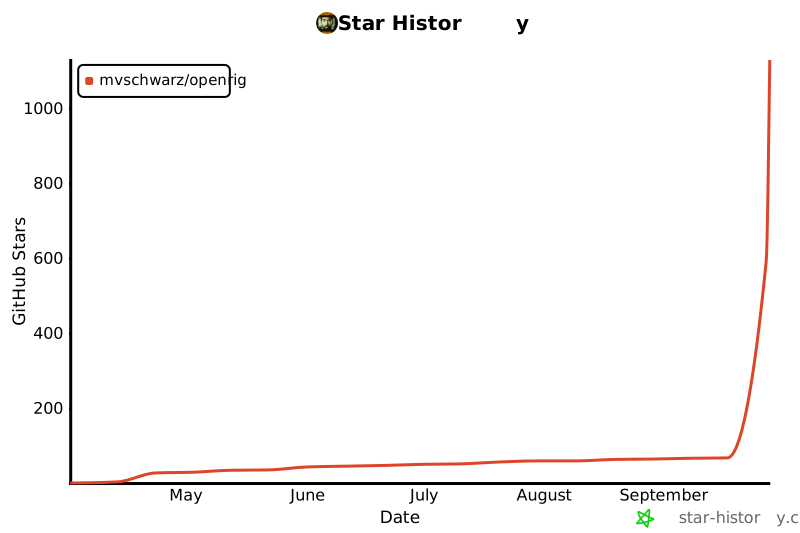](https://star-history.com/#mvschwarz/openrig&Date)
|
||
|
||
## License
|
||
|
||
Apache 2.0
|