 763a6deb12
* First draft of the article!

Still need to update author and header image

* Apply suggestions from code review

Co-authored-by: greptile-apps[bot] <165735046+greptile-apps[bot]@users.noreply.github.com>

* Adding myself as the author

* Table update

* revert yarn.lock change

* import less

* Apply suggestions from code review

Co-authored-by: Ian Vanagas <34755028+ivanagas@users.noreply.github.com>

* unified feature comparisons: error tracking WIP

* converted session replay, flags

* moved over remaining competitors

* clean up old comparison table spacing

* smarter table cell widths

* proof of concept: break table out of .prose width

* more content width child sizing

* make library comparison use OSTable

* fit table width

* center

* table, video width "fixes"

* simplified product comparison slides

* fixed customers slide

* renamed files

* simplify calling of products/features

* simplified usage

* inline the rows

* created feature definitions for remaining products

* more features from core, add docs

* nested labels, descriptions, and featuresets

* product/feature links in comparison tables

* Merge branch 'master' into best-error-tracking-tools-blog-post

* leave cells blank if undefined, top-level product URLs

* Clauded the rest of PH va Amp blog

* vs mixpanel features

* Clauded standardized features across competitors

* make iframes (videos) full width

* added statsig

* feature "realignment"

* component documentation

* finished amplitude post

* rows with arbitrary values

* verified fathom, fullstory posts

* updated GA4

* updated growthbook

* heap comparison

* hotjar done

* fixed launchdarkly

* updated logrocket

* updated matomo

* migrated mixpanel

* Merge branch 'master' into best-error-tracking-tools-blog-post

* cleaned up ArrayCTA signup component

* custom label example

* updated optimizely

* changed style of linked tutorials in comparison article (pendo)

* updated optimizely, pendo

* plausible, + moved import/export to dw, cdp

* verified sentry

* fixed some sentry data

* updated statsig

* finally got best error tracking tools done!

* removed unnecessary imports

* makes the snippet available globally, uses it in a few places

* converted best adobe analytics alts

* fixed subscribe form responsiveness

* converted amplitude article

* fathom, amplitude, eppo articles

* updated flagsmith alts

* growthbook alts, launchdarkly alts

* optimizely alts

* converted statsig alts

* split alts

* fullstory alts

* heap alts

* hotjar alts

* logrocket alts, matomo alts

* mixpanel alts

* Copy edits to the article

* mouseflow, pendo, plausible alternatives

* sentry alts

* fixed best error tracking table

* sprig alts

* sprig alts

* survicate, userpilot, uxcam, vwo alts

* clarity alts

* best mobile app replay tools

* more

* use feature arrays from new source, delete old shiz

* show feature comparisons when there's data

* don't render comparison links when on z page

* amplitude don't got

* fix build

* order posthog first

* include platform features in each product presentation

* only show all groups/features on product pages

* added LLM competitors

* excluded sections

* fixed rows with arbitrary inline data

* sentence case

* updated readme

* remove hard coded data

* Update contents/blog/posthog-vs-fullstory.mdx

Co-authored-by: Vincent (Wen Yu) Ge <29069505+gewenyu99@users.noreply.github.com>

* Update contents/blog/posthog-vs-fullstory.mdx

Co-authored-by: Vincent (Wen Yu) Ge <29069505+gewenyu99@users.noreply.github.com>

* fixes from PR feedback

---------

Co-authored-by: greptile-apps[bot] <165735046+greptile-apps[bot]@users.noreply.github.com>
Co-authored-by: Eli Kinsey <eli@ekinsey.dev>
Co-authored-by: Ian Vanagas <34755028+ivanagas@users.noreply.github.com>
Co-authored-by: Cory Watilo <corywatilo@gmail.com>
Co-authored-by: Vincent (Wen Yu) Ge <29069505+gewenyu99@users.noreply.github.com>
4.2 KiB
title, date, author, showTitle, sidebar, tags
| title | date | author | showTitle | sidebar | tags | |||
|---|---|---|---|---|---|---|---|---|
| How to capture Webflow form submissions | 2023-06-22 |
|
true | Docs |
|
With PostHog, you can autocapture events and record sessions on your Webflow site. With a bit more setup, you can also use it to capture form submissions. In this tutorial, we show how to do this with a basic Webflow site, PostHog, and some JavaScript.
Want a full tutorial on how to set up PostHog for Webflow? Check out "How to set up Webflow analytics and session recordings."
Initial Webflow and PostHog setup
To start, you need a Webflow site with a form. I used the portfolio starter, but any template works (or a site you already created). Once created, we can add the form block element and make some edits to the homepage like this:

Once the basic site is set up, go to the site settings, upgrade to at least the "Basic" website plan (to unlock custom code), then go to the custom code tab. Once there, get your PostHog snippet from the getting started flow or your project settings which looks like this:
Paste this into the custom code "head code" section in Webflow and press save. Once you publish the site, this enables PostHog to autocapture events and makes it ready to capture form submissions.
Setting up our form submit capture
To handle the submission of the form, we need to add some JavaScript to our page. This enables us to capture the details as a PostHog event.
To start, go back to the site designer and add IDs to the text field(s) and submit button. You do this by clicking on the element, then going to the element settings (gear icon on right side panel), and adding a value to the ID field. I used form-name, form-email, and form-submit for the name, email, and submit button respectively.

Next, we’ll add our code to capture events. To add code to the page, click "Pages" on the left side panel, hover over the "Home" page, click the gear that appears, then scroll down to custom code. In "Before body tag" section, set up a click event listener for the submit input with the ID of form-submit that captures a PostHog form submitted event with the values from both the form-name and form-email as properties.
<script>
    // Get the submit input element
    const submitButton = document.getElementById('form-submit')

    // Add event listener to the submit button
    submitButton.addEventListener('click', function (event) {
        // Prevent the default form submission
        event.preventDefault()

        // Get the input elements
        const name = document.getElementById('form-name').value
        const email = document.getElementById('form-email').value

        // Capture the values in PostHog
        posthog.capture('form_submitted', {
            name: name,
            email: email,
        })
    })
</script>
Note: make sure to include the
<script>and</script>tags.
Once done, press save on the page settings and publish the site.

Now, when users submit the form, it is captured as an event in PostHog.
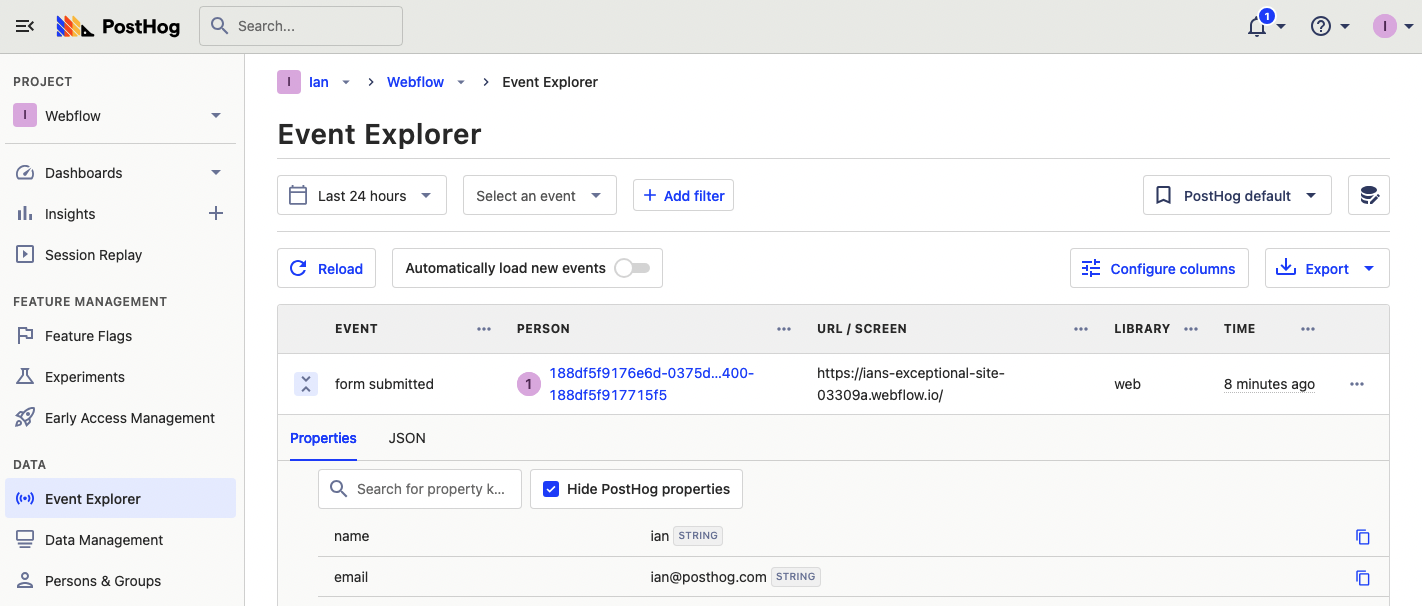
With this, you can set up alerts in Slack for email submissions with a destination, identify users with the email they submit, and export cohorts of users who submit emails.