a264f74038
* [AI] Keep explicitly cleared fields empty when entering new transactions

Rules re-run on every field commit while a new transaction is being
entered, and they are allowed to fill any empty field. A field the user
deliberately cleared (e.g. a category pre-assigned from the payee) was
treated as empty too, so the rule immediately re-filled it - either on
the clear itself or on a later run triggered by editing another field
such as the amount.

Track which fields the user explicitly emptied for the lifetime of the
new-transaction row (desktop register) or edit screen (mobile), and bar
rule runs from re-filling those fields until the row is added or reset.
Auto-fill for untouched fields and notes append/prepend rules keep
working as before.

Fixes the desktop half of #7390; the mobile modal was fixed in #7521.

Co-Authored-By: Claude Fable 5 <[email protected]>

* [AI] Keep cleared fields blocked during mobile payee rule runs

The payee exception in the mobile transaction edit bypassed
shouldApplyRuleChange entirely, so selecting a payee could re-fill a
field the user had explicitly cleared. Check the cleared-field set
before the payee exception, matching the desktop behavior.

Addresses CodeRabbit review feedback on #8792.

Co-Authored-By: Claude Fable 5 <[email protected]>

* [AI] Track cleared fields per transaction row

Review feedback on the cleared-fields tracking: the fields were stored
by name only, shared across the parent and all split rows, so clearing
e.g. the category on one split row stopped rules from filling the
category on its siblings too.

Track cleared fields in a Map keyed by transaction id on both the
desktop register and the mobile transaction edit screen. The rules
merge is extracted into a pure applyRulesToTransaction() helper with
unit tests covering the split scenarios, and split propagation now
skips only rows whose field the user actually cleared instead of
inferring a clear from the parent's (always empty) field value.

Co-Authored-By: Claude Fable 5 <[email protected]>

* [AI] Share split propagation between desktop and mobile rule merges

The mobile transaction edit screen kept its own copy of the
parent-to-subtransaction propagation step. Extract it into an exported
propagateRuleChangeToSubtransactions() helper and call it from both
paths so the two cannot drift apart. The mobile payee override is
unchanged.

Addresses CodeRabbit review feedback on #8792.

Co-Authored-By: Claude Fable 5.1 <[email protected]>

---------

Co-authored-by: bsmarsh333 <[email protected]>
Co-authored-by: Claude Fable 5 <[email protected]>

Getting Started
Actual is a local-first personal finance tool. It is 100% free and open-source, written in NodeJS, it has a synchronization element so that all your changes can move between devices without any heavy lifting.
If you are interested in contributing, or want to know how development works, see our contributing document we would love to have you.
Want to say thanks? Click the ⭐ at the top of the page.
Key Links
- Actual discord community.
- Actual Community Documentation
- Frequently asked questions
Installation
There are four ways to deploy Actual:
- One-click deployment via PikaPods (~2.00 $/month) - recommended for non-technical users
- Managed hosting via Fly.io (~1.50 $/month)
- Self-hosted by using a Docker image
- Local-only apps - downloadable Windows, Mac and Linux apps you can run on your device
Learn more in the installation instructions docs.
Ready to Start Budgeting?
Read about Envelope budgeting to know more about the idea behind Actual Budget.
Are you new to budgeting or want to start fresh?
Check out the community's Starting Fresh guide so you can quickly get up and running!
Are you migrating from other budgeting apps?
Check out the community's Migration guide to start jumping on the Actual Budget train!
Documentation
We have a wide range of documentation on how to use Actual, this is all available in our Community Documentation, this includes topics on Budgeting, Account Management, Tips & Tricks and some documentation for developers.
Contributing
Actual is a community driven product. Learn more about contributing to Actual.
Code structure
The Actual app is split up into a few packages:
- loot-core - The core application that runs on any platform
- desktop-client - The desktop UI
- desktop-electron - The desktop app
More information on the project structure is available in our community documentation.
Feature Requests
Current feature requests can be seen here. Vote for your favorite requests by reacting 👍 to the top comment of the request.
To add new feature requests, open a new Issue of the "Feature Request" type.
Translation
Make Actual Budget accessible to more people by helping with the Internationalization of Actual. We are using a crowd sourcing tool to manage the translations, see our Weblate Project. Weblate proudly supports open-source software projects through their Libre plan.

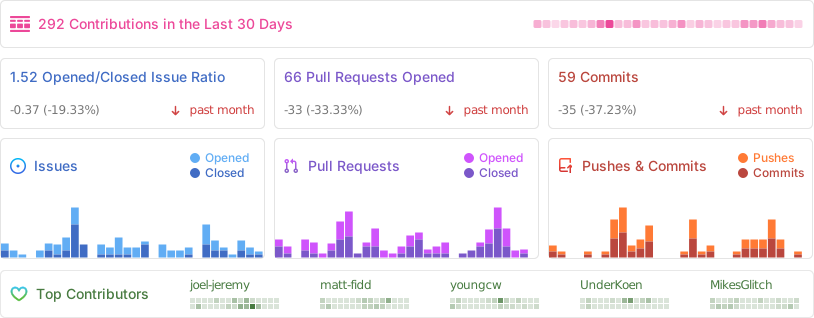
Repo Activity
Sponsors
Thanks to our wonderful sponsors who make Actual Budget possible!