mirror of
https://github.com/BillyOutlast/posthog.com.git
synced 2026-02-05 03:41:21 +01:00
 fd483648a1
* Newsletter form improvement

* Apply suggestions from code review

* Changing image and copy

* Image change

* Copy tweak

* Tweak

* Tweaks

* another try

* Apply suggestions from code review

Co-authored-by: Lior539 <lneuner@gmail.com>

* Update index.tsx

* Image tweak

* putting engineer post back

---------

Co-authored-by: Lior539 <lneuner@gmail.com>
64 lines
3.8 KiB
Markdown
64 lines
3.8 KiB
Markdown
---
|
|
title: How to track GitHub stars in PostHog
|
|
date: 2024-03-27
|
|
author: ["ian-vanagas"]
|
|
tags:
|
|
- events
|
|
---
|
|
|
|
GitHub stars are a popular way to track the success of open-sourced projects. Beyond seeing how many stars a repo has, GitHub does little to help you track or analyze these stars.
|
|
|
|
To help you make better use of stars, this tutorial shows you how to capture them using a combination of PostHog, GitHub webhooks, and [Val Town](https://val.town/), a platform for writing, running, and scheduling JavaScript functions in your browser.
|
|
|
|
## Creating a webhook handler in Val Town
|
|
|
|
Our webhook handler will accept a `POST` request and capture a PostHog event with the data from the request. Val Town is great for doing this because you can reuse [the code I already wrote here](https://www.val.town/v/ianvph/posthogGitHubStarCapture) (just click **Fork** in the three-dot menu beside **Save**):
|
|
|
|
<iframe src="https://www.val.town/embed/ianvph/posthogGitHubStarCapture" height="630" frameBorder="0" allowFullScreen></iframe>
|
|
|
|
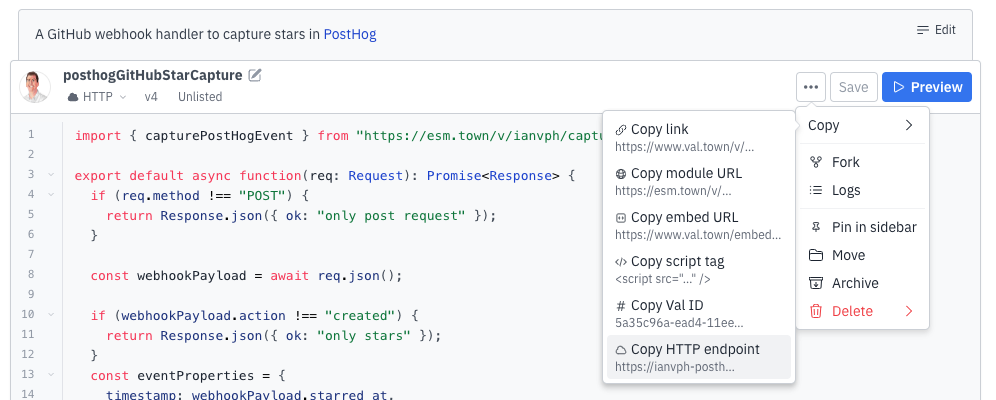
Now create a `phProjectAPIKey` environment variable in [your Val Town settings](https://www.val.town/settings/environment-variables). Set this value to your PostHog project API key, which you can find in [your project settings](https://us.posthog.com/settings/project#variables). Finally, click the three-dot menu next to the**Save** button then copy the HTTP endpoint link.
|
|
|
|
|
|
|
|
## Setting up your webhook in GitHub
|
|
|
|
With the HTTP endpoint link from Val Town, go the settings page of the repository you want to track. Once there:
|
|
|
|
1. Click **Webhooks** in the sidebar and then **Add webhook**.
|
|
2. Paste your HTTP endpoint link into the Payload URL and choose `application/json` as the content type.
|
|
3. Change events that trigger the webhook to selected events, then unselect **Pushes** and select **Stars**.
|
|
4. Click **Add webhook**.
|
|
|
|

|
|
|
|
> **Note:** You can also choose other GitHub events like deployments, forks, issues, pushes, pull requests, releases, and more.
|
|
|
|
Now, go to your repo and star it. You should see an event with the relevant information captured in PostHog.
|
|
|
|
<ProductScreenshot
|
|
imageLight="https://res.cloudinary.com/dmukukwp6/image/upload/v1711401484/posthog.com/contents/images/tutorials/github-star-tracker/event-light.png"
|
|
imageDark="https://res.cloudinary.com/dmukukwp6/image/upload/v1711401485/posthog.com/contents/images/tutorials/github-star-tracker/event-dark.png"
|
|
alt="Event in PostHog"
|
|
classes="rounded"
|
|
/>
|
|
|
|
## Analyzing GitHub stars in PostHog
|
|
|
|
To visualize star data in PostHog, create an insight by going to the [product analytics tab](https://us.posthog.com/insights) and clicking **New insight**. Select `GitHub Star` as the event for your series and visualize it using a time series line chart or total value number.
|
|
|
|
<ProductScreenshot
|
|
imageLight="https://res.cloudinary.com/dmukukwp6/image/upload/v1711472788/posthog.com/contents/images/tutorials/github-star-tracker/stars-insight-light.png"
|
|
imageDark="https://res.cloudinary.com/dmukukwp6/image/upload/v1711472789/posthog.com/contents/images/tutorials/github-star-tracker/stars-insight-dark.png"
|
|
alt="GitHub Stars insight in PostHog"
|
|
classes="rounded"
|
|
/>
|
|
|
|
You can also [set up up the Slack destination](/docs/cdp/destinations/slack) to send a message every time you receive a new star.
|
|
|
|
## Further reading
|
|
|
|
- [How to capture events from Calendly webhooks](/tutorials/calendly-webhooks)
|
|
- [How to capture new RSS items in PostHog (releases, blogs, status)](/tutorials/rss-item-capture)
|
|
- [Using the PostHog API to capture events](/tutorials/api-capture-events)
|
|
|
|
<NewsletterForm /> |