mirror of
https://github.com/BillyOutlast/posthog.com.git
synced 2026-02-07 04:41:21 +01:00

193 lines
7.4 KiB
Markdown
193 lines
7.4 KiB
Markdown
---
|
|
title: How to use PostHog in a web worker
|
|
date: 2024-12-18
|
|
author:
|
|
- ian-vanagas
|
|
tags:
|
|
- configuration
|
|
---
|
|
|
|
Web workers enable you to run computationally expensive tasks or scripts in background threads. This prevents the main webpage thread from slowing down or being blocked.
|
|
|
|
Because the web worker runs on a background thread, it can't access the DOM, browser APIs, or window object methods. Instead, it communicates with the main thread through a messaging system.
|
|
|
|
This means PostHog requires a different setup for a web worker than a normal web implementation. This tutorial helps you with this different setup by building a basic app with a web worker script and then setting up PostHog to work with it.
|
|
|
|
## Creating our basic app with a web worker
|
|
|
|
To start, we'll create our `worker.js` file. This will receive a message from the main thread, do some "heavy" math work, and then return the results back.
|
|
|
|
```js
|
|
// worker.js
|
|
onmessage = function(e) {
|
|
if (e.data === 'start') {
|
|
let result = performWork();
|
|
// Send the result back to the main thread
|
|
postMessage(result);
|
|
}
|
|
};
|
|
|
|
function performWork() {
|
|
// Simulate some heavy computation
|
|
let result = 0;
|
|
for(let i = 0; i < 1000000; i++) {
|
|
result += Math.sqrt(i);
|
|
}
|
|
return result;
|
|
}
|
|
```
|
|
|
|
Next, we create an `index.html` file in the same folder to trigger the web worker and display the results:
|
|
|
|
```html
|
|
<!DOCTYPE html>
|
|
<html>
|
|
<head>
|
|
<title>Web worker tutorial</title>
|
|
</head>
|
|
<body>
|
|
<button onclick="startTask()">Start Task</button>
|
|
<div id="result"></div>
|
|
|
|
<script>
|
|
function handleWorkerMessages() {
|
|
const worker = new Worker('worker.js');
|
|
|
|
worker.onmessage = function(e) {
|
|
document.getElementById('result').textContent = `Result received: ${e.data}`;
|
|
};
|
|
|
|
return worker;
|
|
}
|
|
|
|
function startTask() {
|
|
const worker = handleWorkerMessages();
|
|
worker.postMessage('start');
|
|
}
|
|
</script>
|
|
</body>
|
|
</html>
|
|
```
|
|
|
|
Finally, we need to run a basic server because web workers can only be loaded from proper web servers, not from local files. We use Python's built-in server to do this:
|
|
|
|
```bash
|
|
python3 -m http.server
|
|
```
|
|
|
|
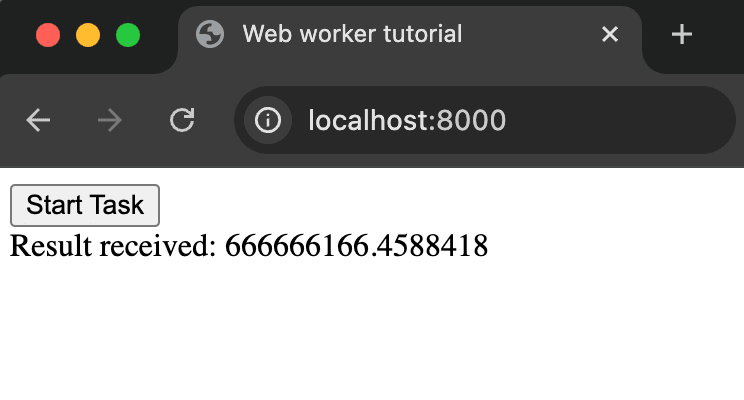
Once you run that script, we can go to `http://localhost:8000` and click **Start Task** to see our web worker in action.
|
|
|
|
|
|
|
|
## Adding PostHog to our app
|
|
|
|
Because of the limitation of web workers, we can't simply add PostHog to the `worker.js` file. Instead, we start by adding the script snippet to the `index.html` file. This requires your project API key and client API host, both of which you can get in [your project settings](https://us.posthog.com/settings/project).
|
|
|
|
Our updated `index.html` file will look like this:
|
|
|
|
```html
|
|
<!DOCTYPE html>
|
|
<html>
|
|
<head>
|
|
<title>Web worker tutorial</title>
|
|
<script>
|
|
!function(t,e){var o,n,p,r;e.__SV||(window.posthog=e,e._i=[],e.init=function(i,s,a){function g(t,e){var o=e.split(".");2==o.length&&(t=t[o[0]],e=o[1]),t[e]=function(){t.push([e].concat(Array.prototype.slice.call(arguments,0)))}}(p=t.createElement("script")).type="text/javascript",p.crossOrigin="anonymous",p.async=!0,p.src=s.api_host.replace(".i.posthog.com","-assets.i.posthog.com")+"/static/array.js",(r=t.getElementsByTagName("script")[0]).parentNode.insertBefore(p,r);var u=e;for(void 0!==a?u=e[a]=[]:a="posthog",u.people=u.people||[],u.toString=function(t){var e="posthog";return"posthog"!==a&&(e+="."+a),t||(e+=" (stub)"),e},u.people.toString=function(){return u.toString(1)+".people (stub)"},o="init capture register register_once register_for_session unregister unregister_for_session getFeatureFlag getFeatureFlagPayload isFeatureEnabled reloadFeatureFlags updateEarlyAccessFeatureEnrollment getEarlyAccessFeatures on onFeatureFlags onSessionId getSurveys getActiveMatchingSurveys renderSurvey canRenderSurvey getNextSurveyStep identify setPersonProperties group resetGroups setPersonPropertiesForFlags resetPersonPropertiesForFlags setGroupPropertiesForFlags resetGroupPropertiesForFlags reset get_distinct_id getGroups get_session_id get_session_replay_url alias set_config startSessionRecording stopSessionRecording sessionRecordingStarted captureException loadToolbar get_property getSessionProperty createPersonProfile opt_in_capturing opt_out_capturing has_opted_in_capturing has_opted_out_capturing clear_opt_in_out_capturing debug".split(" "),n=0;n<o.length;n++)g(u,o[n]);e._i.push([i,s,a])},e.__SV=1)}(document,window.posthog||[]);
|
|
|
|
posthog.init('<ph_project_api_key>', {
|
|
api_host: '<ph_client_api_host>',
|
|
defaults: '<ph_posthog_js_defaults>',
|
|
advanced_disable_flags: true
|
|
});
|
|
</script>
|
|
</head>
|
|
<body>
|
|
<button onclick="startTask()">Start Task</button>
|
|
<div id="result"></div>
|
|
|
|
<script>
|
|
function handleWorkerMessages() {
|
|
const worker = new Worker('worker.js');
|
|
|
|
worker.onmessage = function(e) {
|
|
document.getElementById('result').textContent = `Result received: ${e.data}`;
|
|
};
|
|
|
|
return worker;
|
|
}
|
|
|
|
function startTask() {
|
|
const worker = handleWorkerMessages();
|
|
worker.postMessage('start');
|
|
}
|
|
</script>
|
|
</body>
|
|
</html>
|
|
```
|
|
|
|
> **Note:** We disable `advanced_disable_flags` as it causes a CORS error on our local server. This isn't the case in production so you shouldn't do this for a production-ready app.
|
|
|
|
## Making PostHog work with the web worker
|
|
|
|
To make PostHog work with a web worker, we can set up a new `posthog_event` message in `worker.js` that includes the event name and properties.
|
|
|
|
```js
|
|
// worker.js
|
|
onmessage = function(e) {
|
|
if (e.data === 'start') {
|
|
let result = performWork();
|
|
|
|
// Send PostHog event back to main thread
|
|
postMessage({
|
|
type: 'posthog_event',
|
|
eventName: 'worker_task_completed',
|
|
properties: {
|
|
result: result,
|
|
duration_ms: 1000
|
|
}
|
|
});
|
|
|
|
// Send the result back to the main thread
|
|
postMessage(result);
|
|
}
|
|
};
|
|
|
|
// ... rest of your existing code
|
|
```
|
|
|
|
We can then handle update the `handleWorkerMessages` function to handle the `posthog_event` message in `index.html` with our web PostHog initialization.
|
|
|
|
```html
|
|
<!-- ... your existing code -->
|
|
<script>
|
|
function handleWorkerMessages() {
|
|
const worker = new Worker('worker.js');
|
|
|
|
worker.onmessage = function(e) {
|
|
if (e.data && e.data.type === 'posthog_event') {
|
|
posthog.capture(e.data.eventName, e.data.properties);
|
|
} else {
|
|
document.getElementById('result').textContent = `Result received: ${e.data}`;
|
|
}
|
|
};
|
|
|
|
return worker;
|
|
}
|
|
// ... your existing code
|
|
```
|
|
|
|
Now, when we run our task, we'll also see a `worker_task_completed` event captured in PostHog.
|
|
|
|
<ProductScreenshot
|
|
imageLight = "https://res.cloudinary.com/dmukukwp6/image/upload/Clean_Shot_2024_12_18_at_12_51_42_2x_c111b1244a.png"
|
|
imageDark = "https://res.cloudinary.com/dmukukwp6/image/upload/Clean_Shot_2024_12_18_at_12_51_29_2x_196e045940.png"
|
|
classes="rounded"
|
|
alt="PostHog web worker event capture"
|
|
/>
|
|
|
|
You can use this strategy of posting messages back and forth to use any of [PostHog's functionality](/docs/libraries/js/features) like feature flags or A/B testing.
|
|
|
|
## Further reading
|
|
|
|
- [Using the PostHog API to capture events](/tutorials/api-capture-events)
|
|
- [How to set up cross-domain tracking in PostHog](/tutorials/cross-domain-tracking)
|
|
- [How to do cookieless tracking with PostHog](/tutorials/cookieless-tracking) |